01
One video, many takes
stop and continue, or come back days later
 ZelonAI
Apple Platform App · iPhone
TalkCam
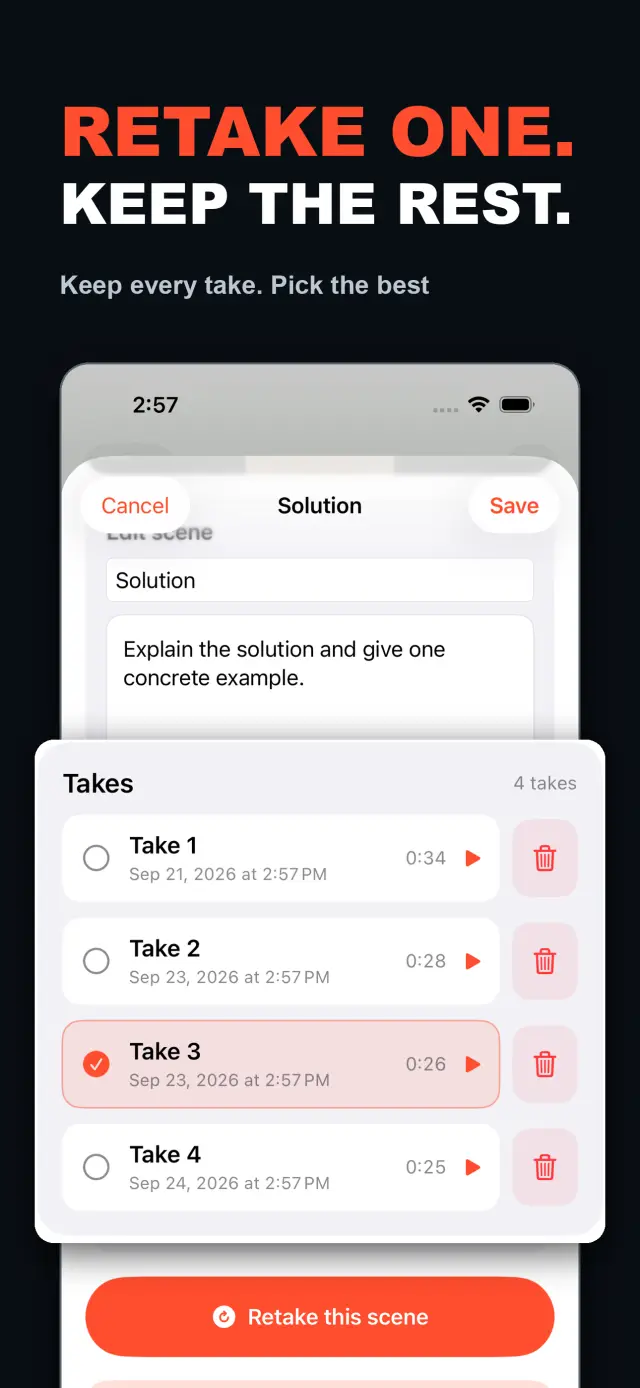
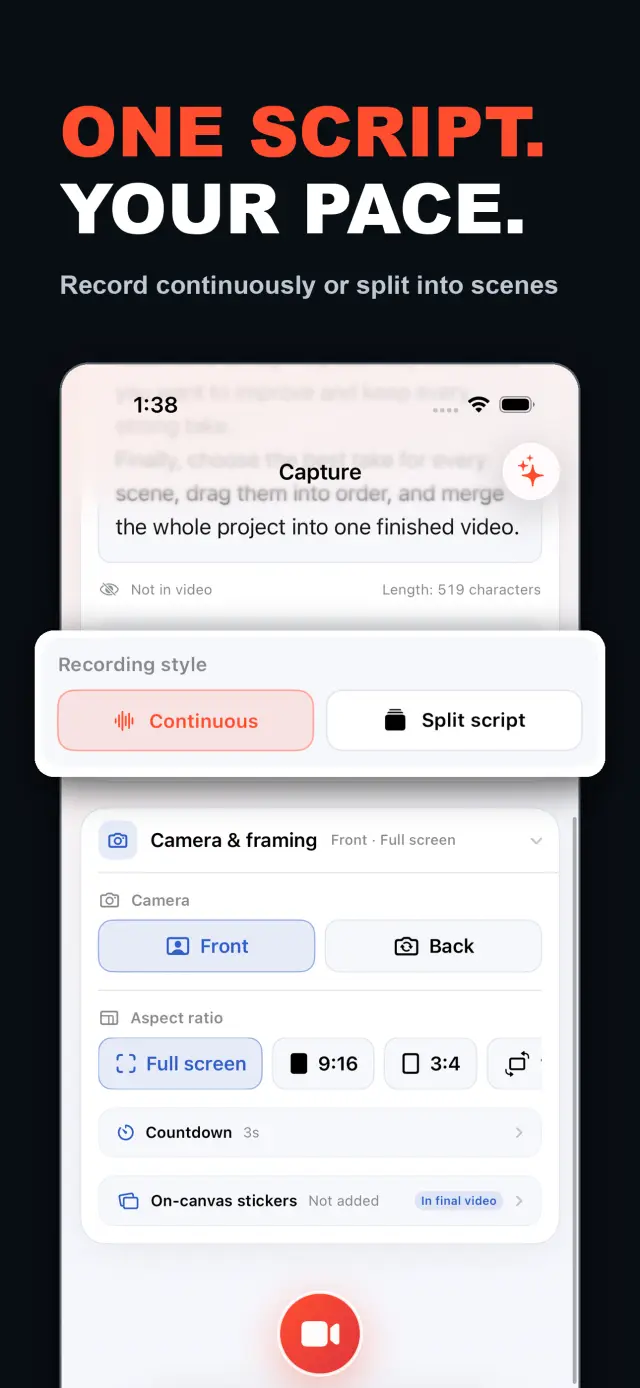
TalkCam is a teleprompter camera and video editor for recording one talking-head video in parts. Tap Record to create the current video automatically: capture one thought, stop, continue from there, or return hours or days later to add the next part. Choose Continuous or Split Script directly on the capture home. Continuous starts without a script — or keeps a full script together — and after every stop, Continue Recording appends the next part to the same video. Split Script pastes a full script and organizes it into short, recordable scenes before filming: the basic splitter runs on device and preserves the original words, and on supported devices Apple Intelligence can optionally organize the split on device; your script is not sent to a TalkCam server. Each scene can hold multiple takes — redo only the part that needs work without overwriting earlier versions, then choose the most natural take in the editor. After a scripted take, the pacing report compares your recording time with paragraph targets using teleprompter reading-position estimates. The multi-scene editor plays the assembled story above a scrubbable clip timeline: seek directly, skip ±5 seconds, switch between 1x/1.5x/2x playback, reorder scenes, select takes, and change the canvas. You do not need to finish every scene first — export what is ready and record the rest later. Inside a take, split, delete, and adjust volume, or add cut, fade, slide, and zoom transitions; text, images, logos, beauty, crop, letterbox treatment, and supplemental footage remain nondestructive. The full-screen camera supports scrolling, page, card, and manual prompt modes with adjustable text size, speed, position, colors, and background opacity — the prompt is an interface overlay only and never appears in the raw recording or exported video. Front or back camera with in-take pause/resume and pinch to zoom; if no camera is available but the microphone is, Audio-Only Studio saves a standard, timeline-compatible video take. Silence removal, noise reduction, audio fades, and gaze correction run on device where available. Choose 480p, 720p, 1080p, 2K, or 4K; 30/50/60 fps; SDR/HDR; and the matching bitrate before export — H.264 or HDR HEVC MP4 with no TalkCam watermark. Free includes continuous recording, split-script recording, the on-device splitter, multiple scenes and takes, timeline preview, the teleprompter, text and logo layers, core editing, and 480p/720p/1080p, 30 fps, SDR, compact or standard bitrate export, with takes up to 60 minutes. TalkCam Pro unlocks 2K/4K, 50/60 fps, HDR, high-bitrate export, unlimited take length, supplemental footage, image stickers, noise reduction, audio fades, and gaze correction. Local-first: no account, no ads, no tracking.
TalkCam
In één oogopslag
Fig. 01A talking-head video no longer needs one perfect take: record it part by part, keep every version, pick the best takes on the timeline — then export one finished video.
In de app
Fig. 02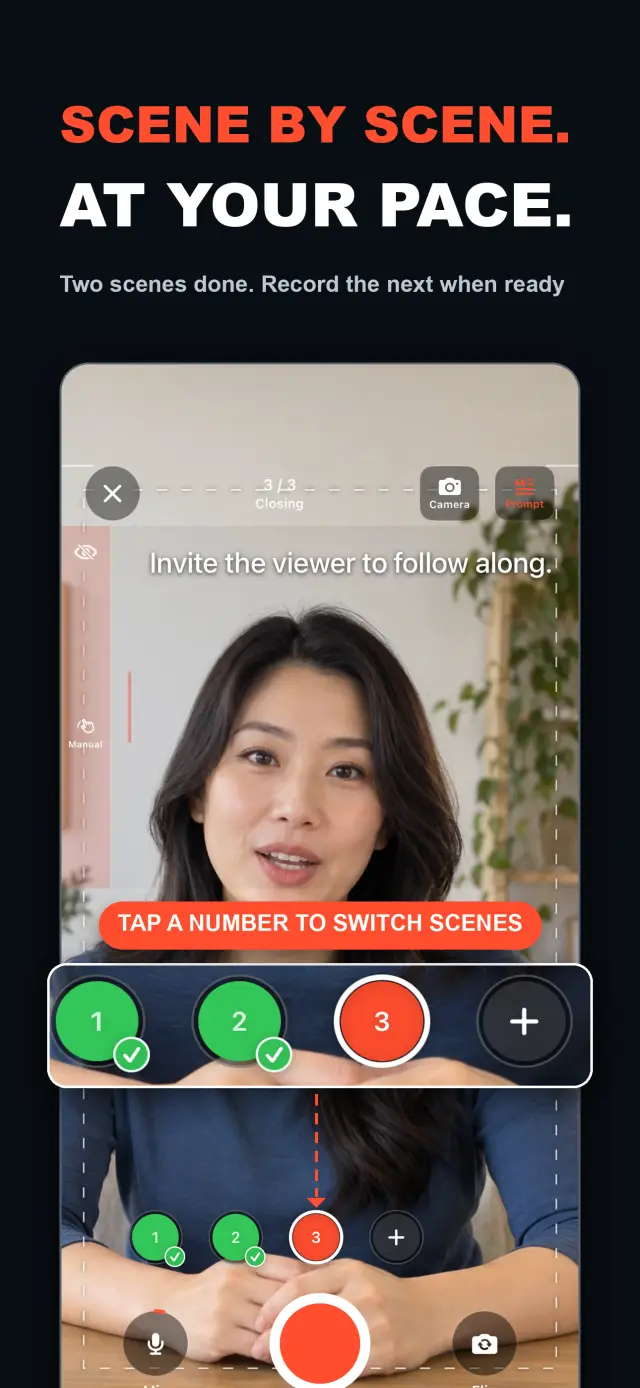
Functies
No. 01stop and continue, or come back days later
choose your mode right on the capture home
Specifications
Tab. 01Workflow
No. 02Choose Continuous or Split Script on the capture home; stop after every thought and continue later, or film a script scene by scene — each scene holds multiple takes.
Redo only the scene that needs work; earlier takes stay untouched until you pick the best one on the timeline.
Scrub the timeline, reorder scenes, switch takes, then export one finished MP4 — with the resolution, frame rate, and SDR/HDR you choose.
Vertrouwen en privacy
No. 03Local-first: no account, no ads, no tracking — data never leaves the device.
No sign-up, no login. Install it and it just works.
Everything core runs offline; no network required.
Free includes continuous recording, split-script recording with the on-device splitter, multiple scenes and takes, timeline preview, the teleprompter, text and logo layers, core editing, and 480p/720p/1080p 30 fps SDR export, with takes up to 60 minutes; TalkCam Pro unlocks 2K/4K, 50/60 fps, HDR, high-bitrate export, unlimited take length, supplemental footage, image stickers, noise reduction, audio fades, and gaze correction. Local-first: no account, no ads, no tracking, everything processed on device.
product direction
No. 04Where this app is headed, in the maker’s own hand.
Record one talking-head video in parts: stop whenever you like, continue from there, or come back days later — the parts stay in the same video.
Start freeform and keep recording after every stop, or paste a script and organize it into short scenes on device before filming.
Every scene keeps multiple takes; retake one part without overwriting, review its pacing, then assemble the chosen takes on the scrubbable timeline.
Scrolling, page, card, and manual modes over the full-screen camera — an overlay that never enters the recording.
Preview and export recorded scenes before the script is finished — 480p to 4K, up to 60 fps, SDR or HDR, no watermark.
about TalkCam
No. 5The longer story — what it is, who it is for, and the choices behind it.
Laatst bijgewerkt: 2026-09-24
TalkCam is de talking-headcamera die één video in delen opneemt, take voor take. Tik op Opnemen en de huidige video begint vanzelf: leg één gedachte vast, stop en ga daarna van daaruit door — of kom uren of dagen later terug en voeg het volgende deel toe. Werk je vanaf een script? Plak het één keer in en TalkCam organiseert het op het apparaat in korte, opneembare scènes. Elke scène bewaart meerdere takes, dus een heropname overschrijft nooit de versie die goed was, en het samengevoegde verhaal komt samen op een tijdlijn waar je doorheen kunt scrubben. De gratis versie dekt takes van 60 minuten en export tot en met 1080p; TalkCam Pro ontgrendelt 2K/4K, 50/60 fps, HDR, export met hoge bitrate, onbeperkte lengte per take en een complete professionele afwerkingsset.
Kies op het startscherm voor opnames direct voor Doorlopend (Continuous) of Splits script (Split Script) — je hoeft eerst geen projectformulier in te vullen. In de modus Doorlopend begin je zonder script of houd je een volledig script bij elkaar; kies na elke stop Doorgaan met opnemen (Continue Recording) en het volgende deel blijft in dezelfde video voor voorbeeld, bewerking en export. In de modus Splits script plak je een volledig script en organiseer je het vóór het filmen in korte scènes: de basissplitter draait op het apparaat en behoudt je oorspronkelijke woorden, en op ondersteunde apparaten kan Apple Intelligence de splitsing optioneel op het apparaat organiseren — je script wordt nooit naar een TalkCam-server gestuurd.
Elke scène kan meerdere takes bevatten. Neem alleen het deel dat beter moet opnieuw op zonder eerdere versies te overschrijven en kies daarna in de editor de natuurlijkste take. De editor voor meerdere scènes speelt het samengevoegde verhaal af boven een tijdlijn met clips die je kunt scrubben: spring direct ergens heen, sla ±5 seconden over, wissel tussen 1x/1.5x/2x-weergave, herschik scènes, kies takes en wijzig het canvas voordat je één video exporteert. Je hoeft niet eerst elke scène af te maken — zodra er een bruikbare take is, bekijk en exporteer je wat klaar is, en je keert later terug naar het project om de rest op te nemen.
Binnen één take kun je splitsen, verwijderen en het volume aanpassen, of overgangen toevoegen: cut, fade, slide en zoom. Tekst, afbeeldingen, logo's, schoonheid, bijsnijden, letterbox-behandeling en aanvullend beeldmateriaal blijven niet-destructief; de oorspronkelijke camera-opnames blijven onaangeroerd. Spreek je vanaf een script, dan biedt de camera op volledig scherm modi voor scrollend, pagina-, kaart- en handmatig prompten met aanpasbare tekstgrootte, snelheid, positie, kleuren en achtergrondondoorzichtigheid — een interface-overlay die nooit in de ruwe opname of de geëxporteerde video verschijnt.
De camera houdt je bij: voor- of achtercamera, pauzeren en hervatten tijdens een take, en knijpen om te zoomen. Is er geen camera beschikbaar maar de microfoon wel, dan bewaart de Alleen-audio-studio (Audio-Only Studio) een standaard, tijdlijncompatibele videotake. Stilteverwijdering, ruisonderdrukking, audiofades en oogcontactcorrectie draaien waar beschikbaar op het apparaat. Kies vóór de export 480p, 720p, 1080p, 2K of 4K; 30, 50 of 60 fps; SDR of HDR; en de bijbehorende bitrate — een H.264- of HDR HEVC MP4 zonder TalkCam-watermerk.
De meeste talking-head-apps verwachten één perfecte take en stoppen bij het opnemen. TalkCam bouwt de video take voor take op: stop na elke gedachte, neem alleen de scène die beter moet opnieuw op zonder de versies te verliezen die goed waren, en laat de tijdlijn het verhaal samenstellen. De teleprompter — scrollend, pagina, kaart of handmatig — helpt je bij je voorstelling maar komt nooit in de opgenomen pixels terecht, en effecten worden pas bij de export ingebakken via een offline renderstap. Elke opname blijft een schone camera- + microfoon-MP4, zodat je stickers kunt restylen, het schoonheidsfilter opnieuw kunt afstellen en beeldverhoudingen zo vaak kunt wisselen als je wilt zonder je originele takes te verliezen. Spiegeling van de frontcamera is alleen een gemak bij opname en voorbeeld; de export gebruikt de opgeslagen frames zoals ze zijn, zonder opnieuw te spiegelen.
TalkCam is lokaal eerst: geen account, geen advertenties, geen analytics- of tracking-SDK's en geen verzameling van persoonsgegevens. Projecten, scripts, opnames, geïmporteerde media en exports worden op het apparaat verwerkt — inclusief de optionele Apple Intelligence-splitsing van scripts, die op ondersteunde hardware op het apparaat draait. Camera en microfoon worden alleen gebruikt voor opnames; toegang tot Foto's wordt alleen gevraagd wanneer je ervoor kiest een export op te slaan, en geëxporteerde video's gaan naar je eigen fotobibliotheek. TalkCam ondersteunt Engels en Vereenvoudigd Chinees en een licht/donker uiterlijk.
De gratis versie omvat doorlopend opnemen, opnemen met gesplitst script via de splitter op het apparaat, meerdere scènes en takes, tijdlijnvoorbeeld, de teleprompter, tekst- en logolagen en de kern van het bewerken — bijsnijden, splitsen, verwijderen, overgangen en volume — met takes tot 60 minuten en export in 480p/720p/1080p, 30 fps, SDR, compacte of standaard bitrate. TalkCam Pro ontgrendelt:
Verkrijgbaar als een optioneel maandelijks of jaarlijks automatisch verlengend abonnement, of als een eenmalige levenslange aankoop. Abonnementen verlengen automatisch, tenzij je ten minste 24 uur vóór het einde van de huidige periode opzegt; beheer of zeg ze op in je App Store-accountinstellingen en herstel aankopen via Instellingen → TalkCam Pro Workflow in de app.
docs support
No. 6Plain-language documents. No fine print you would be surprised by.
faq title
Yes — that is the point. Tap Record and TalkCam creates the current video automatically; stop whenever you like and continue from there, or come back hours or days later. Paste a script to split it into scenes, record one scene at a time, and keep multiple takes of each. When you finish, the takes you chose merge into one video.
Continuous keeps one video growing: after every stop, choose Continue Recording and the next part is appended to the same video for preview, editing, and export. Split Script is for working from a script: paste the full text, organize it into short scenes on device, then film scene by scene with multiple takes each. Both modes share the same camera, takes, editor, and export path.
Nothing is overwritten. Every take of a scene is kept; you choose the one that goes into the final video, and you can switch or delete takes at any time before export.
Never. The full-screen camera supports scrolling, page, card, and manual prompt modes — an interface overlay only. The recording stays a clean camera-plus-microphone MP4, and text or effects are baked in at export, not captured by accident.
Every take shows its total time. With a script and visible teleprompter, paragraph times are estimated from when the reading position crosses each paragraph, then compared with the target. This is a pacing guide, not speech transcription.
Yes. As soon as a usable take exists, preview it on the timeline and export the scenes you have already recorded, then return to the project later to film the rest. In the export panel, choose the resolution, frame rate, SDR/HDR, and bitrate — some options require TalkCam Pro.
Nowhere. The basic splitter runs on device and preserves your original wording, and the optional Apple Intelligence split also runs on device on supported hardware. Your script is not sent to a TalkCam server; projects, recordings, and exports are all processed locally.
Free: continuous recording, split-script recording with the on-device splitter, multiple scenes and takes, timeline preview, the teleprompter, text and logo layers, core editing, and 480p/720p/1080p 30 fps SDR export, with takes up to 60 minutes. TalkCam Pro unlocks 2K/4K, 50/60 fps, HDR, high-bitrate export, unlimited take length, supplemental footage, image stickers, noise reduction, audio fades, and gaze correction.
TalkCam
TalkCam is on the App Store — record in parts, keep every take, finish as one video.