01
One video, many takes
stop and continue, or come back days later
 ZelonAI
Apple Platform App · iPhone
TalkCam
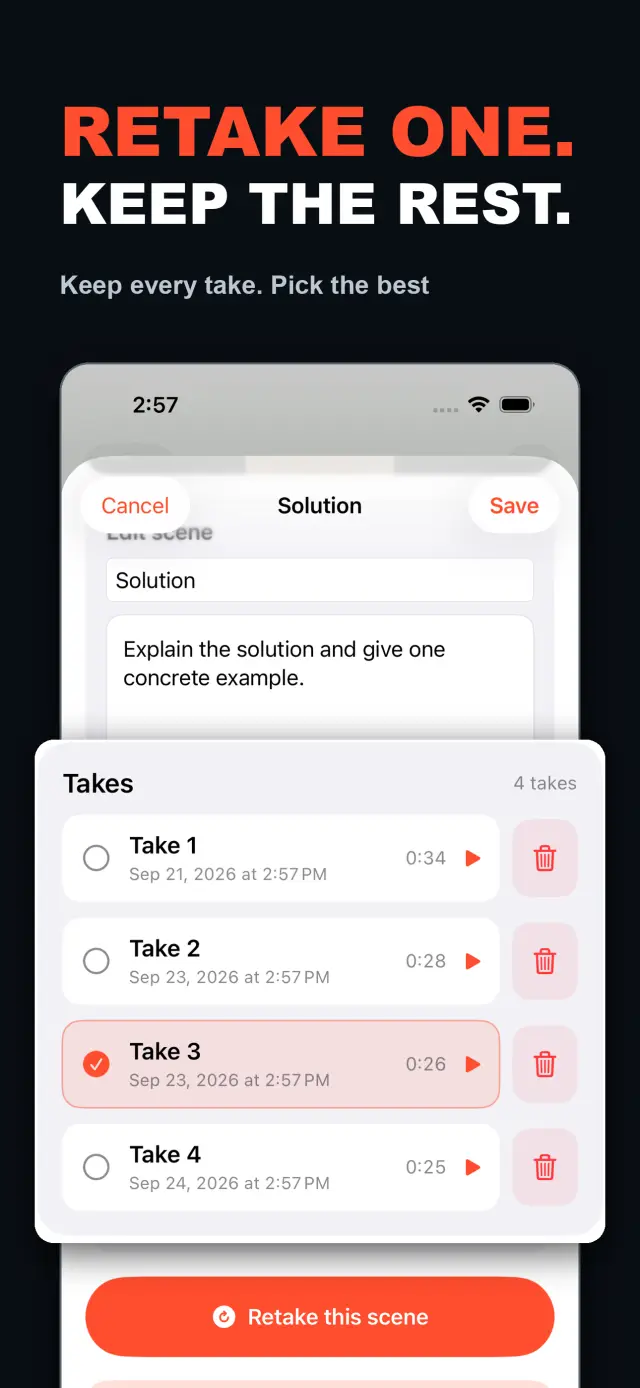
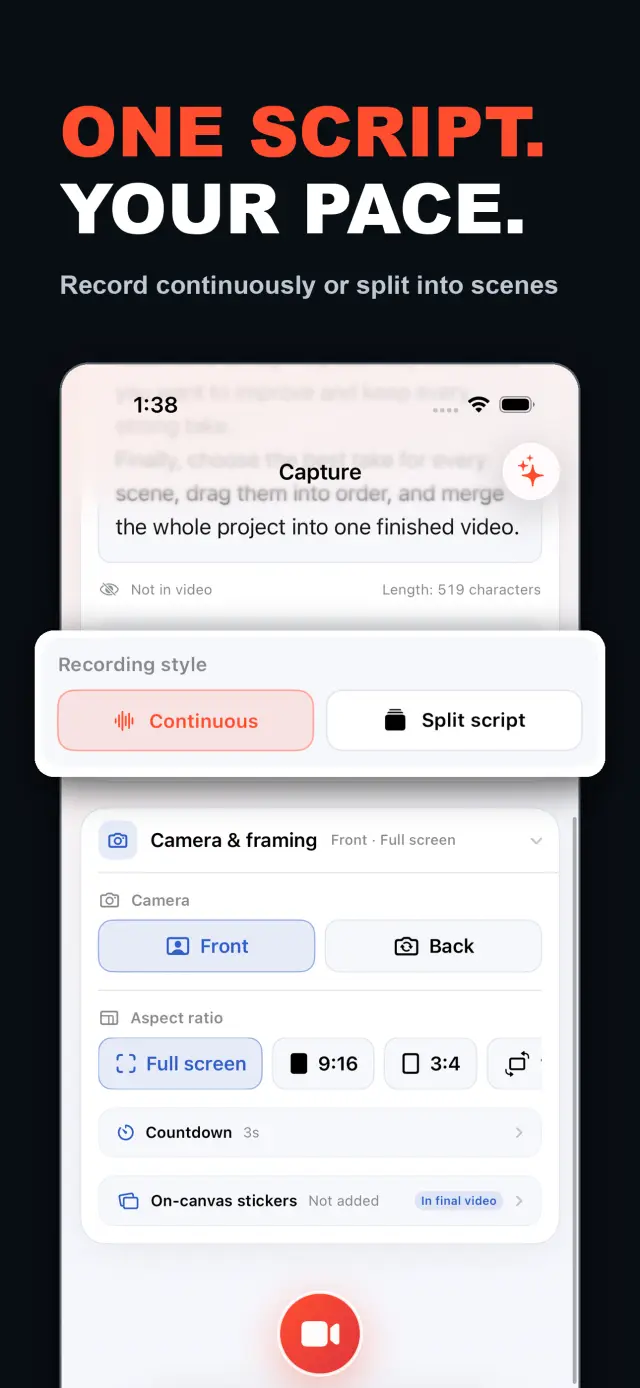
TalkCam is a teleprompter camera and video editor for recording one talking-head video in parts. Tap Record to create the current video automatically: capture one thought, stop, continue from there, or return hours or days later to add the next part. Choose Continuous or Split Script directly on the capture home. Continuous starts without a script — or keeps a full script together — and after every stop, Continue Recording appends the next part to the same video. Split Script pastes a full script and organizes it into short, recordable scenes before filming: the basic splitter runs on device and preserves the original words, and on supported devices Apple Intelligence can optionally organize the split on device; your script is not sent to a TalkCam server. Each scene can hold multiple takes — redo only the part that needs work without overwriting earlier versions, then choose the most natural take in the editor. After a scripted take, the pacing report compares your recording time with paragraph targets using teleprompter reading-position estimates. The multi-scene editor plays the assembled story above a scrubbable clip timeline: seek directly, skip ±5 seconds, switch between 1x/1.5x/2x playback, reorder scenes, select takes, and change the canvas. You do not need to finish every scene first — export what is ready and record the rest later. Inside a take, split, delete, and adjust volume, or add cut, fade, slide, and zoom transitions; text, images, logos, beauty, crop, letterbox treatment, and supplemental footage remain nondestructive. The full-screen camera supports scrolling, page, card, and manual prompt modes with adjustable text size, speed, position, colors, and background opacity — the prompt is an interface overlay only and never appears in the raw recording or exported video. Front or back camera with in-take pause/resume and pinch to zoom; if no camera is available but the microphone is, Audio-Only Studio saves a standard, timeline-compatible video take. Silence removal, noise reduction, audio fades, and gaze correction run on device where available. Choose 480p, 720p, 1080p, 2K, or 4K; 30/50/60 fps; SDR/HDR; and the matching bitrate before export — H.264 or HDR HEVC MP4 with no TalkCam watermark. Free includes continuous recording, split-script recording, the on-device splitter, multiple scenes and takes, timeline preview, the teleprompter, text and logo layers, core editing, and 480p/720p/1080p, 30 fps, SDR, compact or standard bitrate export, with takes up to 60 minutes. TalkCam Pro unlocks 2K/4K, 50/60 fps, HDR, high-bitrate export, unlimited take length, supplemental footage, image stickers, noise reduction, audio fades, and gaze correction. Local-first: no account, no ads, no tracking.

TalkCam
한눈에 보기
Fig. 01A talking-head video no longer needs one perfect take: record it part by part, keep every version, pick the best takes on the timeline — then export one finished video.
앱 화면
Fig. 02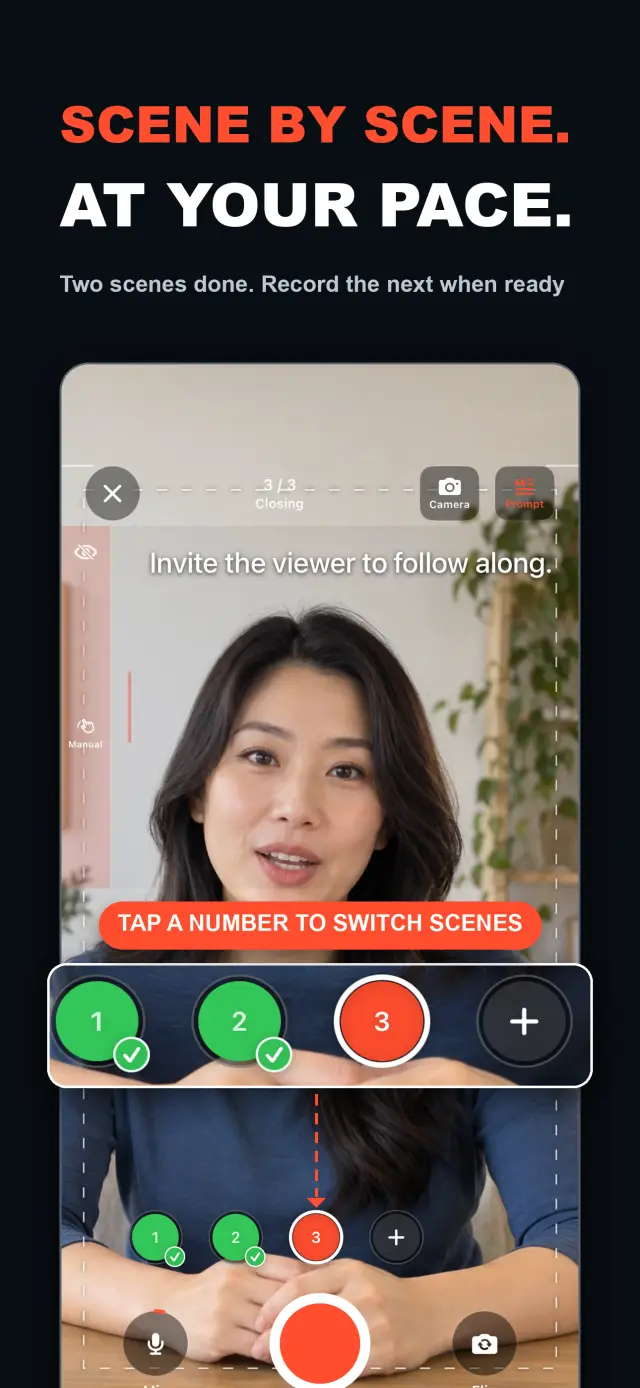
기능
No. 01stop and continue, or come back days later
choose your mode right on the capture home
Specifications
Tab. 01워크플로
No. 02Choose Continuous or Split Script on the capture home; stop after every thought and continue later, or film a script scene by scene — each scene holds multiple takes.
Redo only the scene that needs work; earlier takes stay untouched until you pick the best one on the timeline.
Scrub the timeline, reorder scenes, switch takes, then export one finished MP4 — with the resolution, frame rate, and SDR/HDR you choose.
신뢰와 개인정보
No. 03Local-first: no account, no ads, no tracking — data never leaves the device.
No sign-up, no login. Install it and it just works.
Everything core runs offline; no network required.
Free includes continuous recording, split-script recording with the on-device splitter, multiple scenes and takes, timeline preview, the teleprompter, text and logo layers, core editing, and 480p/720p/1080p 30 fps SDR export, with takes up to 60 minutes; TalkCam Pro unlocks 2K/4K, 50/60 fps, HDR, high-bitrate export, unlimited take length, supplemental footage, image stickers, noise reduction, audio fades, and gaze correction. Local-first: no account, no ads, no tracking, everything processed on device.
product direction
No. 04Where this app is headed, in the maker’s own hand.
Record one talking-head video in parts: stop whenever you like, continue from there, or come back days later — the parts stay in the same video.
Start freeform and keep recording after every stop, or paste a script and organize it into short scenes on device before filming.
Every scene keeps multiple takes; retake one part without overwriting, review its pacing, then assemble the chosen takes on the scrubbable timeline.
Scrolling, page, card, and manual modes over the full-screen camera — an overlay that never enters the recording.
Preview and export recorded scenes before the script is finished — 480p to 4K, up to 60 fps, SDR or HDR, no watermark.
about TalkCam
No. 5The longer story — what it is, who it is for, and the choices behind it.
최종 업데이트: 2026-09-24
TalkCam은 하나의 토크헤드 동영상을 여러 부분으로, 테이크를 거듭하며 녹화하는 iPhone 카메라입니다. 녹화를 탭하면 현재 동영상이 저절로 시작됩니다. 생각 하나를 촬영하고 멈춘 뒤 그 자리에서 이어가거나, 몇 시간이나 며칠 뒤에 돌아와 다음 부분을 추가할 수도 있습니다. 대본이 있다면 한 번만 붙여넣으면 TalkCam이 기기에서 짧게 촬영 가능한 장면으로 정리합니다. 각 장면은 여러 테이크를 보관하므로 다시 찍어도 잘 나온 버전을 덮어쓰지 않고, 완성되어 가는 이야기는 스크럽 가능한 타임라인 위에서 모습을 갖춰 갑니다. 무료 버전은 60분 테이크와 깔끔한 1080p까지 내보내기를 지원하고, TalkCam Pro는 2K/4K, 50/60 fps, HDR, 고비트레이트 내보내기, 무제한 테이크 길이, 전문 마감 도구 전체를 잠금 해제합니다.
촬영 홈에서 연속 촬영(Continuous) 또는 대본 분할(Split Script)을 바로 선택하세요. 먼저 프로젝트 양식을 채울 필요가 없습니다. 연속 촬영 모드에서는 대본 없이 시작하거나 전체 대본을 하나로 묶어 둘 수 있고, 멈출 때마다 이어서 녹화(Continue Recording)를 선택하면 다음 부분이 미리보기, 편집, 내보내기가 가능한 같은 동영상에 남습니다. 대본 분할 모드에서는 전체 대본을 붙여넣어 촬영 전에 짧은 장면으로 정리합니다. 기본 분할 기능은 기기에서 실행되어 원문 그대로를 보존하고, 지원되는 기기에서는 Apple Intelligence가 선택적으로 기기에서 분할을 정리할 수 있습니다. 대본은 절대 TalkCam 서버로 전송되지 않습니다.
각 장면은 여러 테이크를 담을 수 있습니다. 이전 버전을 덮어쓰지 않고 손볼 부분만 다시 찍은 뒤, 편집기에서 가장 자연스러운 테이크를 고르세요. 멀티 장면 편집기는 완성되는 이야기를 스크럽 가능한 클립 타임라인 위에서 재생합니다. 바로 찾아가고, ±5초 건너뛰고, 1x/1.5x/2x 재생 속도를 바꾸고, 장면 순서를 바꾸고, 테이크를 고르고, 동영상 하나를 내보내기 전에 캔버스를 바꿀 수 있습니다. 모든 장면을 먼저 끝낼 필요도 없습니다. 쓸 만한 테이크가 생기면 완성된 부분을 미리보고 내보낸 뒤, 나중에 프로젝트로 돌아와 나머지를 녹화하면 됩니다.
하나의 테이크 안에서는 분할, 삭제, 볼륨 조절을 하거나 컷, 페이드, 슬라이드, 줌 트랜지션을 추가할 수 있습니다. 텍스트, 이미지, 로고, 뷰티, 크롭, 레터박스 처리, 보조 영상은 모두 비파괴 방식으로 유지되며 원본 카메라 녹화는 그대로 남습니다. 대본을 읽을 때는 전체 화면 카메라가 스크롤, 페이지, 카드, 수동 프롬프트 모드를 제공하고 글자 크기, 속도, 위치, 색상, 배경 불투명도를 조절할 수 있습니다. 화면 인터페이스 오버레이일 뿐, 원본 녹화와 내보낸 동영상 어디에도 절대 나타나지 않습니다.
카메라도 빠르게 따라옵니다. 전면/후면 카메라, 테이크 내 일시정지/재개, 손가락 모으기 줌을 지원합니다. 카메라를 쓸 수 없어도 마이크가 있다면 오디오 전용 스튜디오(Audio-Only Studio)가 표준이며 타임라인 호환되는 동영상 테이크를 저장합니다. 무음 제거, 노이즈 감소, 오디오 페이드, 아이컨택 보정은 가능한 경우 기기에서 실행됩니다. 내보내기 전에 480p, 720p, 1080p, 2K 또는 4K, 30/50/60 fps, SDR 또는 HDR, 그에 맞는 비트레이트를 선택하세요. TalkCam 워터마크 없는 H.264 또는 HDR HEVC MP4로 완성됩니다.
대부분의 토크헤드 앱은 완벽한 원테이크를 기대하고 녹화에서 멈춥니다. TalkCam은 테이크를 거듭하며 동영상을 완성해 갑니다. 생각이 끝날 때마다 멈추고, 잘 나온 버전을 잃지 않으면서 손볼 장면만 다시 찍고, 이야기 조립은 타임라인에 맡기세요. 텔레프롬프터 — 스크롤, 페이지, 카드, 수동 — 는 연기를 돕지만 녹화된 픽셀에 절대 들어가지 않고, 효과는 내보낼 때 오프라인 렌더 패스로만 구워집니다. 녹화 파일은 깨끗한 카메라 + 마이크 MP4로 남기 때문에, 원본 테이크를 잃지 않고 스티커를 다시 꾸미고, 뷰티를 다시 조정하고, 화면 비율을 몇 번이고 바꿀 수 있습니다. 전면 카메라 미러링은 촬영/미리보기 편의 기능일 뿐이며, 내보내기는 저장된 프레임을 그대로 사용해 다시 미러링하지 않습니다.
TalkCam은 로컬 우선 방식입니다. 계정 없음, 광고 없음, 분석이나 추적 SDK 없음, 개인 데이터 수집 없음. 프로젝트, 대본, 녹화물, 가져온 미디어, 내보내기 파일은 모두 기기에서 처리되며, 지원되는 하드웨어에서 기기 안에서 실행되는 선택적 Apple Intelligence 대본 나누기도 마찬가지입니다. 카메라와 마이크는 녹화에만 사용되고, 사진 접근은 내보내기를 저장하기로 선택할 때만 요청되며, 내보낸 동영상은 사용자의 사진 보관함에 저장됩니다. TalkCam은 영어와 중국어 간체, 밝은/어두운 모드를 지원합니다.
무료 버전에는 연속 녹화, 기기 내 분할 기능을 이용한 대본 분할 녹화, 여러 장면과 테이크, 타임라인 미리보기, 텔레프롬프터, 텍스트와 로고 레이어, 핵심 편집 기능(다듬기, 분할, 삭제, 트랜지션, 볼륨)이 포함되며 60분 길이 테이크와 480p/720p/1080p, 30 fps, SDR, 컴팩트 또는 표준 비트레이트 내보내기를 지원합니다. TalkCam Pro는 다음을 잠금 해제합니다.
선택 사항인 월간 또는 연간 자동 갱신 구독 또는 일회성 평생 구매로 이용할 수 있습니다. 구독은 현재 기간 종료 최소 24시간 전에 취소하지 않으면 자동으로 갱신됩니다. App Store 계정 설정에서 관리하거나 취소할 수 있고, 앱의 설정 → TalkCam Pro Workflow에서 구매를 복원할 수 있습니다.
docs support
No. 6Plain-language documents. No fine print you would be surprised by.
faq title
Yes — that is the point. Tap Record and TalkCam creates the current video automatically; stop whenever you like and continue from there, or come back hours or days later. Paste a script to split it into scenes, record one scene at a time, and keep multiple takes of each. When you finish, the takes you chose merge into one video.
Continuous keeps one video growing: after every stop, choose Continue Recording and the next part is appended to the same video for preview, editing, and export. Split Script is for working from a script: paste the full text, organize it into short scenes on device, then film scene by scene with multiple takes each. Both modes share the same camera, takes, editor, and export path.
Nothing is overwritten. Every take of a scene is kept; you choose the one that goes into the final video, and you can switch or delete takes at any time before export.
Never. The full-screen camera supports scrolling, page, card, and manual prompt modes — an interface overlay only. The recording stays a clean camera-plus-microphone MP4, and text or effects are baked in at export, not captured by accident.
Every take shows its total time. With a script and visible teleprompter, paragraph times are estimated from when the reading position crosses each paragraph, then compared with the target. This is a pacing guide, not speech transcription.
Yes. As soon as a usable take exists, preview it on the timeline and export the scenes you have already recorded, then return to the project later to film the rest. In the export panel, choose the resolution, frame rate, SDR/HDR, and bitrate — some options require TalkCam Pro.
Nowhere. The basic splitter runs on device and preserves your original wording, and the optional Apple Intelligence split also runs on device on supported hardware. Your script is not sent to a TalkCam server; projects, recordings, and exports are all processed locally.
Free: continuous recording, split-script recording with the on-device splitter, multiple scenes and takes, timeline preview, the teleprompter, text and logo layers, core editing, and 480p/720p/1080p 30 fps SDR export, with takes up to 60 minutes. TalkCam Pro unlocks 2K/4K, 50/60 fps, HDR, high-bitrate export, unlimited take length, supplemental footage, image stickers, noise reduction, audio fades, and gaze correction.
TalkCam
TalkCam is on the App Store — record in parts, keep every take, finish as one video.