01
One video, many takes
stop and continue, or come back days later
 ZelonAI
Apple Platform App · iPhone
TalkCam
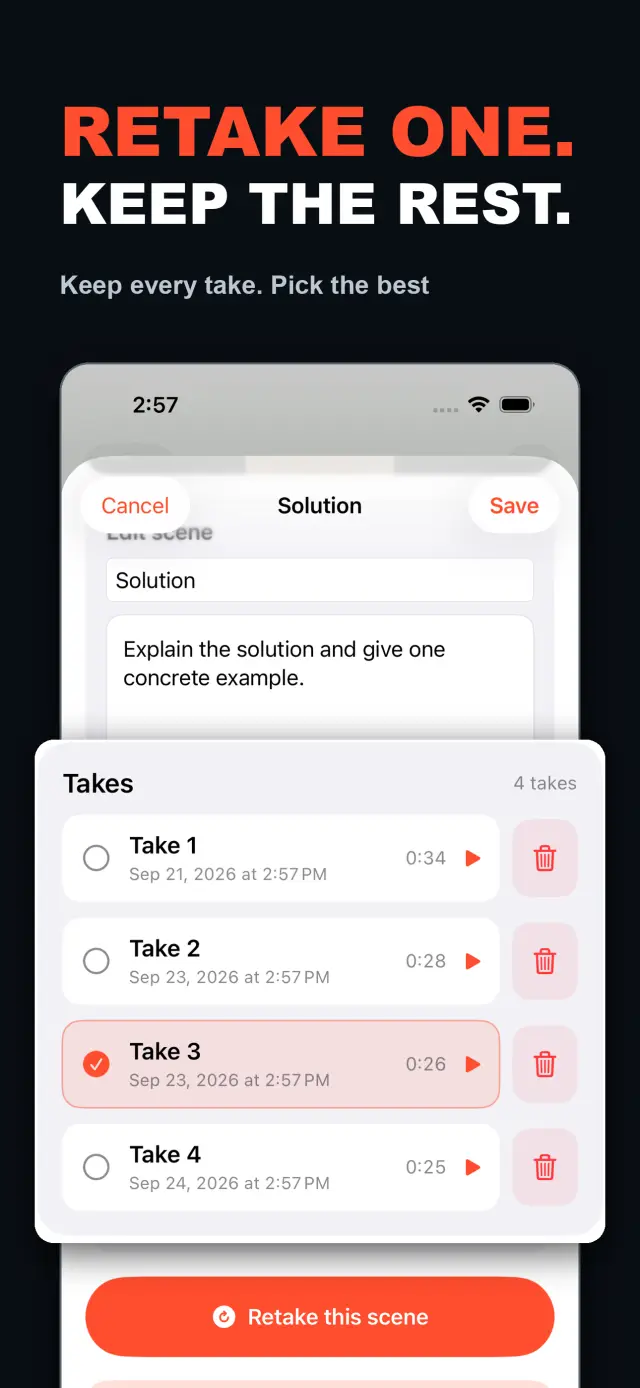
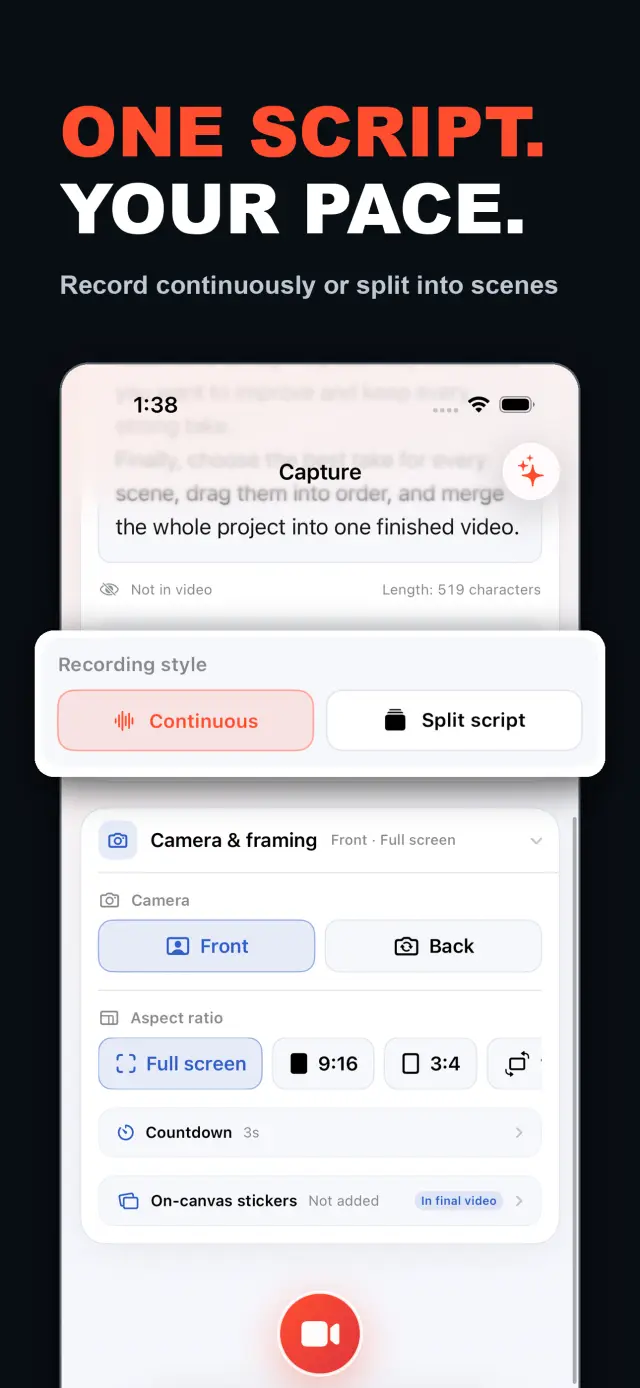
TalkCam is a teleprompter camera and video editor for recording one talking-head video in parts. Tap Record to create the current video automatically: capture one thought, stop, continue from there, or return hours or days later to add the next part. Choose Continuous or Split Script directly on the capture home. Continuous starts without a script — or keeps a full script together — and after every stop, Continue Recording appends the next part to the same video. Split Script pastes a full script and organizes it into short, recordable scenes before filming: the basic splitter runs on device and preserves the original words, and on supported devices Apple Intelligence can optionally organize the split on device; your script is not sent to a TalkCam server. Each scene can hold multiple takes — redo only the part that needs work without overwriting earlier versions, then choose the most natural take in the editor. After a scripted take, the pacing report compares your recording time with paragraph targets using teleprompter reading-position estimates. The multi-scene editor plays the assembled story above a scrubbable clip timeline: seek directly, skip ±5 seconds, switch between 1x/1.5x/2x playback, reorder scenes, select takes, and change the canvas. You do not need to finish every scene first — export what is ready and record the rest later. Inside a take, split, delete, and adjust volume, or add cut, fade, slide, and zoom transitions; text, images, logos, beauty, crop, letterbox treatment, and supplemental footage remain nondestructive. The full-screen camera supports scrolling, page, card, and manual prompt modes with adjustable text size, speed, position, colors, and background opacity — the prompt is an interface overlay only and never appears in the raw recording or exported video. Front or back camera with in-take pause/resume and pinch to zoom; if no camera is available but the microphone is, Audio-Only Studio saves a standard, timeline-compatible video take. Silence removal, noise reduction, audio fades, and gaze correction run on device where available. Choose 480p, 720p, 1080p, 2K, or 4K; 30/50/60 fps; SDR/HDR; and the matching bitrate before export — H.264 or HDR HEVC MP4 with no TalkCam watermark. Free includes continuous recording, split-script recording, the on-device splitter, multiple scenes and takes, timeline preview, the teleprompter, text and logo layers, core editing, and 480p/720p/1080p, 30 fps, SDR, compact or standard bitrate export, with takes up to 60 minutes. TalkCam Pro unlocks 2K/4K, 50/60 fps, HDR, high-bitrate export, unlimited take length, supplemental footage, image stickers, noise reduction, audio fades, and gaze correction. Local-first: no account, no ads, no tracking.

TalkCam
ایک نظر میں
Fig. 01A talking-head video no longer needs one perfect take: record it part by part, keep every version, pick the best takes on the timeline — then export one finished video.
ایپ میں
Fig. 02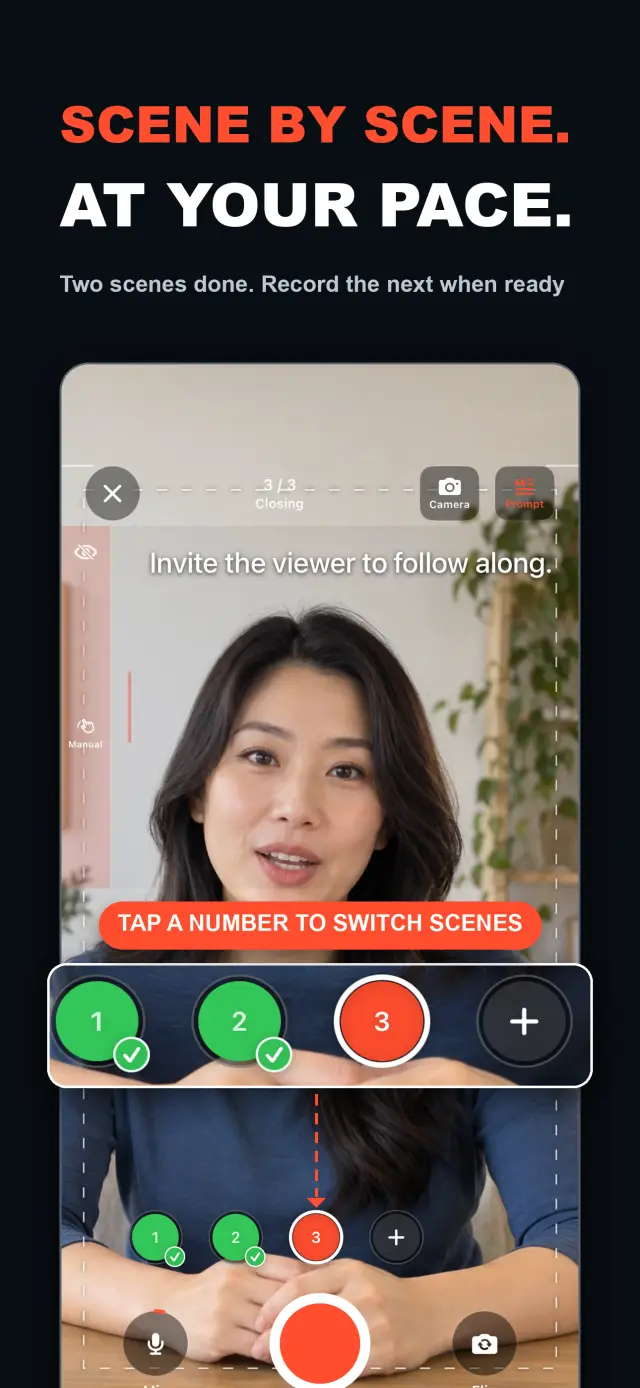
خصوصیات
No. 01stop and continue, or come back days later
choose your mode right on the capture home
Specifications
Tab. 01ورک فلو
No. 02Choose Continuous or Split Script on the capture home; stop after every thought and continue later, or film a script scene by scene — each scene holds multiple takes.
Redo only the scene that needs work; earlier takes stay untouched until you pick the best one on the timeline.
Scrub the timeline, reorder scenes, switch takes, then export one finished MP4 — with the resolution, frame rate, and SDR/HDR you choose.
اعتماد اور رازداری
No. 03Local-first: no account, no ads, no tracking — data never leaves the device.
No sign-up, no login. Install it and it just works.
Everything core runs offline; no network required.
Free includes continuous recording, split-script recording with the on-device splitter, multiple scenes and takes, timeline preview, the teleprompter, text and logo layers, core editing, and 480p/720p/1080p 30 fps SDR export, with takes up to 60 minutes; TalkCam Pro unlocks 2K/4K, 50/60 fps, HDR, high-bitrate export, unlimited take length, supplemental footage, image stickers, noise reduction, audio fades, and gaze correction. Local-first: no account, no ads, no tracking, everything processed on device.
product direction
No. 04Where this app is headed, in the maker’s own hand.
Record one talking-head video in parts: stop whenever you like, continue from there, or come back days later — the parts stay in the same video.
Start freeform and keep recording after every stop, or paste a script and organize it into short scenes on device before filming.
Every scene keeps multiple takes; retake one part without overwriting, review its pacing, then assemble the chosen takes on the scrubbable timeline.
Scrolling, page, card, and manual modes over the full-screen camera — an overlay that never enters the recording.
Preview and export recorded scenes before the script is finished — 480p to 4K, up to 60 fps, SDR or HDR, no watermark.
about TalkCam
No. 5The longer story — what it is, who it is for, and the choices behind it.
آخری اپ ڈیٹ: 2026-09-24
TalkCam وہ iPhone کیمرہ ہے جو ایک ٹاکنگ ہیڈ ویڈیو کو حصوں میں، ٹیک در ٹیک ریکارڈ کرتا ہے۔ ریکارڈ پر ٹیپ کریں اور موجودہ ویڈیو خود شروع ہو جاتی ہے: ایک خیال ریکارڈ کریں، روکیں، پھر وہیں سے جاری رکھیں — یا گھنٹوں یا دنوں بعد واپس آ کر اگلا حصہ شامل کریں۔ کیا آپ اسکرپٹ سے کام کر رہے ہیں؟ اسے ایک بار پیسٹ کریں اور TalkCam اسے آپ کے ڈیوائس پر مختصر، ریکارڈ کیے جانے والے مناظر میں ترتیب دے دیتا ہے۔ ہر منظر متعدد ٹیک رکھتا ہے، چنانچہ دوبارہ ریکارڈ کرنے پر وہ ورژن کبھی ضائع نہیں ہوتا جو پہلے ہی ٹھیک ہو چکا تھا، اور مکمل کہانی ایک اسکرین کیے جانے والے ٹائم لائن پر جُڑتی ہے۔ مفت ٹائر 60 منٹ کے ٹیک اور 1080p تک کی صاف ایکسپورٹ فراہم کرتا ہے؛ TalkCam Pro ازقاق 2K/4K، 50/60 fps، HDR، ہائی بٹ ریٹ ایکسپورٹ، بے انتہا ٹیک لمبائی اور مکمل پیشہ ورانہ پالش سیٹ کھولتا ہے۔
کیپچر ہوم پر ہی مسلسل ریکارڈنگ (Continuous) یا اسکرپٹ تقسیم (Split Script) چنیں — پہلے کوئی پروجیکٹ فارم پُر کرنے کی ضرورت نہیں۔ مسلسل ریکارڈنگ موڈ میں، بغیر اسکرپٹ شروع کریں یا پوری اسکرپٹ کو ایک ساتھ رکھیں؛ ہر اسٹاپ کے بعد ریکارڈنگ جاری رکھیں (Continue Recording) چنیں اور اگلا حصہ پریویو، ایڈیٹنگ اور ایکسپورٹ کے لیے اسی ویڈیو میں رہتا ہے۔ اسکرپٹ تقسیم موڈ میں پوری اسکرپٹ پیسٹ کریں اور فلم بندی سے پہلے اسے مختصر مناظر میں ترتیب دیں: بنیادی اسپلٹر ڈیوائس پر چلتا ہے اور آپ کے اصل الفاظ محفوظ رکھتا ہے، اور معاون ڈیوائسز پر Apple Intelligence تقسیم کو اختیاری طور پر ڈیوائس پر ہی ترتیب دے سکتا ہے — آپ کی اسکرپٹ کبھی کسی TalkCam سرور پر نہیں بھیجی جاتی۔
ہر منظر میں متعدد ٹیک رکھے جا سکتے ہیں۔ صرف جس حصے میں بہتری چاہیے اسے دوبارہ ریکارڈ کریں، پرانے ورژنز کے اوپر کچھ لکھا نہیں جاتا، پھر ایڈیٹر میں سب سے قدرتی ٹیک چنیں۔ ملٹی سین ایڈیتر جُڑی ہوئی کہانی کو اسکرین کیے جانے والے کلپ ٹائم لائن کے اوپر چلاتا ہے: براہِ راست کسی لمحے پر جائیں، ±5 سیکنڈ اسکیپ کریں، 1x/1.5x/2x پلے بیک رفتار بدلیں، مناظر کی ترتیب بدلیں، ٹیک چنیں اور ایک ویڈیو ایکسپورٹ کرنے سے پہلے کینوس بدلیں۔ ہر منظر مکمل کرنا ضروری نہیں — جیسے ہی کوئی قابلِ استعمال ٹیک موجود ہو، تیار حصے کا پریو لے کر ایکسپورٹ کریں، پھر بعد میں پروجیکٹ پر واپس آ کر باقی ریکارڈ کریں۔
ایک ٹیک کے اندر اسپلٹ کریں، ڈیلیٹ کریں، والیوم ایڈجسٹ کریں، یا کٹ، فیڈ، سلائیڈ اور زوم ٹرانزیشن شامل کریں۔ ٹیکسٹ، تصاویر، لوگوز، بیوٹی، کراپ، لیٹر باکس اور اضافی فوٹیج غیر تباہ کن (نان ڈسٹرکٹو) رہتے ہیں؛ اصل کیمرہ ریکارڈنگ بالکل برقرار رہتی ہے۔ جب آپ اسکرپٹ سے بولتے ہیں تو فل اسکرین کیمرہ اسکرولنگ، پیج، کارڈ اور مینوئل پرامپٹ موڈ فراہم کرتا ہے، جن میں ٹیکسٹ کا سائز، رفتار، پوزیشن، رنگ اور بیک گراؤنڈ کی دھندلاپن ایڈجسٹ کیا جا سکتا ہے — یہ صرف انٹرفیس اوورلے ہے جو کبھی خام ریکارڈنگ یا ایکسپورٹ شدہ ویڈیو میں نظر نہیں آتا۔
کیمرہ آپ کے ساتھ چلتا ہے: فرنٹ یا بیک کیمرہ، ٹیک کے اندر پاز/ریزیوم، اور پنچ سے زوم۔ اگر کیمرہ دستیاب نہ ہو مگر مائیکروفون ہو، تو آڈیو اونلی اسٹوڈیو (Audio-Only Studio) ایک معیاری، ٹائم لائن سے ہم آہنگ ویڈیو ٹیک محفوظ کرتا ہے۔ خاموشی کا خاتمہ، شور کی کمی، آڈیو فیڈ اور نظر کی درستی جہاں دستیاب ہوں ڈیوائس پر ہی چلتے ہیں۔ ایکسپورٹ سے پہلے 480p، 720p، 1080p، 2K یا 4K؛ 30، 50 یا 60 fps؛ SDR یا HDR؛ اور مطابقت رکھنے والا بٹ ریٹ چنیں — TalkCam واٹر مارک کے بغیر H.264 یا HDR HEVC MP4۔
زیادہ تر ٹاکنگ ہیڈ ایپس ایک بہترین ٹیک کی توقع رکھتی ہیں اور ریکارڈنگ پر ہی رک جاتی ہیں۔ TalkCam ویڈیو کو ٹیک در ٹیک بناتا ہے: ہر خیال کے بعد روکیں، کامیاب ورژنز کھوئے بغیر صرف اسی منظر کو دوبارہ کریں، اور کہانی کو ٹائم لائن سے جوڑنے دیں۔ ٹیلی پرامپٹر — اسکرولنگ، پیج، کارڈ یا مینوئل — آپ کی پرفارمنس میں مدد کرتا ہے مگر کبھی ریکارڈ ہونے والے پکسلز میں شامل نہیں ہوتا، اور ایفیکٹس صرف ایکسپورٹ کے وقت آف لائن رینڈرنگ سے شامل ہوتے ہیں۔ ہر ریکارڈنگ ایک صاف کیمرہ + مائیکروفون MP4 بنی رہتی ہے، تو آپ اسٹیکرز کی اسٹائلنگ بدل سکتے ہیں، بیوٹی دوبارہ ٹیون کر سکتے ہیں اور ایسپیکٹ ریشیو جتنی بار چاہیں بدل سکتے ہیں — اصل ٹیک کھوئے بغیر۔ فرنٹ کیمرہ میررنگ صرف کیپچر/پریویو کی سہولت ہے؛ ایکسپورٹ محفوظ فریمز کو جیسا ہے ویسا ہی استعمال کرتا ہے، دوبارہ میرر نہیں کرتا۔
TalkCam لوکل فرسٹ ہے: کوئی اکاؤنٹ نہیں، کوئی اشتہارات نہیں، کوئی اینالیٹکس یا ٹریکنگ SDK نہیں، اور کوئی ذاتی ڈیٹا جمع نہیں۔ پروجیکٹس، اسکرپٹس، ریکارڈنگز، درآمد شدہ میڈیا اور ایکسپورٹس ڈیوائس پر ہی پروسیس ہوتے ہیں — بشمول اختیاری Apple Intelligence اسکرپٹ تقسیم کے، جو معاون ہارڈویئر پر ڈیوائس پر چلتا ہے۔ کیمرہ اور مائیکروفون صرف ریکارڈنگ کے لیے استعمال ہوتے ہیں؛ تصاویر تک رسائی صرف اس وقت مانگی جاتی ہے جب آپ کوئی ایکسپورٹ محفوظ کرنے کا انتخاب کریں، اور ایکسپورٹ شدہ ویڈیوز آپ کی اپنی تصاویر لائبریری میں جاتی ہیں۔ TalkCam انگریزی اور سادہ چینی کے ساتھ ساتھ لائٹ/ڈارک ظاہری شکل کو سپورٹ کرتا ہے۔
مفت ٹائر میں مسلسل ریکارڈنگ، ڈیوائس اسپلٹر کے ساتھ اسکرپٹ تقسیم ریکارڈنگ، متعدد مناظر اور ٹیک، ٹائم لائن پریویو، ٹیلی پرامپٹر، ٹیکسٹ اور لوگو لیئرز، اور بنیادی ایڈیٹنگ — ٹرم، اسپلٹ، ڈیلیٹ، ٹرانزیشنز، والیوم — شامل ہے، جس میں 60 منٹ تک کے ٹیک اور 480p/720p/1080p، 30 fps، SDR، کمپیکٹ یا معیاری بٹ ریٹ ایکسپورٹ ملتا ہے۔ TalkCam Pro کھولتا ہے:
اختیاری ماہانہ یا سالانہ خودکار تجدید ہونے والی سبسکرپشن، یا ایک بار کی لائف ٹائم خریداری کے طور پر دستیاب۔ سبسکرپشنز خودکار طور پر تجدید ہوتی ہیں جب تک کہ موجودہ مدت کے خاتمے سے کم از کم 24 گھنٹے پہلے منسوخ نہ کر دی جائے؛ انہیں اپنے App Store اکاؤنٹ سیٹنگز سے منظم یا منسوخ کریں، اور ایپ میں سیٹنگز → TalkCam Pro Workflow سے خریداریاں بحال کریں۔
docs support
No. 6Plain-language documents. No fine print you would be surprised by.
faq title
Yes — that is the point. Tap Record and TalkCam creates the current video automatically; stop whenever you like and continue from there, or come back hours or days later. Paste a script to split it into scenes, record one scene at a time, and keep multiple takes of each. When you finish, the takes you chose merge into one video.
Continuous keeps one video growing: after every stop, choose Continue Recording and the next part is appended to the same video for preview, editing, and export. Split Script is for working from a script: paste the full text, organize it into short scenes on device, then film scene by scene with multiple takes each. Both modes share the same camera, takes, editor, and export path.
Nothing is overwritten. Every take of a scene is kept; you choose the one that goes into the final video, and you can switch or delete takes at any time before export.
Never. The full-screen camera supports scrolling, page, card, and manual prompt modes — an interface overlay only. The recording stays a clean camera-plus-microphone MP4, and text or effects are baked in at export, not captured by accident.
Every take shows its total time. With a script and visible teleprompter, paragraph times are estimated from when the reading position crosses each paragraph, then compared with the target. This is a pacing guide, not speech transcription.
Yes. As soon as a usable take exists, preview it on the timeline and export the scenes you have already recorded, then return to the project later to film the rest. In the export panel, choose the resolution, frame rate, SDR/HDR, and bitrate — some options require TalkCam Pro.
Nowhere. The basic splitter runs on device and preserves your original wording, and the optional Apple Intelligence split also runs on device on supported hardware. Your script is not sent to a TalkCam server; projects, recordings, and exports are all processed locally.
Free: continuous recording, split-script recording with the on-device splitter, multiple scenes and takes, timeline preview, the teleprompter, text and logo layers, core editing, and 480p/720p/1080p 30 fps SDR export, with takes up to 60 minutes. TalkCam Pro unlocks 2K/4K, 50/60 fps, HDR, high-bitrate export, unlimited take length, supplemental footage, image stickers, noise reduction, audio fades, and gaze correction.
TalkCam
TalkCam is on the App Store — record in parts, keep every take, finish as one video.