01
One video, many takes
stop and continue, or come back days later
 ZelonAI
Apple Platform App · iPhone
TalkCam
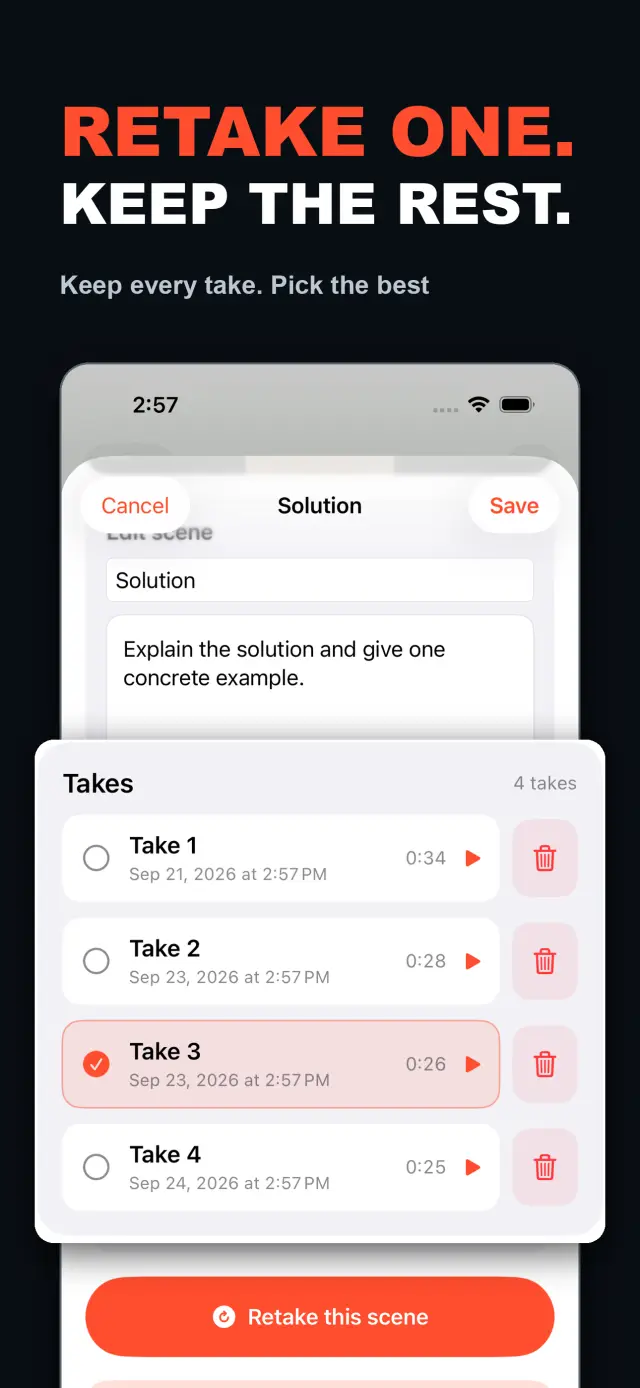
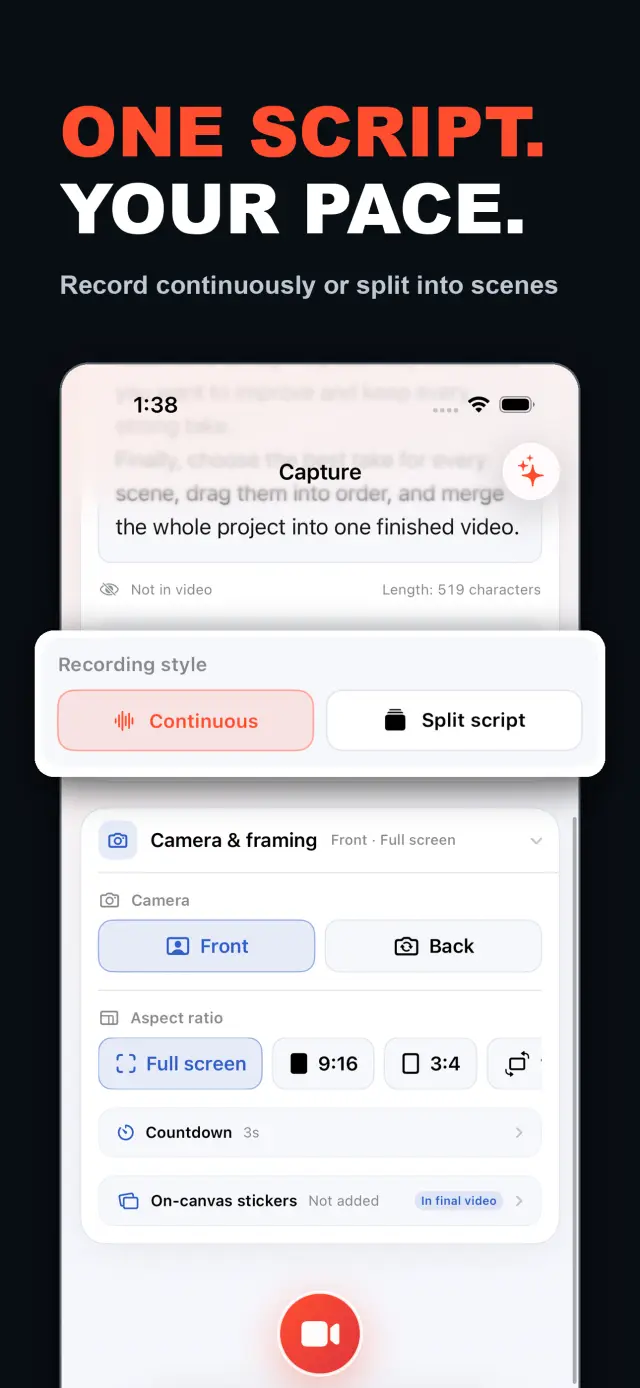
TalkCam is a teleprompter camera and video editor for recording one talking-head video in parts. Tap Record to create the current video automatically: capture one thought, stop, continue from there, or return hours or days later to add the next part. Choose Continuous or Split Script directly on the capture home. Continuous starts without a script — or keeps a full script together — and after every stop, Continue Recording appends the next part to the same video. Split Script pastes a full script and organizes it into short, recordable scenes before filming: the basic splitter runs on device and preserves the original words, and on supported devices Apple Intelligence can optionally organize the split on device; your script is not sent to a TalkCam server. Each scene can hold multiple takes — redo only the part that needs work without overwriting earlier versions, then choose the most natural take in the editor. After a scripted take, the pacing report compares your recording time with paragraph targets using teleprompter reading-position estimates. The multi-scene editor plays the assembled story above a scrubbable clip timeline: seek directly, skip ±5 seconds, switch between 1x/1.5x/2x playback, reorder scenes, select takes, and change the canvas. You do not need to finish every scene first — export what is ready and record the rest later. Inside a take, split, delete, and adjust volume, or add cut, fade, slide, and zoom transitions; text, images, logos, beauty, crop, letterbox treatment, and supplemental footage remain nondestructive. The full-screen camera supports scrolling, page, card, and manual prompt modes with adjustable text size, speed, position, colors, and background opacity — the prompt is an interface overlay only and never appears in the raw recording or exported video. Front or back camera with in-take pause/resume and pinch to zoom; if no camera is available but the microphone is, Audio-Only Studio saves a standard, timeline-compatible video take. Silence removal, noise reduction, audio fades, and gaze correction run on device where available. Choose 480p, 720p, 1080p, 2K, or 4K; 30/50/60 fps; SDR/HDR; and the matching bitrate before export — H.264 or HDR HEVC MP4 with no TalkCam watermark. Free includes continuous recording, split-script recording, the on-device splitter, multiple scenes and takes, timeline preview, the teleprompter, text and logo layers, core editing, and 480p/720p/1080p, 30 fps, SDR, compact or standard bitrate export, with takes up to 60 minutes. TalkCam Pro unlocks 2K/4K, 50/60 fps, HDR, high-bitrate export, unlimited take length, supplemental footage, image stickers, noise reduction, audio fades, and gaze correction. Local-first: no account, no ads, no tracking.

TalkCam
Краткий обзор
Fig. 01A talking-head video no longer needs one perfect take: record it part by part, keep every version, pick the best takes on the timeline — then export one finished video.
В приложении
Fig. 02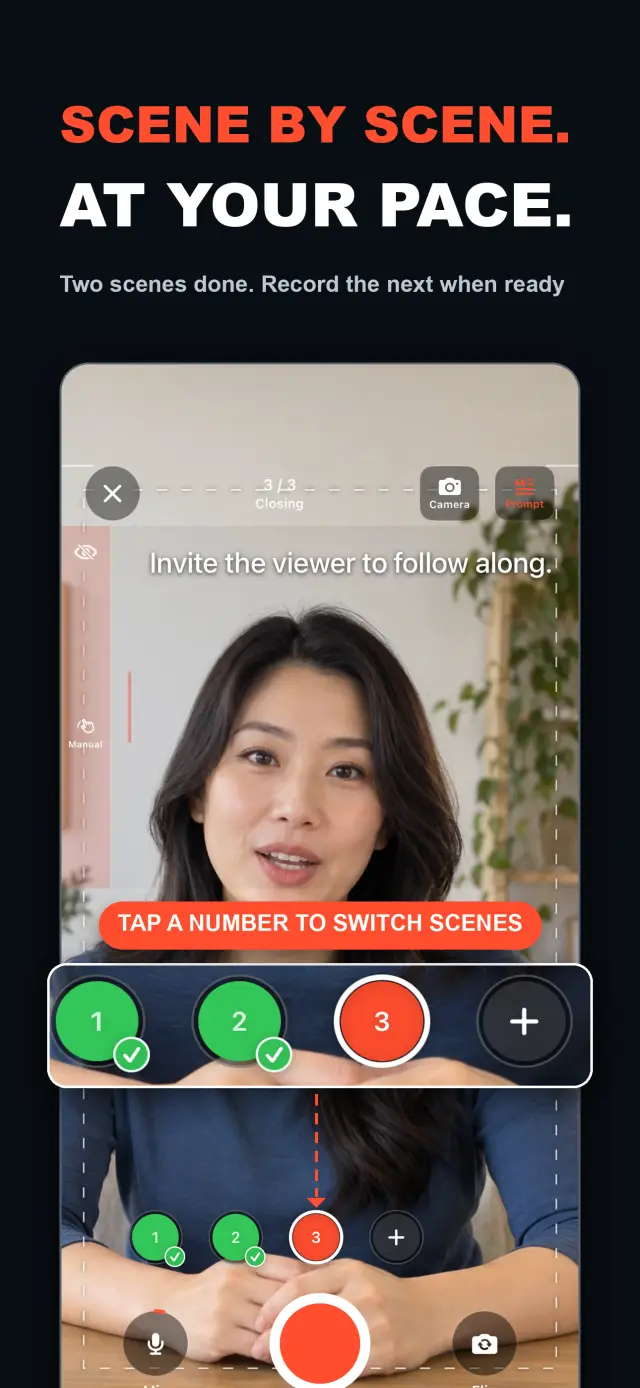
Возможности
No. 01stop and continue, or come back days later
choose your mode right on the capture home
Specifications
Tab. 01Рабочий процесс
No. 02Choose Continuous or Split Script on the capture home; stop after every thought and continue later, or film a script scene by scene — each scene holds multiple takes.
Redo only the scene that needs work; earlier takes stay untouched until you pick the best one on the timeline.
Scrub the timeline, reorder scenes, switch takes, then export one finished MP4 — with the resolution, frame rate, and SDR/HDR you choose.
Доверие и конфиденциальность
No. 03Local-first: no account, no ads, no tracking — data never leaves the device.
No sign-up, no login. Install it and it just works.
Everything core runs offline; no network required.
Free includes continuous recording, split-script recording with the on-device splitter, multiple scenes and takes, timeline preview, the teleprompter, text and logo layers, core editing, and 480p/720p/1080p 30 fps SDR export, with takes up to 60 minutes; TalkCam Pro unlocks 2K/4K, 50/60 fps, HDR, high-bitrate export, unlimited take length, supplemental footage, image stickers, noise reduction, audio fades, and gaze correction. Local-first: no account, no ads, no tracking, everything processed on device.
product direction
No. 04Where this app is headed, in the maker’s own hand.
Record one talking-head video in parts: stop whenever you like, continue from there, or come back days later — the parts stay in the same video.
Start freeform and keep recording after every stop, or paste a script and organize it into short scenes on device before filming.
Every scene keeps multiple takes; retake one part without overwriting, review its pacing, then assemble the chosen takes on the scrubbable timeline.
Scrolling, page, card, and manual modes over the full-screen camera — an overlay that never enters the recording.
Preview and export recorded scenes before the script is finished — 480p to 4K, up to 60 fps, SDR or HDR, no watermark.
О продукте TalkCam
No. 5The longer story — what it is, who it is for, and the choices behind it.
Последнее обновление: 2026-09-24
TalkCam — это камера iPhone, которая записывает одно видео «говорящей головы» по частям, дубль за дублем. Нажмите «Запись» — и текущее видео начнётся само: зафиксируйте одну мысль, остановитесь и продолжайте с этого места — или возвращайтесь спустя часы или дни и добавляйте следующую часть. Работаете со сценарием? Вставьте его один раз, и TalkCam разобьёт его на короткие, удобные для записи сцены прямо на устройстве. Каждая сцена хранит несколько дублей, поэтому пересъёмка никогда не затирает удачный вариант, а собранная история складывается на прокручиваемом таймлайне. Бесплатный уровень покрывает дубли до 60 минут и чистый экспорт до 1080p; TalkCam Pro открывает 2K/4K, 50/60 fps, HDR, экспорт с высоким битрейтом, неограниченную длительность дубля и полный набор профессиональной доводки.
Выберите режим «Непрерывная съёмка» (Continuous) или «Разбить сценарий» (Split Script) прямо на главном экране записи — заполнять форму проекта заранее не нужно. В режиме «Непрерывная съёмка» начинайте без сценария или держите весь сценарий целиком; после каждой остановки выбирайте «Продолжить запись» (Continue Recording), и следующая часть останется в том же видео — для предпросмотра, монтажа и экспорта. В режиме «Разбить сценарий» вставьте полный сценарий и организуйте его в короткие сцены ещё до съёмки: базовый инструмент разбиения работает на устройстве и сохраняет ваши исходные формулировки, а на поддерживаемых устройствах Apple Intelligence может по желанию выполнить разбиение прямо на устройстве — ваш сценарий никогда не отправляется на сервер TalkCam.
Каждая сцена может содержать несколько дублей. Переснимайте только то, что требует доработки, не затирая предыдущие версии, а затем выбирайте самый естественный дубль в редакторе. Редактор с несколькими сценами воспроизводит собранную историю над прокручиваемым таймлайном клипов: сразу переходите к нужному моменту, пропускайте ±5 секунд, переключайте скорость воспроизведения 1x/1.5x/2x, меняйте порядок сцен, выбирайте дубли и меняйте холст до экспорта одного видео. Завершать все сцены заранее не нужно — как только появился годный дубль, предпросматривайте и экспортируйте готовое, а к остальному вернитесь в проект позже.
Внутри одного дубля — разделение, удаление и настройка громкости, а также переходы «склейка», «фейд», «сдвиг» и «зум». Текст, изображения, логотипы, красота, кадрирование, леттербокс и дополнительные съёмки остаются неразрушающими; исходные записи камеры не трогаются. Когда вы говорите по сценарию, полноэкранная камера предлагает режимы суфлирования — прокрутки, постраничный, карточный и ручной — с настраиваемыми размером текста, скоростью, позицией, цветами и прозрачностью фона; это наложение интерфейса, которое никогда не попадает ни в исходную запись, ни в экспортируемое видео.
Камера успевает за вами: фронтальная или основная камера, пауза и возобновление внутри дубля, зум щипком. Если камеры нет, а микрофон есть, аудиостудия (Audio-Only Studio) сохранит стандартный дубль-видео, совместимый с таймлайном. Удаление тишины, шумоподавление, аудиофейды и коррекция зрительного контакта работают на устройстве там, где доступны. Перед экспортом выбирайте 480p, 720p, 1080p, 2K или 4K; 30, 50 или 60 fps; SDR или HDR — и подходящий битрейт: H.264 или HDR HEVC MP4 без водяного знака TalkCam.
Большинство приложений «говорящей головы» ждут один идеальный дубль и останавливаются на записи. TalkCam собирает видео дубль за дублем: останавливайтесь после каждой мысли, переснимайте только ту сцену, которая требует доработки, не теряя удавшихся версий, и позвольте таймлайну собрать историю. Телесуфлёр — прокрутка, постраничный, карточный или ручной — помогает вам выступать, но никогда не попадает в записанные пиксели, а эффекты закрепляются только при экспорте в ходе офлайн-рендера. Каждая запись остаётся чистым MP4 с камеры и микрофона, поэтому можно менять стиль стикеров, заново настраивать красоту и переключать соотношения сторон сколько угодно раз, не теряя исходные дубли. Зеркалирование фронтальной камеры — лишь удобство при записи и предпросмотре; экспорт использует сохранённые кадры как есть, без повторного зеркалирования.
TalkCam работает по принципу локальности: без учётной записи, без рекламы, без аналитики и SDK для слежки, без сбора персональных данных. Проекты, сценарии, записи, импортированные медиа и экспорты обрабатываются на устройстве — включая необязательное разбиение сценария через Apple Intelligence, которое на поддерживаемом оборудовании выполняется на устройстве. Камера и микрофон используются только для записи; доступ к «Фото» запрашивается лишь тогда, когда вы решите сохранить экспорт, а экспортированные видео попадают в вашу собственную медиатеку «Фото». TalkCam поддерживает английский и упрощённый китайский языки, а также светлый и тёмный вид.
Бесплатный уровень включает непрерывную запись, запись по сценарию с разбиением на устройстве, несколько сцен и дублей, предпросмотр на таймлайне, телесуфлёр, слои текста и логотипов и базовый монтаж — обрезку, разделение, удаление, переходы и громкость — с дублями до 60 минут и экспортом 480p/720p/1080p, 30 fps, SDR, компактным или стандартным битрейтом. TalkCam Pro открывает:
Доступно как необязательная автоматически продлеваемая подписка на месяц или год либо как разовая пожизненная покупка. Подписки продлеваются автоматически, если не отменены как минимум за 24 часа до окончания текущего периода; управляйте ими или отменяйте их в настройках учётной записи App Store, а покупки восстанавливайте через «Настройки» → TalkCam Pro Workflow в приложении.
docs support
No. 6Plain-language documents. No fine print you would be surprised by.
faq title
Yes — that is the point. Tap Record and TalkCam creates the current video automatically; stop whenever you like and continue from there, or come back hours or days later. Paste a script to split it into scenes, record one scene at a time, and keep multiple takes of each. When you finish, the takes you chose merge into one video.
Continuous keeps one video growing: after every stop, choose Continue Recording and the next part is appended to the same video for preview, editing, and export. Split Script is for working from a script: paste the full text, organize it into short scenes on device, then film scene by scene with multiple takes each. Both modes share the same camera, takes, editor, and export path.
Nothing is overwritten. Every take of a scene is kept; you choose the one that goes into the final video, and you can switch or delete takes at any time before export.
Never. The full-screen camera supports scrolling, page, card, and manual prompt modes — an interface overlay only. The recording stays a clean camera-plus-microphone MP4, and text or effects are baked in at export, not captured by accident.
Every take shows its total time. With a script and visible teleprompter, paragraph times are estimated from when the reading position crosses each paragraph, then compared with the target. This is a pacing guide, not speech transcription.
Yes. As soon as a usable take exists, preview it on the timeline and export the scenes you have already recorded, then return to the project later to film the rest. In the export panel, choose the resolution, frame rate, SDR/HDR, and bitrate — some options require TalkCam Pro.
Nowhere. The basic splitter runs on device and preserves your original wording, and the optional Apple Intelligence split also runs on device on supported hardware. Your script is not sent to a TalkCam server; projects, recordings, and exports are all processed locally.
Free: continuous recording, split-script recording with the on-device splitter, multiple scenes and takes, timeline preview, the teleprompter, text and logo layers, core editing, and 480p/720p/1080p 30 fps SDR export, with takes up to 60 minutes. TalkCam Pro unlocks 2K/4K, 50/60 fps, HDR, high-bitrate export, unlimited take length, supplemental footage, image stickers, noise reduction, audio fades, and gaze correction.
TalkCam
TalkCam is on the App Store — record in parts, keep every take, finish as one video.