01
One video, many takes
stop and continue, or come back days later
 ZelonAI
Apple Platform App · iPhone
TalkCam
TalkCam is a teleprompter camera and video editor for recording one talking-head video in parts. Tap Record to create the current video automatically: capture one thought, stop, continue from there, or return hours or days later to add the next part. Choose Continuous or Split Script directly on the capture home. Continuous starts without a script — or keeps a full script together — and after every stop, Continue Recording appends the next part to the same video. Split Script pastes a full script and organizes it into short, recordable scenes before filming: the basic splitter runs on device and preserves the original words, and on supported devices Apple Intelligence can optionally organize the split on device; your script is not sent to a TalkCam server. Each scene can hold multiple takes — redo only the part that needs work without overwriting earlier versions, then choose the most natural take in the editor. After a scripted take, the pacing report compares your recording time with paragraph targets using teleprompter reading-position estimates. The multi-scene editor plays the assembled story above a scrubbable clip timeline: seek directly, skip ±5 seconds, switch between 1x/1.5x/2x playback, reorder scenes, select takes, and change the canvas. You do not need to finish every scene first — export what is ready and record the rest later. Inside a take, split, delete, and adjust volume, or add cut, fade, slide, and zoom transitions; text, images, logos, beauty, crop, letterbox treatment, and supplemental footage remain nondestructive. The full-screen camera supports scrolling, page, card, and manual prompt modes with adjustable text size, speed, position, colors, and background opacity — the prompt is an interface overlay only and never appears in the raw recording or exported video. Front or back camera with in-take pause/resume and pinch to zoom; if no camera is available but the microphone is, Audio-Only Studio saves a standard, timeline-compatible video take. Silence removal, noise reduction, audio fades, and gaze correction run on device where available. Choose 480p, 720p, 1080p, 2K, or 4K; 30/50/60 fps; SDR/HDR; and the matching bitrate before export — H.264 or HDR HEVC MP4 with no TalkCam watermark. Free includes continuous recording, split-script recording, the on-device splitter, multiple scenes and takes, timeline preview, the teleprompter, text and logo layers, core editing, and 480p/720p/1080p, 30 fps, SDR, compact or standard bitrate export, with takes up to 60 minutes. TalkCam Pro unlocks 2K/4K, 50/60 fps, HDR, high-bitrate export, unlimited take length, supplemental footage, image stickers, noise reduction, audio fades, and gaze correction. Local-first: no account, no ads, no tracking.
TalkCam
At a glance
Fig. 01A talking-head video no longer needs one perfect take: record it part by part, keep every version, pick the best takes on the timeline — then export one finished video.
In the app
Fig. 02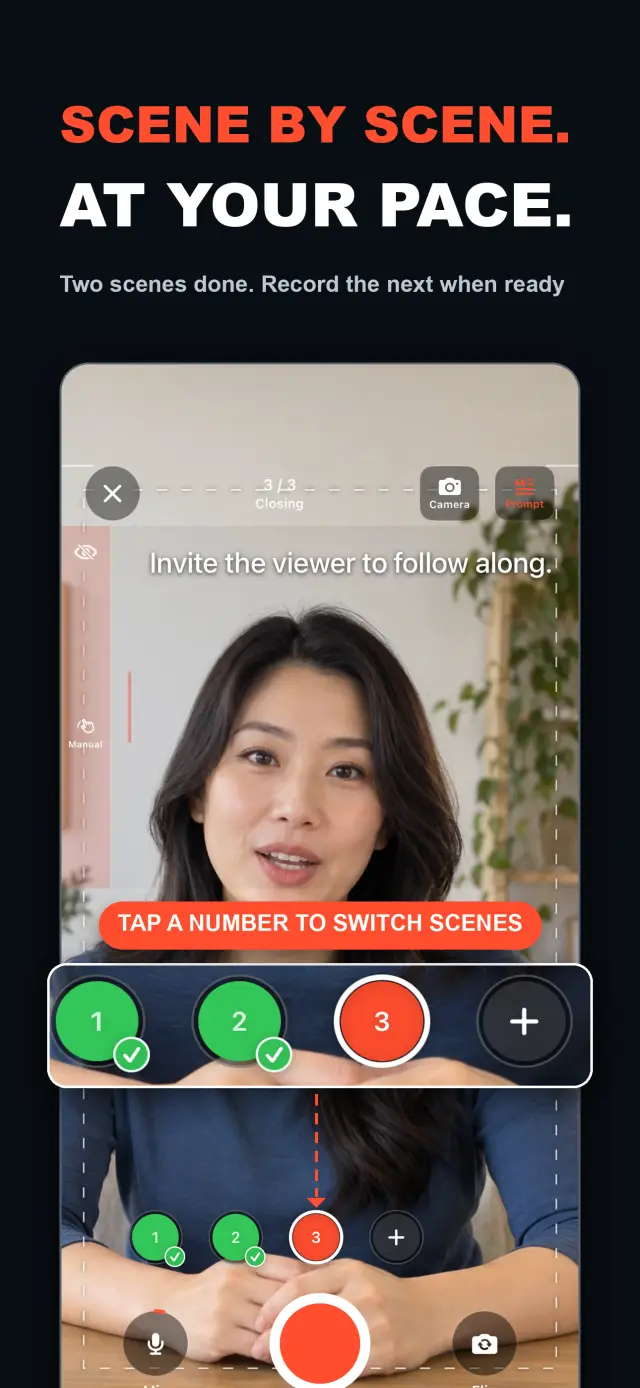
Features
No. 01stop and continue, or come back days later
choose your mode right on the capture home
Specifications
Tab. 01Workflow
No. 02Choose Continuous or Split Script on the capture home; stop after every thought and continue later, or film a script scene by scene — each scene holds multiple takes.
Redo only the scene that needs work; earlier takes stay untouched until you pick the best one on the timeline.
Scrub the timeline, reorder scenes, switch takes, then export one finished MP4 — with the resolution, frame rate, and SDR/HDR you choose.
Trust & Privacy
No. 03Local-first: no account, no ads, no tracking — data never leaves the device.
No sign-up, no login. Install it and it just works.
Everything core runs offline; no network required.
Free includes continuous recording, split-script recording with the on-device splitter, multiple scenes and takes, timeline preview, the teleprompter, text and logo layers, core editing, and 480p/720p/1080p 30 fps SDR export, with takes up to 60 minutes; TalkCam Pro unlocks 2K/4K, 50/60 fps, HDR, high-bitrate export, unlimited take length, supplemental footage, image stickers, noise reduction, audio fades, and gaze correction. Local-first: no account, no ads, no tracking, everything processed on device.
Product Direction
No. 04Where this app is headed, in the maker’s own hand.
Record one talking-head video in parts: stop whenever you like, continue from there, or come back days later — the parts stay in the same video.
Start freeform and keep recording after every stop, or paste a script and organize it into short scenes on device before filming.
Every scene keeps multiple takes; retake one part without overwriting, review its pacing, then assemble the chosen takes on the scrubbable timeline.
Scrolling, page, card, and manual modes over the full-screen camera — an overlay that never enters the recording.
Preview and export recorded scenes before the script is finished — 480p to 4K, up to 60 fps, SDR or HDR, no watermark.
About TalkCam
No. 5The longer story — what it is, who it is for, and the choices behind it.
Last updated: 2026-09-24
TalkCam is the iPhone camera that records one talking-head video in parts, take by take. Tap Record and the current video starts itself: capture one thought, stop, then continue from there — or come back hours or days later and add the next part. Working from a script? Paste it once and TalkCam organizes it into short, recordable scenes on device. Every scene keeps multiple takes, so a retake never overwrites the version that worked, and the assembled story comes together on a scrubbable timeline. The free tier covers 60-minute takes and clean up-to-1080p export; TalkCam Pro unlocks 2K/4K, 50/60 fps, HDR, high-bitrate export, unlimited take length, and a full professional polish set.
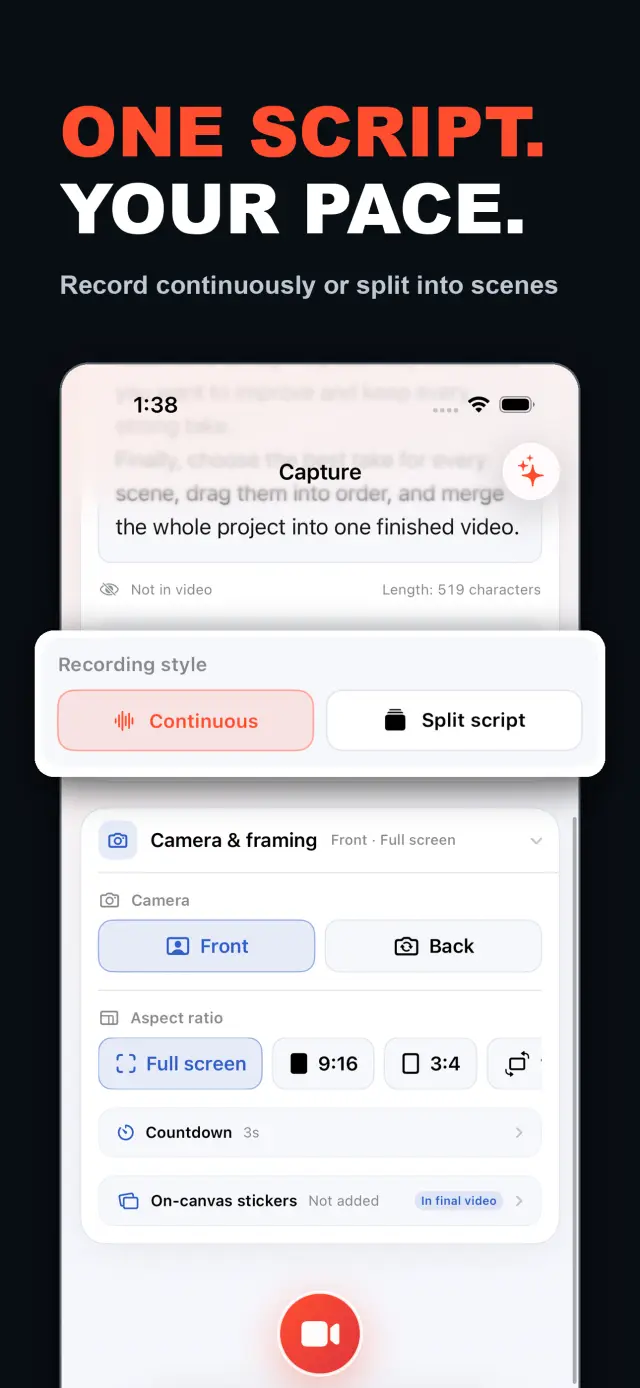
Choose Continuous or Split Script directly on the capture home — no project form to fill in first. In Continuous mode, start without a script or keep a full script together; after every stop, choose Continue Recording and the next part stays in the same video for preview, editing, and export. In Split Script mode, paste a full script and organize it into short scenes before filming: the basic splitter runs on device and preserves your original words, and on supported devices Apple Intelligence can optionally organize the split on device — your script is never sent to a TalkCam server.
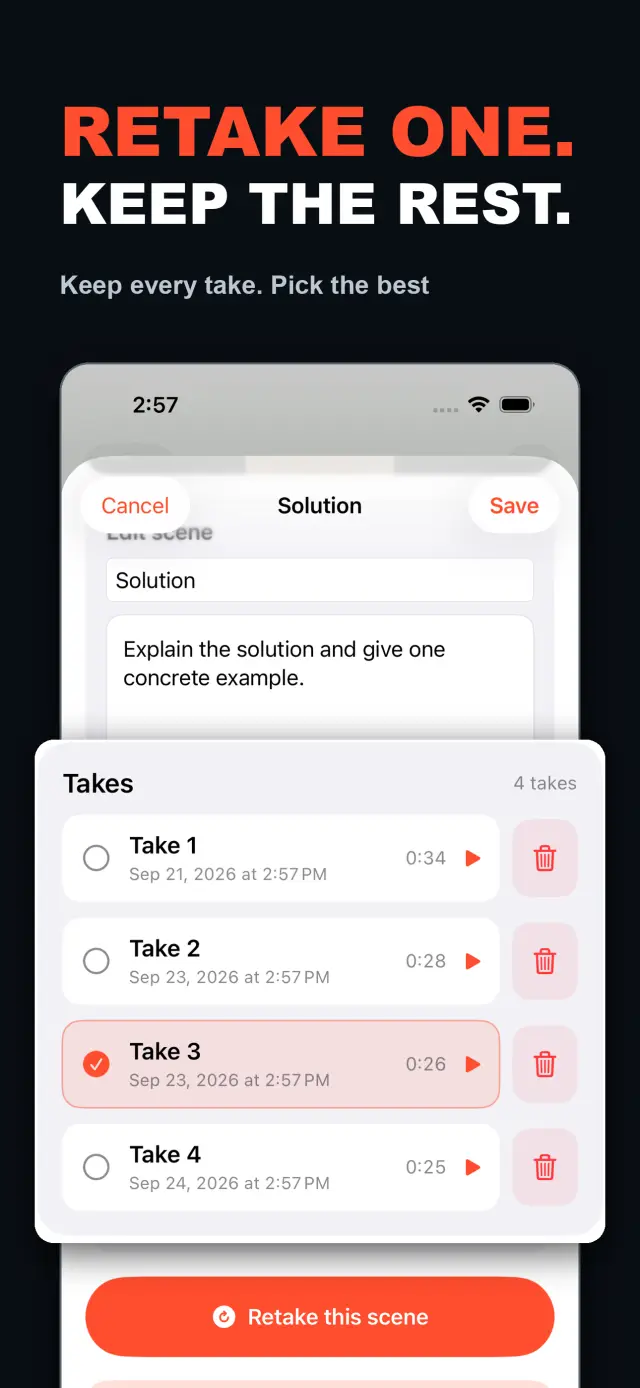
Each scene can hold multiple takes. Redo only the part that needs work without overwriting earlier versions, then choose the most natural take in the editor. After a scripted take, a timing report compares your total recording time and each paragraph's target with the time inferred from the teleprompter reading position; it is a pacing guide, not speech recognition. The multi-scene editor plays the assembled story above a scrubbable clip timeline: seek directly, skip ±5 seconds, switch between 1x/1.5x/2x playback, reorder scenes, select takes, and change the canvas before exporting one video. You do not need to finish every scene first — as soon as a usable take exists, preview and export what is ready, then return to the project later to record the rest.
Inside a single take, split, delete, and adjust volume, or add cut, fade, slide, and zoom transitions. Text, images, logos, beauty, crop, letterbox treatment, and supplemental footage remain nondestructive; the original camera recordings stay untouched. When you speak from a script, the full-screen camera offers scrolling, page, card, and manual prompt modes with adjustable text size, speed, position, colors, and background opacity — an interface overlay that never appears in the raw recording or the exported video.
The camera keeps up: front or back camera, in-take pause/resume, and pinch to zoom. If no camera is available but the microphone is, Audio-Only Studio saves a standard, timeline-compatible video take. Silence removal, noise reduction, audio fades, and gaze correction run on device where available. Before export, choose 480p, 720p, 1080p, 2K, or 4K; 30, 50, or 60 fps; SDR or HDR; and the matching bitrate — an H.264 or HDR HEVC MP4 with no TalkCam watermark.
Most talking-head apps expect one perfect take and stop at recording. TalkCam builds the video take by take: stop after every thought, retake just the scene that needs work without losing the versions that worked, and let the timeline assemble the story. The teleprompter — scrolling, page, card, or manual — helps you perform but never enters the recorded pixels, and effects bake in only at export via an offline render pass. Each recording stays a clean camera + microphone MP4, so you can restyle stickers, retune the beauty, and switch aspect ratios as many times as you want without losing your original takes. Front-camera mirroring is a capture/preview convenience only; the export uses the stored frames as-is without re-mirroring.
TalkCam is local-first: no account, no ads, and no analytics or tracking SDKs. The app does not automatically collect personal data. Projects, scripts, recordings, imported media, timing reports, and exports are processed on device — including the optional Apple Intelligence script split, which runs on device on supported hardware. Camera and microphone are used only for recording; Photos access is requested only when you choose to save an export to your own Photos library. If you email support, you choose what contact information and details to share. TalkCam supports English and Simplified Chinese and light/dark appearance.
The free tier includes continuous recording, split-script recording with the on-device splitter, multiple scenes and takes, timeline preview, the teleprompter, text and logo layers, and core editing — trim, split, delete, transitions, and volume — with takes up to 60 minutes and 480p/720p/1080p, 30 fps, SDR, compact or standard bitrate export. TalkCam Pro unlocks:
Available as an optional monthly or yearly auto-renewing subscription, or a one-time lifetime purchase. Subscriptions renew automatically unless cancelled at least 24 hours before the current period ends; manage or cancel them in your App Store account settings, and restore purchases from Settings → TalkCam Pro Workflow in the app.
Docs & Support
No. 6Plain-language documents. No fine print you would be surprised by.
Frequently Asked Questions
Yes — that is the point. Tap Record and TalkCam creates the current video automatically; stop whenever you like and continue from there, or come back hours or days later. Paste a script to split it into scenes, record one scene at a time, and keep multiple takes of each. When you finish, the takes you chose merge into one video.
Continuous keeps one video growing: after every stop, choose Continue Recording and the next part is appended to the same video for preview, editing, and export. Split Script is for working from a script: paste the full text, organize it into short scenes on device, then film scene by scene with multiple takes each. Both modes share the same camera, takes, editor, and export path.
Nothing is overwritten. Every take of a scene is kept; you choose the one that goes into the final video, and you can switch or delete takes at any time before export.
Never. The full-screen camera supports scrolling, page, card, and manual prompt modes — an interface overlay only. The recording stays a clean camera-plus-microphone MP4, and text or effects are baked in at export, not captured by accident.
Every take shows its total time. With a script and visible teleprompter, paragraph times are estimated from when the reading position crosses each paragraph, then compared with the target. This is a pacing guide, not speech transcription.
Yes. As soon as a usable take exists, preview it on the timeline and export the scenes you have already recorded, then return to the project later to film the rest. In the export panel, choose the resolution, frame rate, SDR/HDR, and bitrate — some options require TalkCam Pro.
Nowhere. The basic splitter runs on device and preserves your original wording, and the optional Apple Intelligence split also runs on device on supported hardware. Your script is not sent to a TalkCam server; projects, recordings, and exports are all processed locally.
Free: continuous recording, split-script recording with the on-device splitter, multiple scenes and takes, timeline preview, the teleprompter, text and logo layers, core editing, and 480p/720p/1080p 30 fps SDR export, with takes up to 60 minutes. TalkCam Pro unlocks 2K/4K, 50/60 fps, HDR, high-bitrate export, unlimited take length, supplemental footage, image stickers, noise reduction, audio fades, and gaze correction.
TalkCam
TalkCam is on the App Store — record in parts, keep every take, finish as one video.