01
One video, many takes
stop and continue, or come back days later
 ZelonAI
Apple Platform App · iPhone
TalkCam
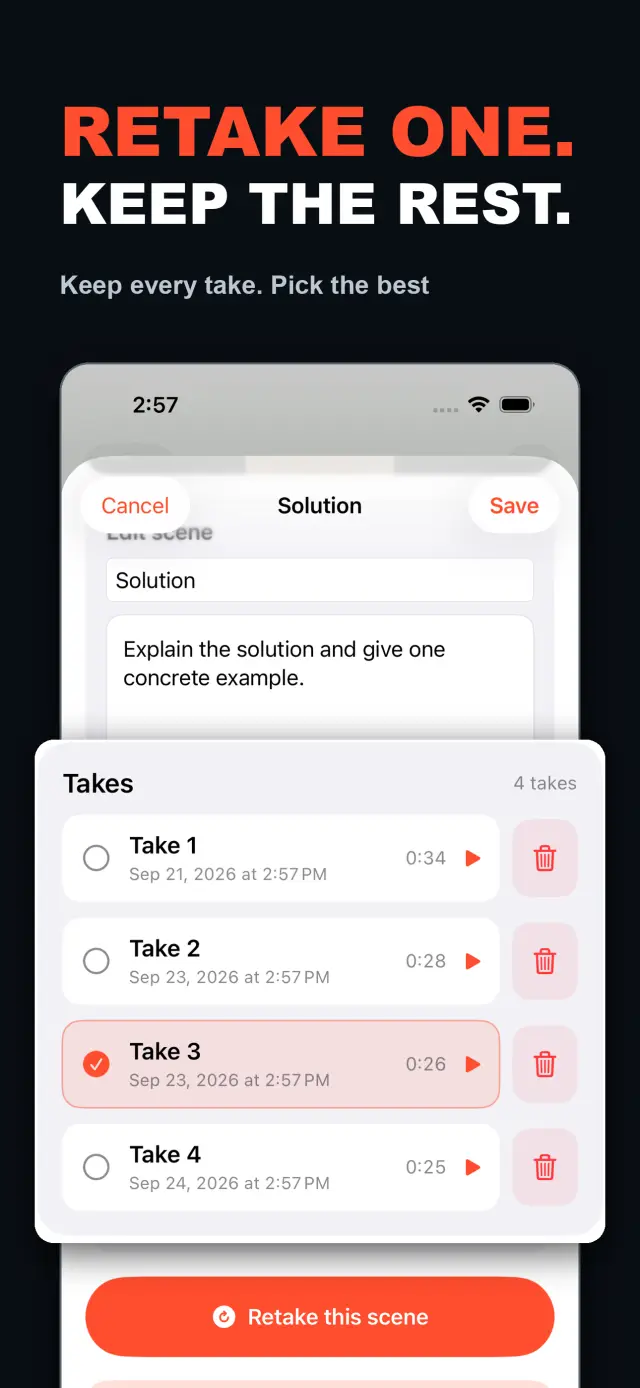
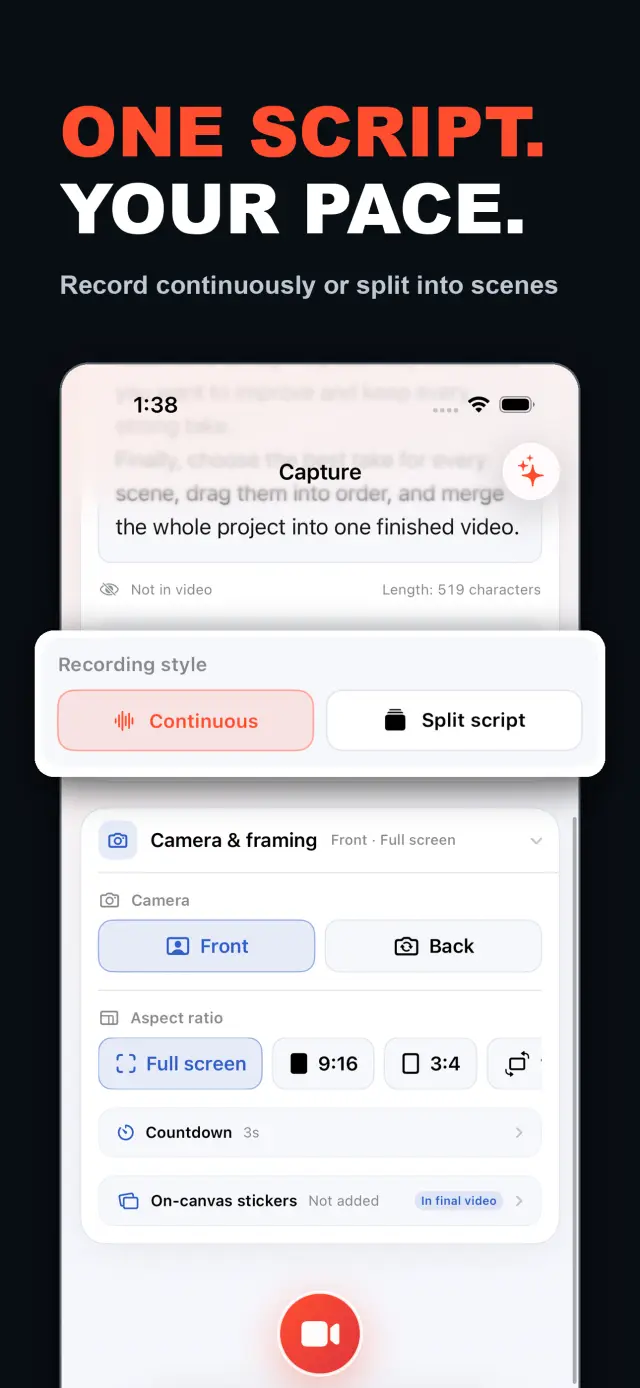
TalkCam is a teleprompter camera and video editor for recording one talking-head video in parts. Tap Record to create the current video automatically: capture one thought, stop, continue from there, or return hours or days later to add the next part. Choose Continuous or Split Script directly on the capture home. Continuous starts without a script — or keeps a full script together — and after every stop, Continue Recording appends the next part to the same video. Split Script pastes a full script and organizes it into short, recordable scenes before filming: the basic splitter runs on device and preserves the original words, and on supported devices Apple Intelligence can optionally organize the split on device; your script is not sent to a TalkCam server. Each scene can hold multiple takes — redo only the part that needs work without overwriting earlier versions, then choose the most natural take in the editor. After a scripted take, the pacing report compares your recording time with paragraph targets using teleprompter reading-position estimates. The multi-scene editor plays the assembled story above a scrubbable clip timeline: seek directly, skip ±5 seconds, switch between 1x/1.5x/2x playback, reorder scenes, select takes, and change the canvas. You do not need to finish every scene first — export what is ready and record the rest later. Inside a take, split, delete, and adjust volume, or add cut, fade, slide, and zoom transitions; text, images, logos, beauty, crop, letterbox treatment, and supplemental footage remain nondestructive. The full-screen camera supports scrolling, page, card, and manual prompt modes with adjustable text size, speed, position, colors, and background opacity — the prompt is an interface overlay only and never appears in the raw recording or exported video. Front or back camera with in-take pause/resume and pinch to zoom; if no camera is available but the microphone is, Audio-Only Studio saves a standard, timeline-compatible video take. Silence removal, noise reduction, audio fades, and gaze correction run on device where available. Choose 480p, 720p, 1080p, 2K, or 4K; 30/50/60 fps; SDR/HDR; and the matching bitrate before export — H.264 or HDR HEVC MP4 with no TalkCam watermark. Free includes continuous recording, split-script recording, the on-device splitter, multiple scenes and takes, timeline preview, the teleprompter, text and logo layers, core editing, and 480p/720p/1080p, 30 fps, SDR, compact or standard bitrate export, with takes up to 60 minutes. TalkCam Pro unlocks 2K/4K, 50/60 fps, HDR, high-bitrate export, unlimited take length, supplemental footage, image stickers, noise reduction, audio fades, and gaze correction. Local-first: no account, no ads, no tracking.

TalkCam
ひと目で分かる
Fig. 01A talking-head video no longer needs one perfect take: record it part by part, keep every version, pick the best takes on the timeline — then export one finished video.
アプリの画面
Fig. 02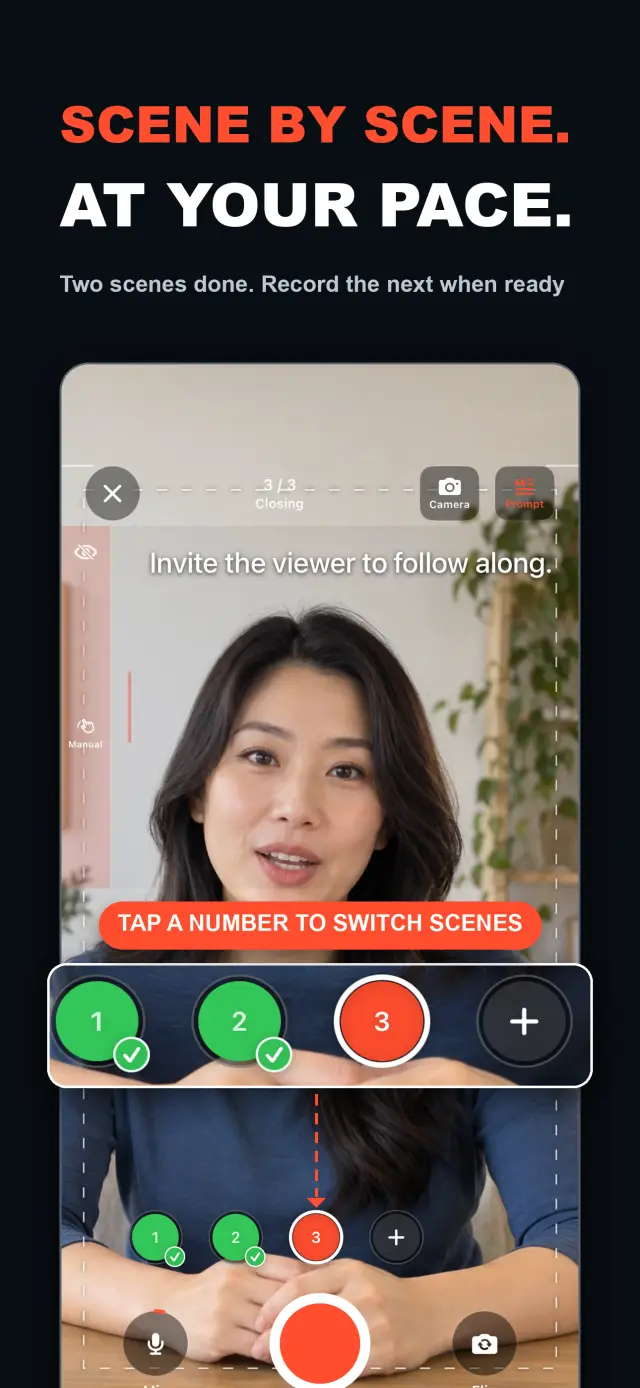
機能
No. 01stop and continue, or come back days later
choose your mode right on the capture home
Specifications
Tab. 01ワークフロー
No. 02Choose Continuous or Split Script on the capture home; stop after every thought and continue later, or film a script scene by scene — each scene holds multiple takes.
Redo only the scene that needs work; earlier takes stay untouched until you pick the best one on the timeline.
Scrub the timeline, reorder scenes, switch takes, then export one finished MP4 — with the resolution, frame rate, and SDR/HDR you choose.
信頼とプライバシー
No. 03Local-first: no account, no ads, no tracking — data never leaves the device.
No sign-up, no login. Install it and it just works.
Everything core runs offline; no network required.
Free includes continuous recording, split-script recording with the on-device splitter, multiple scenes and takes, timeline preview, the teleprompter, text and logo layers, core editing, and 480p/720p/1080p 30 fps SDR export, with takes up to 60 minutes; TalkCam Pro unlocks 2K/4K, 50/60 fps, HDR, high-bitrate export, unlimited take length, supplemental footage, image stickers, noise reduction, audio fades, and gaze correction. Local-first: no account, no ads, no tracking, everything processed on device.
製品方針
No. 04Where this app is headed, in the maker’s own hand.
Record one talking-head video in parts: stop whenever you like, continue from there, or come back days later — the parts stay in the same video.
Start freeform and keep recording after every stop, or paste a script and organize it into short scenes on device before filming.
Every scene keeps multiple takes; retake one part without overwriting, review its pacing, then assemble the chosen takes on the scrubbable timeline.
Scrolling, page, card, and manual modes over the full-screen camera — an overlay that never enters the recording.
Preview and export recorded scenes before the script is finished — 480p to 4K, up to 60 fps, SDR or HDR, no watermark.
概要 TalkCam
No. 5The longer story — what it is, who it is for, and the choices behind it.
最終更新:2026-09-24
TalkCamは、1本のトーキングヘッド動画をパーツごと、テイクごとに録画するiPhoneカメラです。録画をタップすると、現在の動画が自動的に始まります。1つの考えを収録して止め、そこから続きを録る — あるいは数時間後や数日後に戻って、次のパーツを追加することもできます。台本がある場合は、1回貼り付けるだけで、TalkCamが端末上でそれを短く録画できるシーンに整理します。各シーンは複数のテイクを保持するため、撮り直してもうまくいったバージョンが上書きされることはなく、組み立てられたストーリーはスクラブできるタイムライン上でまとまっていきます。無料プランは60分のテイクときれいな1080pまでの書き出しに対応。TalkCam Proは2K/4K、50/60 fps、HDR、高ビットレート書き出し、無制限のテイク長、プロ仕様の仕上げセットすべてをアンロックします。
撮影ホームで連続撮影(Continuous)またはスクリプト分割(Split Script)を直接選択できます。先にプロジェクトフォームへ入力する必要はありません。連続撮影モードでは、台本なしで始めることも、台本全体をひとつにまとめておくこともできます。停止するたびに「録画を続ける(Continue Recording)」を選べば、次のパーツは同じ動画に追加され、プレビュー、編集、書き出しの対象になります。スクリプト分割モードでは、台本全体を貼り付けて、撮影前に短いシーンへ整理します。基本のスプリッターは端末上で動作して元の言葉をそのまま保ち、対応端末ではApple Intelligenceがオプションで端末上の分割を整理できます — 台本がTalkCamのサーバーに送信されることはありません。
各シーンは複数のテイクを保持できます。それまでのバージョンを上書きせずに、直す必要がある部分だけを撮り直し、エディタで最も自然なテイクを選びます。マルチシーンエディタは、組み立てられたストーリーをスクラブできるクリップタイムラインの上で再生します。直接シークし、±5秒スキップし、1x/1.5x/2xの再生速度を切り替え、シーンを並べ替え、テイクを選び、1本の動画を書き出す前にキャンバスを変更できます。すべてのシーンを先に完成させる必要はありません。使えるテイクができた時点で、できている分をプレビューして書き出し、残りは後でプロジェクトに戻って録画できます。
1つのテイクの中では、分割、削除、音量調整を行ったり、カット、フェード、スライド、ズームのトランジションを追加したりできます。テキスト、画像、ロゴ、美肌、クロップ、レターボックス処理、補足フッテージはすべてノンデストラクティブで、オリジナルのカメラ録画はそのまま残ります。台本を読み上げるときは、全画面カメラがスクロール、ページ、カード、手動の各プロンプトモードを提供し、文字サイズ、速度、位置、色、背景の不透明度を調整できます — これはインターフェースのオーバーレイであり、生の録画にも書き出した動画にも決して写り込みません。
カメラもついてきます。フロント/バックカメラ、テイク内の一時停止・再開、ピンチでのズームに対応します。カメラが使えなくてもマイクが使える場合は、音声のみスタジオ(Audio-Only Studio)が標準的でタイムライン互換のビデオテイクを保存します。無音除去、ノイズリダクション、オーディオフェード、アイコンタクト補正は、利用可能な場合は端末上で実行されます。書き出しの前に、480p、720p、1080p、2K、または4K、30、50、または60 fps、SDRまたはHDR、そして対応するビットレートを選択します — TalkCamのウォーターマークなしの、H.264またはHDR HEVCのMP4が仕上がります。
ほとんどのトーキングヘッドアプリは1つの完璧なテイクを求め、録画で終わりです。TalkCamは動画をテイクごとに組み立てていきます。1つの考えごとに止め、うまくいったバージョンを失うことなく直す必要があるシーンだけを撮り直し、ストーリーの組み立てはタイムラインに任せられます。テレプロンプター — スクロール、ページ、カード、手動 — は演技を助けますが、録画画素に書き込まれることはなく、エフェクトは書き出し時のオフラインレンダーパスでのみ焼き込まれます。各録画はクリーンなカメラ+マイクのMP4のままなので、元のテイクを失うことなく、ステッカーのスタイル変更、美肌の再調整、アスペクト比の切り替えを何度でも行えます。フロントカメラのミラーリングはキャプチャ/プレビューのための便利機能にすぎず、書き出しには保存されたフレームがそのまま使われ、再ミラーリングは行われません。
TalkCamはローカルファーストです。アカウント不要、広告なし、分析やトラッキングのSDKなし、個人データの収集もありません。プロジェクト、台本、録画、読み込んだメディア、書き出しはすべて端末上で処理されます — 対応ハードウェア上で端末内で実行される、オプションのApple Intelligenceによる台本分割も含まれます。カメラとマイクは録画のためだけに使われ、写真へのアクセスは書き出しの保存を選んだときにのみ要求され、書き出した動画はご自身の写真ライブラリに保存されます。TalkCamは英語と簡体字中国語、およびライト/ダーク外観に対応しています。
無料プランには、連続録画、端末上のスプリッターによるスクリプト分割録画、複数のシーンとテイク、タイムラインプレビュー、テレプロンプター、テキストとロゴのレイヤー、コアな編集機能 — トリム、分割、削除、トランジション、音量 — が含まれ、60分までのテイクと、480p/720p/1080p、30 fps、SDR、コンパクトまたは標準ビットレートでの書き出しに対応します。TalkCam Proのアンロック内容:
オプションとして、月額または年額の自動更新サブスクリプション、または一回払りの買い切り購入でご利用いただけます。サブスクリプションは、現在の期間の終了の少なくとも24時間前に解約しない限り自動更新されます。App Storeのアカウント設定で管理・解約でき、アプリ内の設定 → TalkCam Pro Workflow から購入を復元できます。
ドキュメントとサポート
No. 6Plain-language documents. No fine print you would be surprised by.
よくある質問
Yes — that is the point. Tap Record and TalkCam creates the current video automatically; stop whenever you like and continue from there, or come back hours or days later. Paste a script to split it into scenes, record one scene at a time, and keep multiple takes of each. When you finish, the takes you chose merge into one video.
Continuous keeps one video growing: after every stop, choose Continue Recording and the next part is appended to the same video for preview, editing, and export. Split Script is for working from a script: paste the full text, organize it into short scenes on device, then film scene by scene with multiple takes each. Both modes share the same camera, takes, editor, and export path.
Nothing is overwritten. Every take of a scene is kept; you choose the one that goes into the final video, and you can switch or delete takes at any time before export.
Never. The full-screen camera supports scrolling, page, card, and manual prompt modes — an interface overlay only. The recording stays a clean camera-plus-microphone MP4, and text or effects are baked in at export, not captured by accident.
Every take shows its total time. With a script and visible teleprompter, paragraph times are estimated from when the reading position crosses each paragraph, then compared with the target. This is a pacing guide, not speech transcription.
Yes. As soon as a usable take exists, preview it on the timeline and export the scenes you have already recorded, then return to the project later to film the rest. In the export panel, choose the resolution, frame rate, SDR/HDR, and bitrate — some options require TalkCam Pro.
Nowhere. The basic splitter runs on device and preserves your original wording, and the optional Apple Intelligence split also runs on device on supported hardware. Your script is not sent to a TalkCam server; projects, recordings, and exports are all processed locally.
Free: continuous recording, split-script recording with the on-device splitter, multiple scenes and takes, timeline preview, the teleprompter, text and logo layers, core editing, and 480p/720p/1080p 30 fps SDR export, with takes up to 60 minutes. TalkCam Pro unlocks 2K/4K, 50/60 fps, HDR, high-bitrate export, unlimited take length, supplemental footage, image stickers, noise reduction, audio fades, and gaze correction.
TalkCam
TalkCam is on the App Store — record in parts, keep every take, finish as one video.