01
One video, many takes
stop and continue, or come back days later
 ZelonAI
Apple Platform App · iPhone
TalkCam
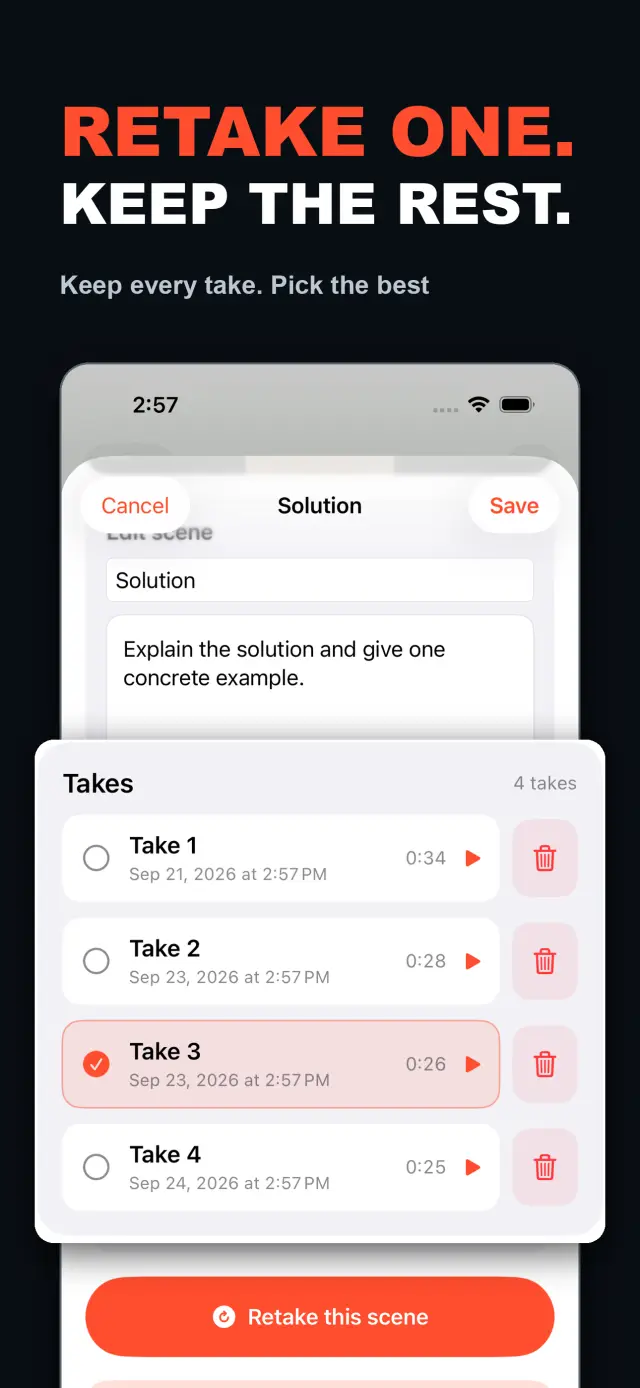
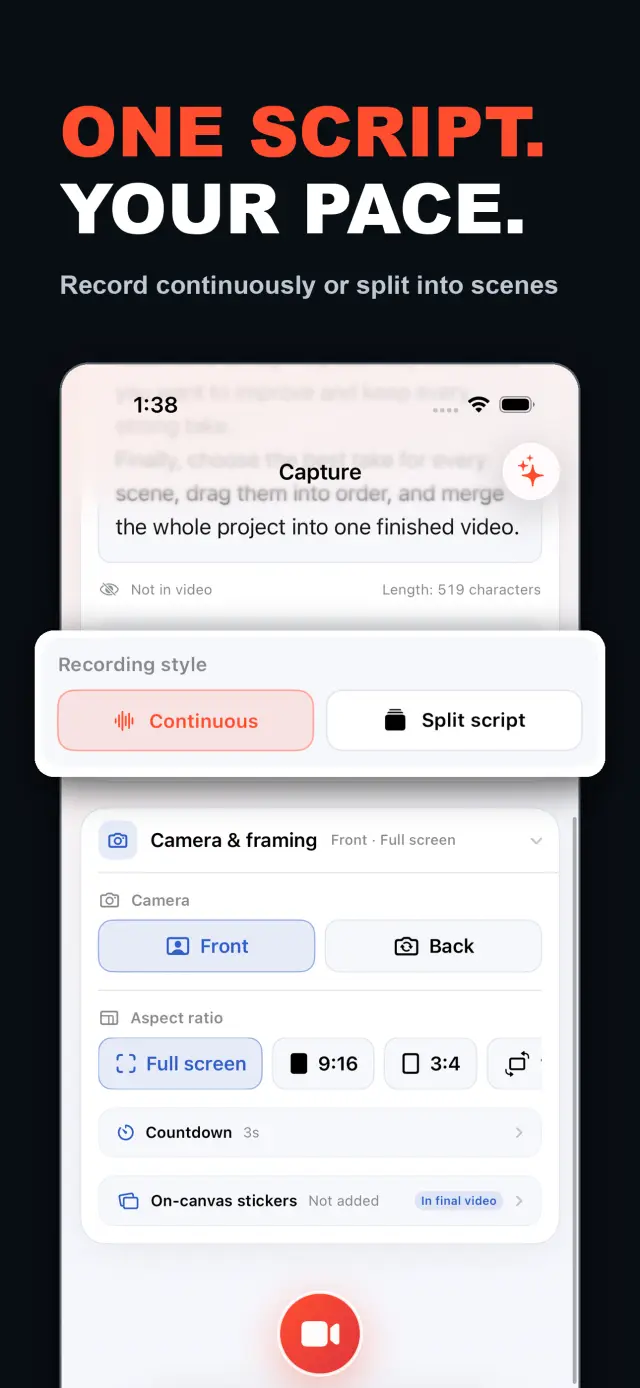
TalkCam is a teleprompter camera and video editor for recording one talking-head video in parts. Tap Record to create the current video automatically: capture one thought, stop, continue from there, or return hours or days later to add the next part. Choose Continuous or Split Script directly on the capture home. Continuous starts without a script — or keeps a full script together — and after every stop, Continue Recording appends the next part to the same video. Split Script pastes a full script and organizes it into short, recordable scenes before filming: the basic splitter runs on device and preserves the original words, and on supported devices Apple Intelligence can optionally organize the split on device; your script is not sent to a TalkCam server. Each scene can hold multiple takes — redo only the part that needs work without overwriting earlier versions, then choose the most natural take in the editor. After a scripted take, the pacing report compares your recording time with paragraph targets using teleprompter reading-position estimates. The multi-scene editor plays the assembled story above a scrubbable clip timeline: seek directly, skip ±5 seconds, switch between 1x/1.5x/2x playback, reorder scenes, select takes, and change the canvas. You do not need to finish every scene first — export what is ready and record the rest later. Inside a take, split, delete, and adjust volume, or add cut, fade, slide, and zoom transitions; text, images, logos, beauty, crop, letterbox treatment, and supplemental footage remain nondestructive. The full-screen camera supports scrolling, page, card, and manual prompt modes with adjustable text size, speed, position, colors, and background opacity — the prompt is an interface overlay only and never appears in the raw recording or exported video. Front or back camera with in-take pause/resume and pinch to zoom; if no camera is available but the microphone is, Audio-Only Studio saves a standard, timeline-compatible video take. Silence removal, noise reduction, audio fades, and gaze correction run on device where available. Choose 480p, 720p, 1080p, 2K, or 4K; 30/50/60 fps; SDR/HDR; and the matching bitrate before export — H.264 or HDR HEVC MP4 with no TalkCam watermark. Free includes continuous recording, split-script recording, the on-device splitter, multiple scenes and takes, timeline preview, the teleprompter, text and logo layers, core editing, and 480p/720p/1080p, 30 fps, SDR, compact or standard bitrate export, with takes up to 60 minutes. TalkCam Pro unlocks 2K/4K, 50/60 fps, HDR, high-bitrate export, unlimited take length, supplemental footage, image stickers, noise reduction, audio fades, and gaze correction. Local-first: no account, no ads, no tracking.
TalkCam
Укратко
Fig. 01A talking-head video no longer needs one perfect take: record it part by part, keep every version, pick the best takes on the timeline — then export one finished video.
У апликацији
Fig. 02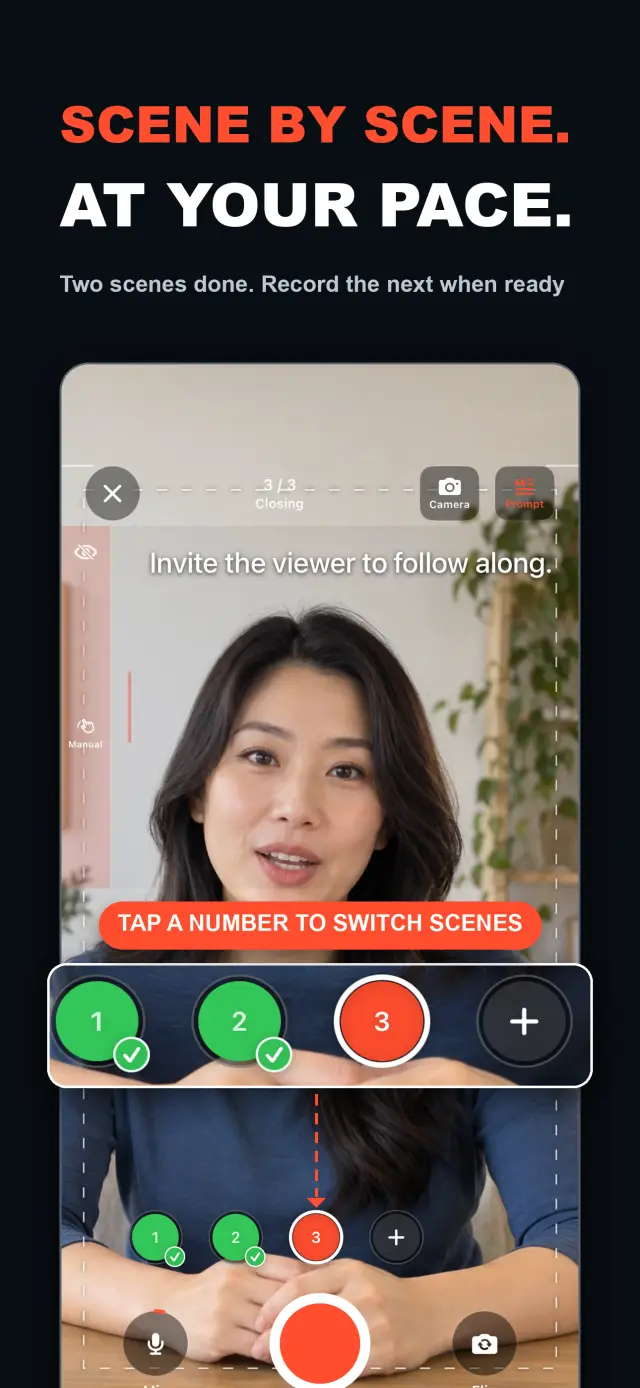
Могућности
No. 01stop and continue, or come back days later
choose your mode right on the capture home
Specifications
Tab. 01Радни ток
No. 02Choose Continuous or Split Script on the capture home; stop after every thought and continue later, or film a script scene by scene — each scene holds multiple takes.
Redo only the scene that needs work; earlier takes stay untouched until you pick the best one on the timeline.
Scrub the timeline, reorder scenes, switch takes, then export one finished MP4 — with the resolution, frame rate, and SDR/HDR you choose.
Поверење и приватност
No. 03Local-first: no account, no ads, no tracking — data never leaves the device.
No sign-up, no login. Install it and it just works.
Everything core runs offline; no network required.
Free includes continuous recording, split-script recording with the on-device splitter, multiple scenes and takes, timeline preview, the teleprompter, text and logo layers, core editing, and 480p/720p/1080p 30 fps SDR export, with takes up to 60 minutes; TalkCam Pro unlocks 2K/4K, 50/60 fps, HDR, high-bitrate export, unlimited take length, supplemental footage, image stickers, noise reduction, audio fades, and gaze correction. Local-first: no account, no ads, no tracking, everything processed on device.
product direction
No. 04Where this app is headed, in the maker’s own hand.
Record one talking-head video in parts: stop whenever you like, continue from there, or come back days later — the parts stay in the same video.
Start freeform and keep recording after every stop, or paste a script and organize it into short scenes on device before filming.
Every scene keeps multiple takes; retake one part without overwriting, review its pacing, then assemble the chosen takes on the scrubbable timeline.
Scrolling, page, card, and manual modes over the full-screen camera — an overlay that never enters the recording.
Preview and export recorded scenes before the script is finished — 480p to 4K, up to 60 fps, SDR or HDR, no watermark.
О апликацији TalkCam
No. 5The longer story — what it is, who it is for, and the choices behind it.
Последње ажурирање: 2026-09-24
TalkCam је talking-head камера која снима један видео у деловима, снимак по снимак. Додирните Сними и тренутни видео се сам покреће: забележите једну мисао, зауставите, па наставите одатле — или се вратите сатима или данима касније и додајте следећи део. Радите ли према сценарију? Налепите га једном и TalkCam га на уређају организује у кратке сцене спремне за снимање. Свака сцена чува више снимака, тако да поновно снимање никада не преписује верзију која је била добра, а састављена прича окупља се на временској линији коју можете премотавати. Бесплатни ниво обухвата снимке до 60 минута и чист извоз до 1080p; TalkCam Pro откључава 2K/4K, 50/60 fps, HDR, извоз високом битратом, неограничену дужину снимка и комплетан сет професионалне завршнице.
На почетном екрану за снимање директно изаберите Непрекидно (Continuous) или Подели сценарио (Split Script) — није потребно претходно попуњавање форме пројекта. У режиму Непрекидно почињете без сценарија или читав сценарио држите на окупу; након сваког заустављања изаберите Настави снимање (Continue Recording) и следећи део остаје у истом видеу за преглед, уређивање и извоз. У режиму Подели сценарио налепите читав сценарио и пре снимања га организујете у кратке сцене: основни алат за дељење ради на уређају и чува ваше оригиналне речи, а на подржаним уређајима Apple Intelligence може по жељи да организује поделу на уређају — ваш сценарио се никада не шаље на TalkCam сервер.
Свака сцена може да садржи више снимака. Поновите само део који треба дорадити без преписивања ранијих верзија, па у уређивачу изаберите најприроднији снимак. Уређивач са више сцена репродукује састављену причу изнад временске линије са исечцима која се може премотавати: скачите директно, прескочите ±5 секунди, прелазите између репродукције 1x/1.5x/2x, мењајте редослед сцена, бирајте снимке и мењајте платно пре извоза једног видеа. Не морате прво да завршите сваку сцену — чим постоји употребљив снимак, погледајте и извезите што је спремно, а касније се вратите пројекту да снимите остатак.
Унутар једног снимка можете делити, брисати и подешавати јачину звука те додавати прелазе: рез, fade, клизање и zoom. Текст, слике, лого, филтер лепоте, исецање, letterbox обрада и допунски видео материјал остају недеструктивни; оригинални снимци камере остају нетакнути. Када говорите према сценарију, камера на целом екрану нуди режиме телепромптера: клизни, странични, картични и ручни, с подесивом величином текста, брзином, положајем, бојама и провидношћу позадине — слој интерфејса који се никада не појављује у сировом снимку ни у извезеном видеу.
Камера држи корак: предња или задња камера, паузирање и настављање током снимка и zoom стиском прстију. Ако камера није доступна, а микрофон јесте, Студио само за звук (Audio-Only Studio) чува стандардан видео снимак компатибилан са временском линијом. Уклањање тишине, смањење шума, постепено појачавање и стишавање звука и корекција очног контакта раде на уређају где је то доступно. Пре извоза изаберите 480p, 720p, 1080p, 2K или 4K; 30, 50 или 60 fps; SDR или HDR; и одговарајућу битрату — H.264 или HDR HEVC MP4 без TalkCam воденог жига.
Већина talking-head апликација очекује један савршен снимак и стаје код снимања. TalkCam гради видео снимак по снимак: зауставите се након сваке мисли, поновите само сцену којој треба дорада без губитка верзија које су биле добре и препустите временској линији да састави причу. Телепромптер — клизни, странични, картични или ручни — помаже вам у наступу, али никада не улази у забележене пикселе, а ефекти се уграђују тек при извозу, офлајн рендеровањем. Сваки снимак остаје чист MP4 камере и микрофона, па можете мењати стил налепница, подешавати филтер лепоте и мењати односе слике колико год пута желите без губитка оригиналних снимака. Огледање предње камере само је погодност при снимању и прегледу; извоз користи сачуване кадрове такве какви јесу, без поновног огледања.
TalkCam ради првенствено локално: без налога, без реклама, без SDK-ова за аналитику или праћење и без прикупљања личних података. Пројекти, сценарији, снимци, увезени медији и извози обрађују се на уређају — укључујући опционалну Apple Intelligence поделу сценарија, која на подржаном хардверу ради на уређају. Камера и микрофон корiste се само за снимање; приступ Фотографијама тражи се само када одлучите да сачувате извоз, а извезени видеи иду у вашу сопствену библиотеку Фотографија. TalkCam подржава енглески и поједностављени кинески, као и светли/тамни изглед.
Бесплатни ниво обухвата непрекидно снимање, снимање подељеног сценарија алатом за дељење на уређају, више сцена и снимака, преглед на временској линији, телепромптер, слојеве текста и логотипа и основно уређивање — резање, дељење, брисање, прелазе и јачину звука — са снимцима до 60 минута и извозом у 480p/720p/1080p, 30 fps, SDR те компактном или стандардном битратом. TalkCam Pro откључава:
Доступно као необавезна месечна или годишња претплата са аутоматским обнављањем или једнократна доживотна куповина. Претплате се аутоматски обнављају осим ако се не откажу најмање 24 сата пре краја текућег периода; управљајте њима или их откажите у подешавањима свог App Store налога, а куповине вратите из Подешавања → TalkCam Pro Workflow у апликацији.
docs support
No. 6Plain-language documents. No fine print you would be surprised by.
faq title
Yes — that is the point. Tap Record and TalkCam creates the current video automatically; stop whenever you like and continue from there, or come back hours or days later. Paste a script to split it into scenes, record one scene at a time, and keep multiple takes of each. When you finish, the takes you chose merge into one video.
Continuous keeps one video growing: after every stop, choose Continue Recording and the next part is appended to the same video for preview, editing, and export. Split Script is for working from a script: paste the full text, organize it into short scenes on device, then film scene by scene with multiple takes each. Both modes share the same camera, takes, editor, and export path.
Nothing is overwritten. Every take of a scene is kept; you choose the one that goes into the final video, and you can switch or delete takes at any time before export.
Never. The full-screen camera supports scrolling, page, card, and manual prompt modes — an interface overlay only. The recording stays a clean camera-plus-microphone MP4, and text or effects are baked in at export, not captured by accident.
Every take shows its total time. With a script and visible teleprompter, paragraph times are estimated from when the reading position crosses each paragraph, then compared with the target. This is a pacing guide, not speech transcription.
Yes. As soon as a usable take exists, preview it on the timeline and export the scenes you have already recorded, then return to the project later to film the rest. In the export panel, choose the resolution, frame rate, SDR/HDR, and bitrate — some options require TalkCam Pro.
Nowhere. The basic splitter runs on device and preserves your original wording, and the optional Apple Intelligence split also runs on device on supported hardware. Your script is not sent to a TalkCam server; projects, recordings, and exports are all processed locally.
Free: continuous recording, split-script recording with the on-device splitter, multiple scenes and takes, timeline preview, the teleprompter, text and logo layers, core editing, and 480p/720p/1080p 30 fps SDR export, with takes up to 60 minutes. TalkCam Pro unlocks 2K/4K, 50/60 fps, HDR, high-bitrate export, unlimited take length, supplemental footage, image stickers, noise reduction, audio fades, and gaze correction.
TalkCam
TalkCam is on the App Store — record in parts, keep every take, finish as one video.