01
One video, many takes
stop and continue, or come back days later
 ZelonAI
Apple Platform App · iPhone
TalkCam
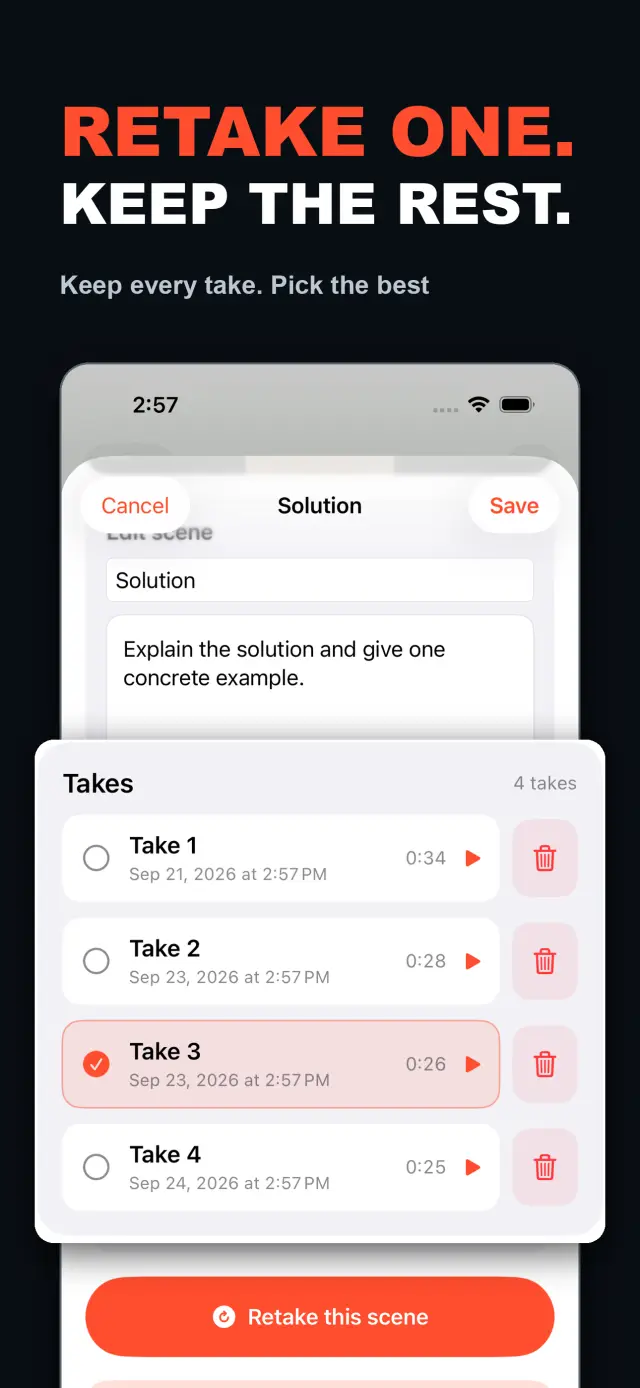
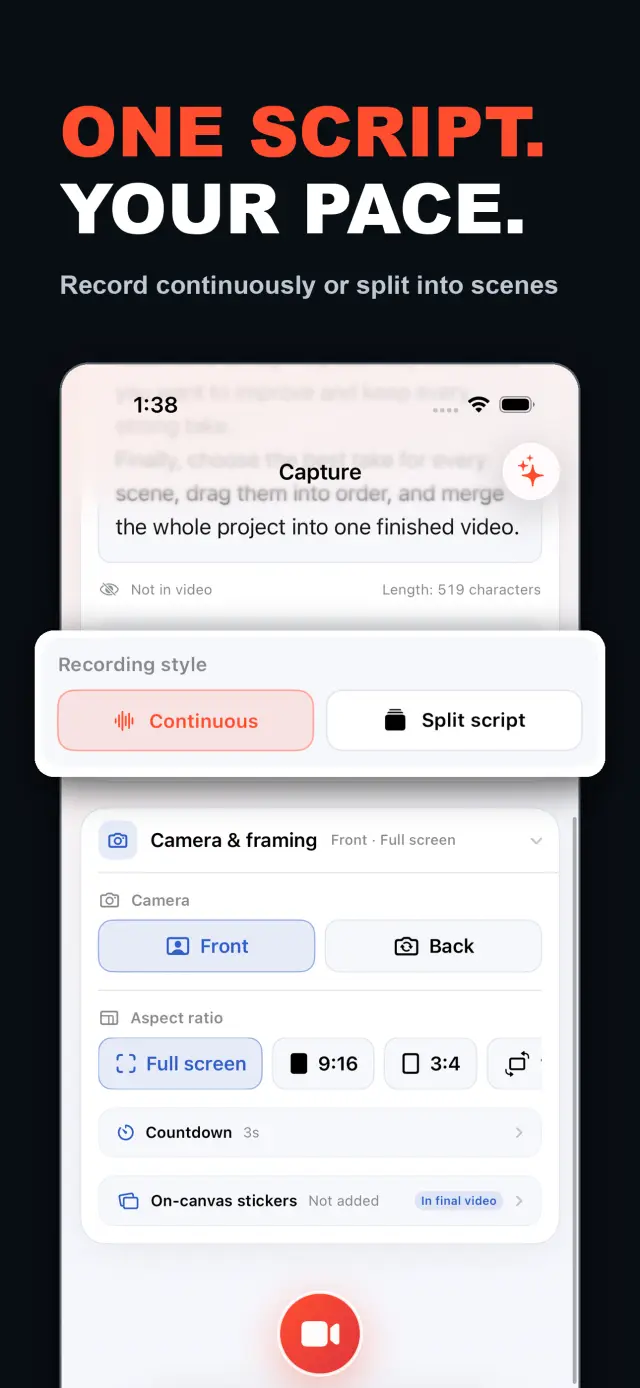
TalkCam is a teleprompter camera and video editor for recording one talking-head video in parts. Tap Record to create the current video automatically: capture one thought, stop, continue from there, or return hours or days later to add the next part. Choose Continuous or Split Script directly on the capture home. Continuous starts without a script — or keeps a full script together — and after every stop, Continue Recording appends the next part to the same video. Split Script pastes a full script and organizes it into short, recordable scenes before filming: the basic splitter runs on device and preserves the original words, and on supported devices Apple Intelligence can optionally organize the split on device; your script is not sent to a TalkCam server. Each scene can hold multiple takes — redo only the part that needs work without overwriting earlier versions, then choose the most natural take in the editor. After a scripted take, the pacing report compares your recording time with paragraph targets using teleprompter reading-position estimates. The multi-scene editor plays the assembled story above a scrubbable clip timeline: seek directly, skip ±5 seconds, switch between 1x/1.5x/2x playback, reorder scenes, select takes, and change the canvas. You do not need to finish every scene first — export what is ready and record the rest later. Inside a take, split, delete, and adjust volume, or add cut, fade, slide, and zoom transitions; text, images, logos, beauty, crop, letterbox treatment, and supplemental footage remain nondestructive. The full-screen camera supports scrolling, page, card, and manual prompt modes with adjustable text size, speed, position, colors, and background opacity — the prompt is an interface overlay only and never appears in the raw recording or exported video. Front or back camera with in-take pause/resume and pinch to zoom; if no camera is available but the microphone is, Audio-Only Studio saves a standard, timeline-compatible video take. Silence removal, noise reduction, audio fades, and gaze correction run on device where available. Choose 480p, 720p, 1080p, 2K, or 4K; 30/50/60 fps; SDR/HDR; and the matching bitrate before export — H.264 or HDR HEVC MP4 with no TalkCam watermark. Free includes continuous recording, split-script recording, the on-device splitter, multiple scenes and takes, timeline preview, the teleprompter, text and logo layers, core editing, and 480p/720p/1080p, 30 fps, SDR, compact or standard bitrate export, with takes up to 60 minutes. TalkCam Pro unlocks 2K/4K, 50/60 fps, HDR, high-bitrate export, unlimited take length, supplemental footage, image stickers, noise reduction, audio fades, and gaze correction. Local-first: no account, no ads, no tracking.

TalkCam
Με μια ματιά
Fig. 01A talking-head video no longer needs one perfect take: record it part by part, keep every version, pick the best takes on the timeline — then export one finished video.
Στην εφαρμογή
Fig. 02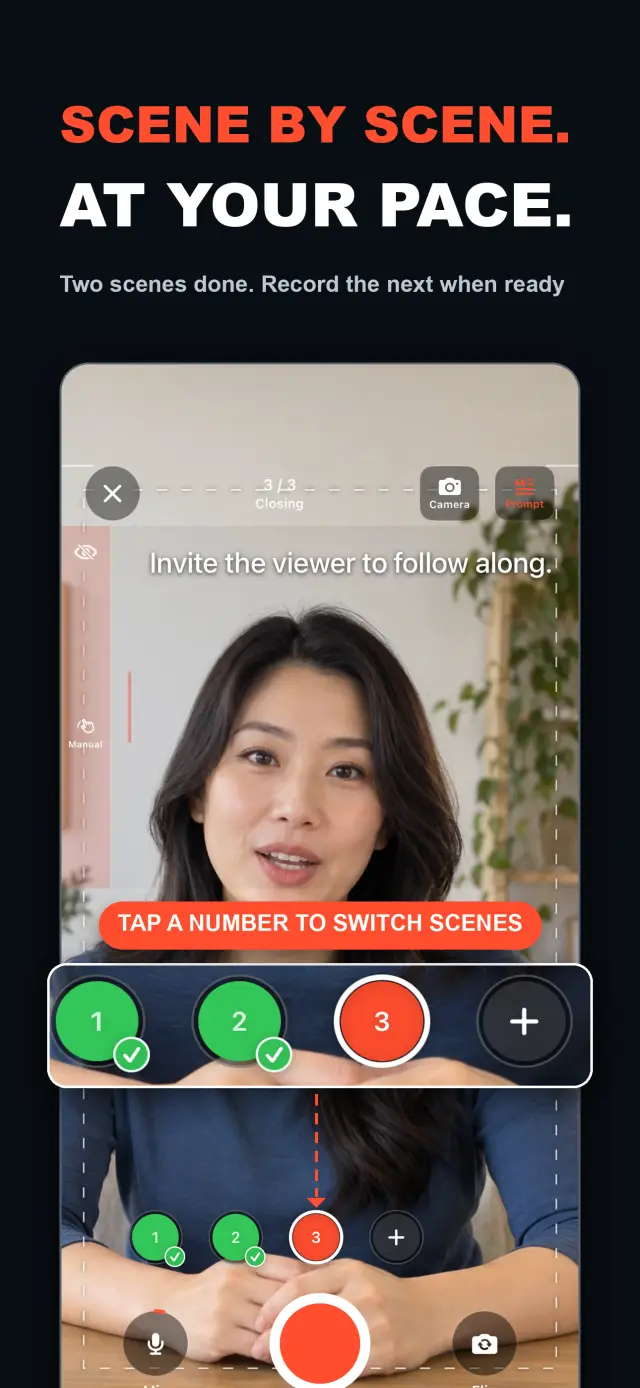
Λειτουργίες
No. 01stop and continue, or come back days later
choose your mode right on the capture home
Specifications
Tab. 01Ροή εργασίας
No. 02Choose Continuous or Split Script on the capture home; stop after every thought and continue later, or film a script scene by scene — each scene holds multiple takes.
Redo only the scene that needs work; earlier takes stay untouched until you pick the best one on the timeline.
Scrub the timeline, reorder scenes, switch takes, then export one finished MP4 — with the resolution, frame rate, and SDR/HDR you choose.
Εμπιστοσύνη και ιδιωτικότητα
No. 03Local-first: no account, no ads, no tracking — data never leaves the device.
No sign-up, no login. Install it and it just works.
Everything core runs offline; no network required.
Free includes continuous recording, split-script recording with the on-device splitter, multiple scenes and takes, timeline preview, the teleprompter, text and logo layers, core editing, and 480p/720p/1080p 30 fps SDR export, with takes up to 60 minutes; TalkCam Pro unlocks 2K/4K, 50/60 fps, HDR, high-bitrate export, unlimited take length, supplemental footage, image stickers, noise reduction, audio fades, and gaze correction. Local-first: no account, no ads, no tracking, everything processed on device.
product direction
No. 04Where this app is headed, in the maker’s own hand.
Record one talking-head video in parts: stop whenever you like, continue from there, or come back days later — the parts stay in the same video.
Start freeform and keep recording after every stop, or paste a script and organize it into short scenes on device before filming.
Every scene keeps multiple takes; retake one part without overwriting, review its pacing, then assemble the chosen takes on the scrubbable timeline.
Scrolling, page, card, and manual modes over the full-screen camera — an overlay that never enters the recording.
Preview and export recorded scenes before the script is finished — 480p to 4K, up to 60 fps, SDR or HDR, no watermark.
Σχετικά TalkCam
No. 5The longer story — what it is, who it is for, and the choices behind it.
Τελευταία ενημέρωση: 2026-09-24
Το TalkCam είναι η κάμερα για iPhone που γυρίζει ένα talking-head βίντεο σε μέρη, λήψη προς λήψη. Πατήστε Εγγραφή και το τρέχον βίντεο ξεκινάει μόνο του: καταγράψτε μια σκέψη, σταματήστε και συνεχίστε από εκεί — ή επιστρέψτε ώρες ή μέρες αργότερα και προσθέστε το επόμενο κομμάτι. Δουλεύετε με σενάριο; Επικολλήστε το μία φορά και το TalkCam το οργανώνει σε σύντομες σκηνές έτοιμες για γύρισμα, μέσα στη συσκευή. Κάθε σκηνή κρατά πολλαπλές λήψεις, οπότε μια επανάληψη δεν αντικαθιστά ποτέ την εκδοχή που πέτυχε, και η συναρμολογημένη ιστορία στήνεται σε μια γραμμή χρόνου με ελεύθερη πλοήγηση. Η δωρεάν έκδοση καλύπτει λήψεις 60 λεπτών και καθαρή εξαγωγή έως 1080p· το TalkCam Pro ξεκλειδώνει 2K/4K, 50/60 fps, HDR, εξαγωγή με υψηλό bitrate, απεριόριστη διάρκεια λήψης και ένα πλήρες επαγγελματικό σετ φινιρίσματος.
Επιλέξτε Συνεχής (Continuous) ή Διαίρεση σε σκηνές (Split Script) κατευθείαν στην αρχική οθόνη λήψης — χωρίς να συμπληρώσετε πρώτα φόρμα έργου. Στη συνεχή λειτουργία ξεκινήστε χωρίς σενάριο ή κρατήστε ένα ολοκληρωμένο σενάριο ενιαίο· μετά από κάθε διακοπή επιλέξτε Συνέχεια Εγγραφής (Continue Recording) και το επόμενο κομμάτι μένει στο ίδιο βίντεο — για προεπισκόπηση, επεξεργασία και εξαγωγή. Στη λειτουργία διαίρεσης σε σκηνές επικολλήστε το πλήρες σενάριο και οργανώστε το σε σύντομες σκηνές πριν τα γυρίσματα: ο βασικός διαχωρισμός τρέχει στη συσκευή και διατηρεί τα πρωτότυπα λόγια σας, ενώ σε υποστηριζόμενες συσκευές το Apple Intelligence μπορεί κατ' επιλογή να οργανώσει τη διαίρεση επίσης στη συσκευή — το σενάριό σας δεν στέλνεται ποτέ σε server του TalkCam.
Κάθε σκηνή μπορεί να κρατήσει πολλαπλές λήψεις. Ξαναγυρίστε μόνο το κομμάτι που χρειάζεται δουλειά, χωρίς να αντικαταστήσετε τις προηγούμενες εκδοχές, και διαλέξτε μετά την πιο φυσική λήψη στον επεξεργαστή. Ο επεξεργαστής πολλαπλών σκηνών αναπαράγει τη συναρμολογημένη ιστορία πάνω από μια γραμμή χρόνου κλιπ με ελεύθερη πλοήγηση: πηδήξτε απευθείας όπου θέλετε, παραλείψτε ±5 δευτερόλεπτα, εναλλάξτε αναπαραγωγή 1x/1.5x/2x, αναδιατάξτε τις σκηνές, επιλέξτε λήψεις και αλλάξτε τον καμβά πριν εξαγάγετε ένα βίντεο. Δεν χρειάζεται να ολοκληρώσετε πρώτα κάθε σκηνή — μόλις υπάρχει μια χρήσιμη λήψη, δείτε και εξαγάγετε ό,τι είναι έτοιμο, και επιστρέψτε αργότερα στο έργο για τα υπόλοιπα.
Μέσα σε μία λήψη: διαχωρισμός, διαγραφή και ρύθμιση έντασης, καθώς και μεταβάσεις κοπής, fade, ολίσθησης και zoom. Κείμενο, εικόνες, λογότυπα, ομορφιά, κόψη, letterbox και συμπληρωματικό υλικό παραμένουν μη καταστροφικά· οι αρχικές εγγραφές της κάμερας μένουν ανέγγιχτες. Όταν μιλάτε από σενάριο, η κάμερα πλήρους οθόνης προσφέρει λειτουργίες τηλεπρόμπτερ — κύλιση, σελίδα, κάρτες και χειροκίνητη — με ρυθμιζόμενο μέγεθος κειμένου, ταχύτητα, θέση, χρώματα και διαφάνεια φόντου· είναι ένα overlay διεπαφής που δεν εμφανίζεται ποτέ ούτε στην ακατέργαστη εγγραφή ούτε στο εξαγόμενο βίντεο.
Η κάμερα αντέχει τον ρυθμό: μπροστινή ή πίσω κάμερα, παύση και συνέχιση μέσα στη λήψη, zoom με pinch. Αν δεν υπάρχει κάμερα αλλά υπάρχει μικρόφωνο, το Στούντιο μόνο ήχου (Audio-Only Studio) αποθηκεύει μια τυπική λήψη βίντεο συμβατή με τη γραμμή χρόνου. Αφαίρεση σιωπής, μείωση θορύβου, fades ήχου και διόρθωση επαφής ματιών τρέχουν στη συσκευή όπου είναι διαθέσιμα. Πριν την εξαγωγή επιλέξτε 480p, 720p, 1080p, 2K ή 4K· 30, 50 ή 60 fps· SDR ή HDR — και το αντίστοιχο bitrate: ένα H.264 ή HDR HEVC MP4 χωρίς υδατογράφημα TalkCam.
Οι περισσότερες εφαρμογές talking-head περιμένουν μία τέλεια λήψη και σταματούν στην εγγραφή. Το TalkCam χτίζει το βίντεο λήψη προς λήψη: σταματήστε μετά από κάθε σκέψη, ξαναγυρίστε μόνο τη σκηνή που χρειάζεται δουλειά χωρίς να χάσετε τις εκδοχές που πέτυχαν, και αφήστε τη γραμμή χρόνου να συναρμολογήσει την ιστορία. Ο τηλεπρόμπτερ — κύλιση, σελίδα, κάρτες ή χειροκίνητος — σας βοηθά στην ερμηνεία αλλά δεν μπαίνει ποτέ στα καταγεγραμμένα pixel, και τα εφέ ενσωματώνονται μόνο κατά την εξαγωγή, μέσω μιας διεργασίας offline render. Κάθε εγγραφή παραμένει καθαρό MP4 κάμερας + μικροφώνου, έτσι μπορείτε να αλλάξετε στυλ στα αυτοκόλλητα, να ξαναρυθμίσετε την ομορφιά και να αλλάξετε αναλογίες οθόνης όσες φορές θέλετε χωρίς να χάσετε τις αρχικές σας λήψεις. Ο κατοπτρισμός της μπροστινής κάμερας αφορά μόνο την εγγραφή/προεπισκόπηση· η εξαγωγή χρησιμοποιεί τα αποθηκευμένα καρέ ως έχουν, χωρίς εκ νέου κατοπτρισμό.
Το TalkCam είναι local-first: χωρίς λογαριασμό, χωρίς διαφημίσεις, χωρίς SDK αναλυτικών στοιχείων ή παρακολούθησης, και χωρίς συλλογή προσωπικών δεδομένων. Έργα, σενάρια, εγγραφές, εισαγόμενα πολυμέσα και εξαγωγές επεξεργάζονται στη συσκευή — συμπεριλαμβανομένης της προαιρετικής διαίρεσης σεναρίου μέσω Apple Intelligence, που τρέχει στη συσκευή σε υποστηριζόμενο hardware. Η κάμερα και το μικρόφωνο χρησιμοποιούνται μόνο για εγγραφή· η πρόσβαση στις Φωτογραφίες ζητείται μόνο όταν επιλέξετε να αποθηκεύσετε μια εξαγωγή, και τα εξαγόμενα βίντεο πηγαίνουν στη δική σας βιβλιοθήκη Φωτογραφιών. Το TalkCam υποστηρίζει αγγλικά και απλοποιημένα κινεζικά, καθώς και φωτεινή/σκοτεινή εμφάνιση.
Η δωρεάν έκδοση περιλαμβάνει συνεχή εγγραφή, εγγραφή με σενάριο και διαχωρισμό στη συσκευή, πολλαπλές σκηνές και λήψεις, προεπισκόπηση στη γραμμή χρόνου, τον τηλεπρόμπτερ, στρώσεις κειμένου και λογότυπου και βασική επεξεργασία — περικοπή, διαχωρισμό, διαγραφή, μεταβάσεις και ένταση — με λήψεις έως 60 λεπτά και εξαγωγή 480p/720p/1080p, 30 fps, SDR, συμπαγές ή τυπικό bitrate. Το TalkCam Pro ξεκλειδώνει:
Διατίθεται ως προαιρετική μηνιαία ή ετήσια συνδρομή με αυτόματη ανανέωση ή ως εφάπαξ αγορά για όλη τη ζωή. Οι συνδρομές ανανεώνονται αυτόματα εκτός εάν ακυρωθούν τουλάχιστον 24 ώρες πριν από το τέλος της τρέχουσας περιόδου· διαχειριστείτε τις ή ακυρώστε τις στις ρυθμίσεις του λογαριασμού App Store, και επαναφέρετε αγορές από Ρυθμίσεις → TalkCam Pro Workflow μέσα στην εφαρμογή.
docs support
No. 6Plain-language documents. No fine print you would be surprised by.
faq title
Yes — that is the point. Tap Record and TalkCam creates the current video automatically; stop whenever you like and continue from there, or come back hours or days later. Paste a script to split it into scenes, record one scene at a time, and keep multiple takes of each. When you finish, the takes you chose merge into one video.
Continuous keeps one video growing: after every stop, choose Continue Recording and the next part is appended to the same video for preview, editing, and export. Split Script is for working from a script: paste the full text, organize it into short scenes on device, then film scene by scene with multiple takes each. Both modes share the same camera, takes, editor, and export path.
Nothing is overwritten. Every take of a scene is kept; you choose the one that goes into the final video, and you can switch or delete takes at any time before export.
Never. The full-screen camera supports scrolling, page, card, and manual prompt modes — an interface overlay only. The recording stays a clean camera-plus-microphone MP4, and text or effects are baked in at export, not captured by accident.
Every take shows its total time. With a script and visible teleprompter, paragraph times are estimated from when the reading position crosses each paragraph, then compared with the target. This is a pacing guide, not speech transcription.
Yes. As soon as a usable take exists, preview it on the timeline and export the scenes you have already recorded, then return to the project later to film the rest. In the export panel, choose the resolution, frame rate, SDR/HDR, and bitrate — some options require TalkCam Pro.
Nowhere. The basic splitter runs on device and preserves your original wording, and the optional Apple Intelligence split also runs on device on supported hardware. Your script is not sent to a TalkCam server; projects, recordings, and exports are all processed locally.
Free: continuous recording, split-script recording with the on-device splitter, multiple scenes and takes, timeline preview, the teleprompter, text and logo layers, core editing, and 480p/720p/1080p 30 fps SDR export, with takes up to 60 minutes. TalkCam Pro unlocks 2K/4K, 50/60 fps, HDR, high-bitrate export, unlimited take length, supplemental footage, image stickers, noise reduction, audio fades, and gaze correction.
TalkCam
TalkCam is on the App Store — record in parts, keep every take, finish as one video.