01
One video, many takes
stop and continue, or come back days later
 ZelonAI
Apple Platform App · iPhone
TalkCam
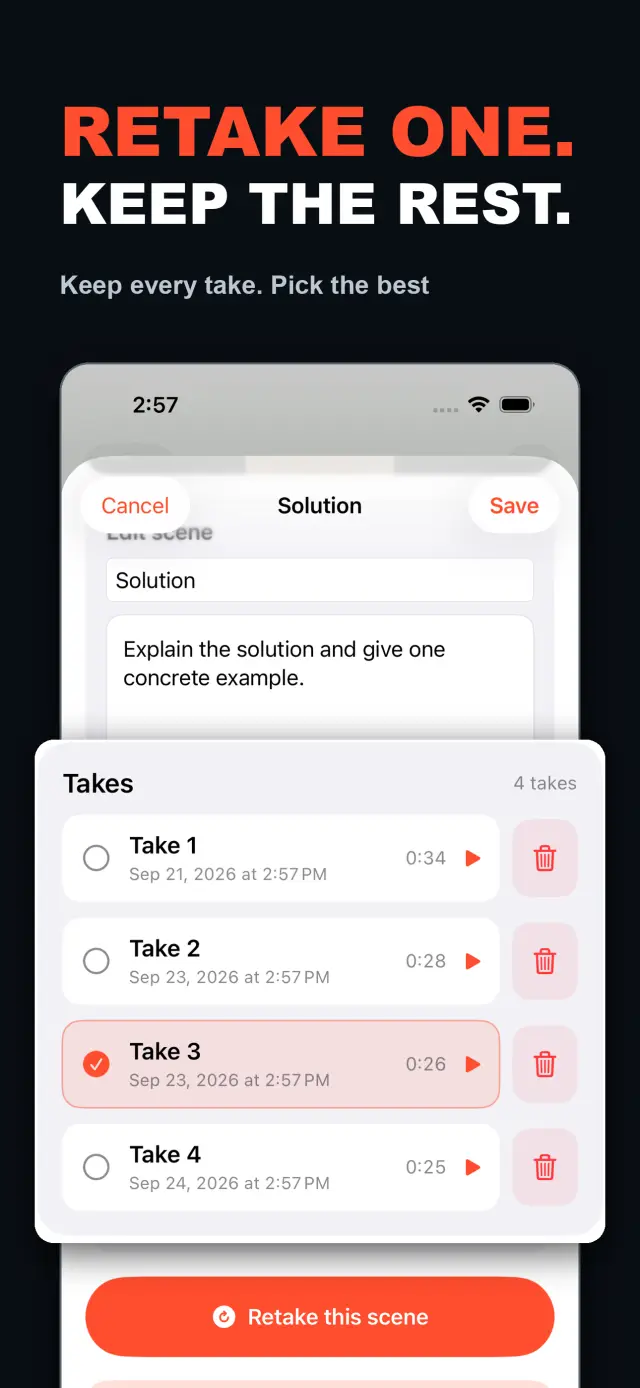
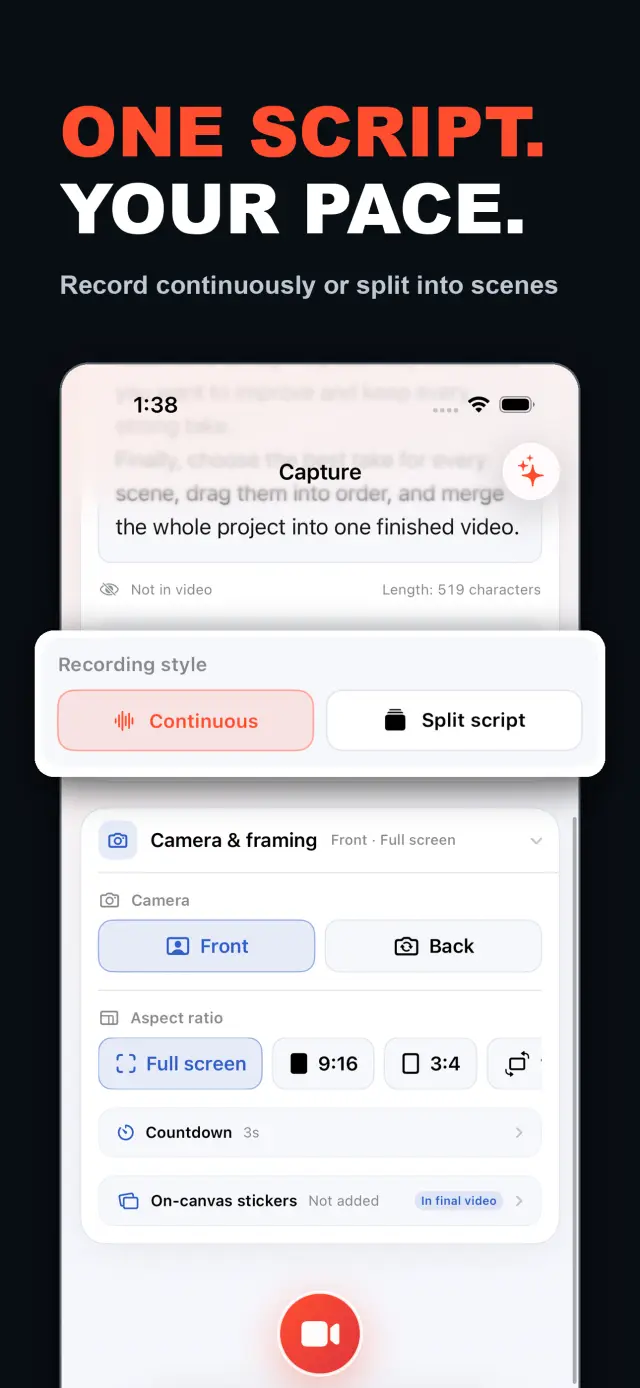
TalkCam is a teleprompter camera and video editor for recording one talking-head video in parts. Tap Record to create the current video automatically: capture one thought, stop, continue from there, or return hours or days later to add the next part. Choose Continuous or Split Script directly on the capture home. Continuous starts without a script — or keeps a full script together — and after every stop, Continue Recording appends the next part to the same video. Split Script pastes a full script and organizes it into short, recordable scenes before filming: the basic splitter runs on device and preserves the original words, and on supported devices Apple Intelligence can optionally organize the split on device; your script is not sent to a TalkCam server. Each scene can hold multiple takes — redo only the part that needs work without overwriting earlier versions, then choose the most natural take in the editor. After a scripted take, the pacing report compares your recording time with paragraph targets using teleprompter reading-position estimates. The multi-scene editor plays the assembled story above a scrubbable clip timeline: seek directly, skip ±5 seconds, switch between 1x/1.5x/2x playback, reorder scenes, select takes, and change the canvas. You do not need to finish every scene first — export what is ready and record the rest later. Inside a take, split, delete, and adjust volume, or add cut, fade, slide, and zoom transitions; text, images, logos, beauty, crop, letterbox treatment, and supplemental footage remain nondestructive. The full-screen camera supports scrolling, page, card, and manual prompt modes with adjustable text size, speed, position, colors, and background opacity — the prompt is an interface overlay only and never appears in the raw recording or exported video. Front or back camera with in-take pause/resume and pinch to zoom; if no camera is available but the microphone is, Audio-Only Studio saves a standard, timeline-compatible video take. Silence removal, noise reduction, audio fades, and gaze correction run on device where available. Choose 480p, 720p, 1080p, 2K, or 4K; 30/50/60 fps; SDR/HDR; and the matching bitrate before export — H.264 or HDR HEVC MP4 with no TalkCam watermark. Free includes continuous recording, split-script recording, the on-device splitter, multiple scenes and takes, timeline preview, the teleprompter, text and logo layers, core editing, and 480p/720p/1080p, 30 fps, SDR, compact or standard bitrate export, with takes up to 60 minutes. TalkCam Pro unlocks 2K/4K, 50/60 fps, HDR, high-bitrate export, unlimited take length, supplemental footage, image stickers, noise reduction, audio fades, and gaze correction. Local-first: no account, no ads, no tracking.
TalkCam
Auf einen Blick
Fig. 01A talking-head video no longer needs one perfect take: record it part by part, keep every version, pick the best takes on the timeline — then export one finished video.
In der App
Fig. 02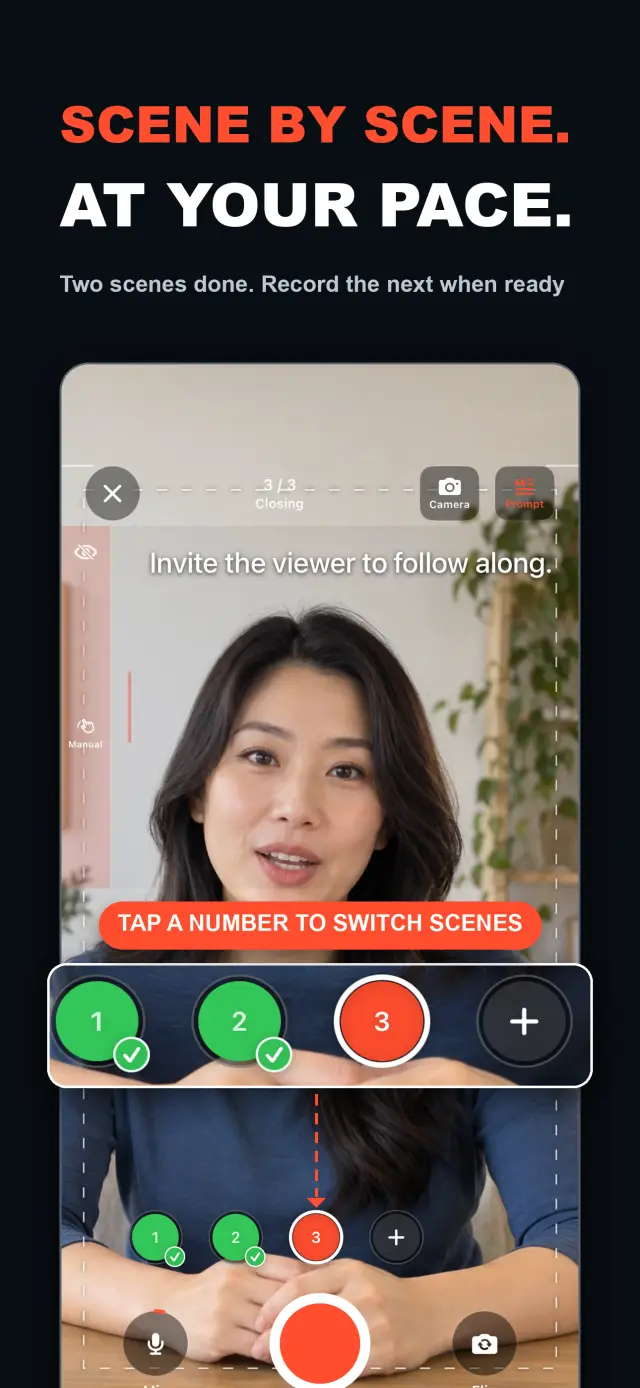
Funktionen
No. 01stop and continue, or come back days later
choose your mode right on the capture home
Specifications
Tab. 01Workflow
No. 02Choose Continuous or Split Script on the capture home; stop after every thought and continue later, or film a script scene by scene — each scene holds multiple takes.
Redo only the scene that needs work; earlier takes stay untouched until you pick the best one on the timeline.
Scrub the timeline, reorder scenes, switch takes, then export one finished MP4 — with the resolution, frame rate, and SDR/HDR you choose.
Vertrauen & Datenschutz
No. 03Local-first: no account, no ads, no tracking — data never leaves the device.
No sign-up, no login. Install it and it just works.
Everything core runs offline; no network required.
Free includes continuous recording, split-script recording with the on-device splitter, multiple scenes and takes, timeline preview, the teleprompter, text and logo layers, core editing, and 480p/720p/1080p 30 fps SDR export, with takes up to 60 minutes; TalkCam Pro unlocks 2K/4K, 50/60 fps, HDR, high-bitrate export, unlimited take length, supplemental footage, image stickers, noise reduction, audio fades, and gaze correction. Local-first: no account, no ads, no tracking, everything processed on device.
Produktrichtung
No. 04Where this app is headed, in the maker’s own hand.
Record one talking-head video in parts: stop whenever you like, continue from there, or come back days later — the parts stay in the same video.
Start freeform and keep recording after every stop, or paste a script and organize it into short scenes on device before filming.
Every scene keeps multiple takes; retake one part without overwriting, review its pacing, then assemble the chosen takes on the scrubbable timeline.
Scrolling, page, card, and manual modes over the full-screen camera — an overlay that never enters the recording.
Preview and export recorded scenes before the script is finished — 480p to 4K, up to 60 fps, SDR or HDR, no watermark.
Über TalkCam
No. 5The longer story — what it is, who it is for, and the choices behind it.
Zuletzt aktualisiert: 2026-09-24
TalkCam ist die iPhone-Kamera, die ein Talking-Head-Video in Teilen aufnimmt, Take für Take. Tippe auf Aufnehmen und das aktuelle Video startet von selbst: Halte einen Gedanken fest, stoppe und mach genau dort weiter — oder komm Stunden oder Tage später zurück und füge den nächsten Teil hinzu. Du arbeitest von einem Skript? Füge es einmal ein und TalkCam gliedert es auf dem Gerät in kurze, aufnehmbare Szenen. Jede Szene behält mehrere Takes, sodass ein Retake nie die Version überschreibt, die funktioniert hat, und die zusammengesetzte Geschichte wächst auf einer scrubbaren Timeline zusammen. Die kostenlose Version deckt 60-minütige Takes und sauberen Export bis 1080p ab; TalkCam Pro schaltet 2K/4K, 50/60 fps, HDR, Export mit hoher Bitrate, unbegrenzte Take-Länge und ein vollständiges Profi-Veredelungsset frei.
Wähle direkt auf dem Aufnahme-Startbildschirm Kontinuierlich (Continuous) oder Skript aufteilen (Split Script) — ohne zuerst ein Projektformular auszufüllen. Im Modus Kontinuierlich startest du ohne Skript oder hältst ein komplettes Skript zusammen; wähle nach jedem Stopp „Aufnahme fortsetzen“ (Continue Recording) und der nächste Teil bleibt für Vorschau, Bearbeitung und Export im selben Video. Im Modus Skript aufteilen füge ein komplettes Skript ein und gliedere es vor dem Dreh in kurze Szenen: Der grundlegende Splitter läuft auf dem Gerät und bewahrt deine Originalworte, und auf unterstützten Geräten kann Apple Intelligence die Aufteilung optional auf dem Gerät organisieren — dein Skript wird nie an einen TalkCam-Server gesendet.
Jede Szene kann mehrere Takes aufnehmen. Wiederhole nur den Teil, der Nacharbeit braucht, ohne frühere Versionen zu überschreiben, und wähle dann im Editor den natürlichsten Take. Der Multi-Szenen-Editor spielt die zusammengesetzte Geschichte über einer scrubbaren Clip-Timeline ab: springe direkt zu einer Stelle, überspringe ±5 Sekunden, wechsle zwischen 1x/1.5x/2x-Wiedergabe, ordne Szenen neu, wähle Takes und ändere die Canvas, bevor du ein Video exportierst. Du musst nicht jede Szene zuerst fertigstellen — sobald ein brauchbarer Take existiert, kannst du das Fertige in der Vorschau ansehen und exportieren und später zum Projekt zurückkehren, um den Rest aufzunehmen.
Innerhalb eines einzelnen Takes kannst du teilen, löschen und die Lautstärke anpassen oder Schnitt-, Blende-, Schiebe- und Zoom-Übergänge hinzufügen. Text, Bilder, Logos, Beauty, Zuschnitt, Letterbox-Behandlung und Zusatzfilmmaterial bleiben zerstörungsfrei; die originalen Kameraaufnahmen bleiben unangetastet. Wenn du von einem Skript sprichst, bietet die Vollbild-Kamera Scroll-, Seiten-, Karten- und manuelle Prompt-Modi mit einstellbarer Textgröße, Geschwindigkeit, Position, Farben und Hintergrund-Deckkraft — ein Interface-Overlay, das nie in der Rohaufnahme oder im exportierten Video erscheint.
Die Kamera hält mit: Front- oder Rückkamera, Pause und Fortsetzen während des Takes sowie Zoom per Finger-Gesten. Ist keine Kamera verfügbar, wohl aber das Mikrofon, speichert das Nur-Ton-Studio (Audio-Only Studio) einen standardmäßigen, timeline-kompatiblen Video-Take. Stille-Entfernung, Rauschunterdrückung, Audio-Blenden und Blickkontakt-Korrektur laufen, wo verfügbar, auf dem Gerät. Vor dem Export wähle 480p, 720p, 1080p, 2K oder 4K; 30, 50 oder 60 fps; SDR oder HDR; und die passende Bitrate — als H.264- oder HDR-HEVC-MP4 ganz ohne TalkCam-Wasserzeichen.
Die meisten Talking-Head-Apps erwarten den einen perfekten Take und hören bei der Aufnahme auf. TalkCam baut das Video Take für Take auf: Stopp nach jedem Gedanken, nur die Szene nachdrehen, die Nacharbeit braucht, ohne die funktionierenden Versionen zu verlieren, und die Timeline lässt die Geschichte zusammenwachsen. Der Teleprompter — Scrollen, Seiten, Karten oder manuell — hilft dir bei der Performance, gelangt aber nie in die aufgezeichneten Pixel, und Effekte werden erst beim Export über einen Offline-Render-Durchgang eingebrannt. Jede Aufnahme bleibt ein sauberes Kamera- + Mikrofon-MP4, sodass du Sticker neu gestalten, das Beauty-Tuning anpassen und das Seitenverhältnis so oft wechseln kannst, wie du möchtest, ohne deine originalen Takes zu verlieren. Die Spiegelung der Frontkamera ist nur ein Komfort bei Aufnahme und Vorschau; der Export verwendet die gespeicherten Frames unverändert und ohne erneute Spiegelung.
TalkCam ist local-first: kein Konto, keine Werbung, keine Analytics- oder Tracking-SDKs und keine Erhebung personenbezogener Daten. Projekte, Skripte, Aufnahmen, importierte Medien und Exporte werden auf dem Gerät verarbeitet — einschließlich der optionalen Skript-Aufteilung per Apple Intelligence, die auf unterstützter Hardware auf dem Gerät läuft. Kamera und Mikrofon werden nur für die Aufnahme genutzt; der Fotos-Zugriff wird nur angefragt, wenn du einen Export speichern willst, und exportierte Videos landen in deiner eigenen Fotos-Mediathek. TalkCam unterstützt Englisch und vereinfachtes Chinesisch sowie helles/dunkles Erscheinungsbild.
Die kostenlose Version umfasst kontinuierliche Aufnahme, Skript-Aufnahme mit dem Splitter auf dem Gerät, mehrere Szenen und Takes, Timeline-Vorschau, den Teleprompter, Text- und Logo-Ebenen sowie das Kern-Editing — Trimmen, Teilen, Löschen, Übergänge und Lautstärke — mit Takes bis zu 60 Minuten und Export in 480p/720p/1080p, 30 fps, SDR mit kompakter oder Standard-Bitrate. TalkCam Pro schaltet frei:
Erhältlich als optionale, monatlich oder jährlich automatisch verlängernde Subscription oder als einmaliger Lifetime-Kauf. Abonnements verlängern sich automatisch, sofern sie nicht mindestens 24 Stunden vor Ende des aktuellen Zeitraums gekündigt werden; verwalte oder kündige sie in den Kontoeinstellungen des App Store und stelle Käufe in der App unter Einstellungen → TalkCam Pro Workflow wieder her.
Dokumente & Unterstützung
No. 6Plain-language documents. No fine print you would be surprised by.
Häufig gestellte Fragen
Yes — that is the point. Tap Record and TalkCam creates the current video automatically; stop whenever you like and continue from there, or come back hours or days later. Paste a script to split it into scenes, record one scene at a time, and keep multiple takes of each. When you finish, the takes you chose merge into one video.
Continuous keeps one video growing: after every stop, choose Continue Recording and the next part is appended to the same video for preview, editing, and export. Split Script is for working from a script: paste the full text, organize it into short scenes on device, then film scene by scene with multiple takes each. Both modes share the same camera, takes, editor, and export path.
Nothing is overwritten. Every take of a scene is kept; you choose the one that goes into the final video, and you can switch or delete takes at any time before export.
Never. The full-screen camera supports scrolling, page, card, and manual prompt modes — an interface overlay only. The recording stays a clean camera-plus-microphone MP4, and text or effects are baked in at export, not captured by accident.
Every take shows its total time. With a script and visible teleprompter, paragraph times are estimated from when the reading position crosses each paragraph, then compared with the target. This is a pacing guide, not speech transcription.
Yes. As soon as a usable take exists, preview it on the timeline and export the scenes you have already recorded, then return to the project later to film the rest. In the export panel, choose the resolution, frame rate, SDR/HDR, and bitrate — some options require TalkCam Pro.
Nowhere. The basic splitter runs on device and preserves your original wording, and the optional Apple Intelligence split also runs on device on supported hardware. Your script is not sent to a TalkCam server; projects, recordings, and exports are all processed locally.
Free: continuous recording, split-script recording with the on-device splitter, multiple scenes and takes, timeline preview, the teleprompter, text and logo layers, core editing, and 480p/720p/1080p 30 fps SDR export, with takes up to 60 minutes. TalkCam Pro unlocks 2K/4K, 50/60 fps, HDR, high-bitrate export, unlimited take length, supplemental footage, image stickers, noise reduction, audio fades, and gaze correction.
TalkCam
TalkCam is on the App Store — record in parts, keep every take, finish as one video.