01
One video, many takes
stop and continue, or come back days later
 ZelonAI
Apple Platform App · iPhone
TalkCam
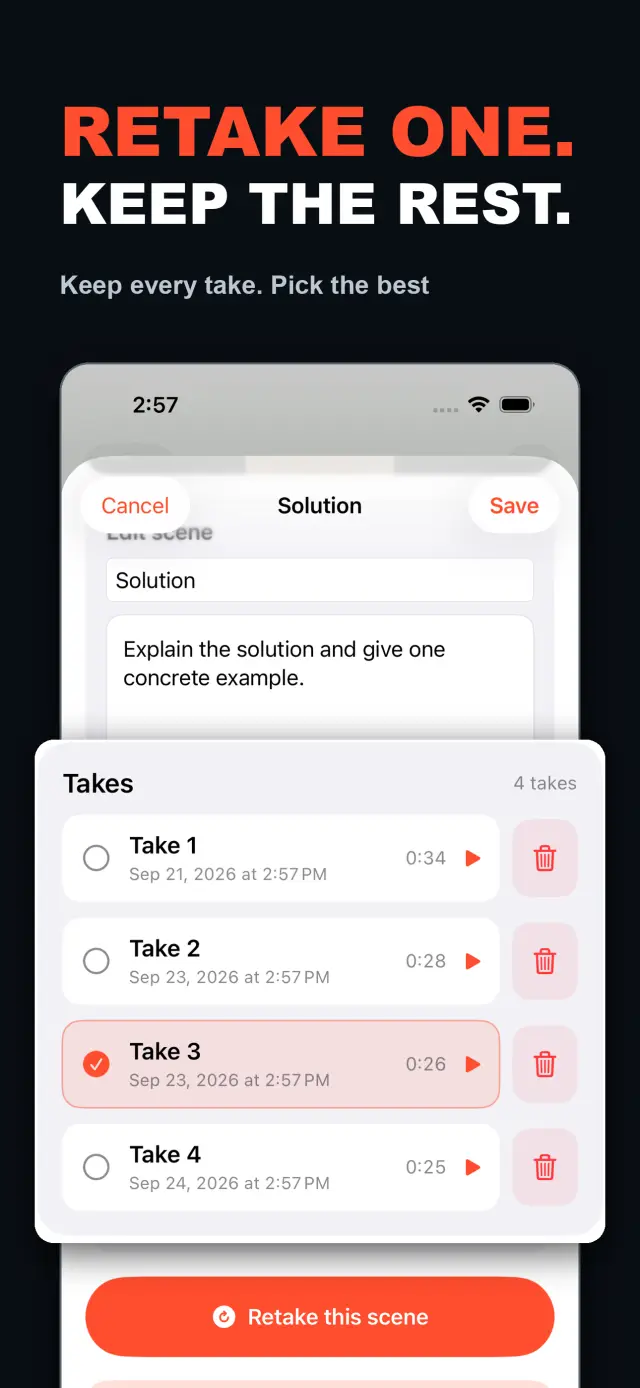
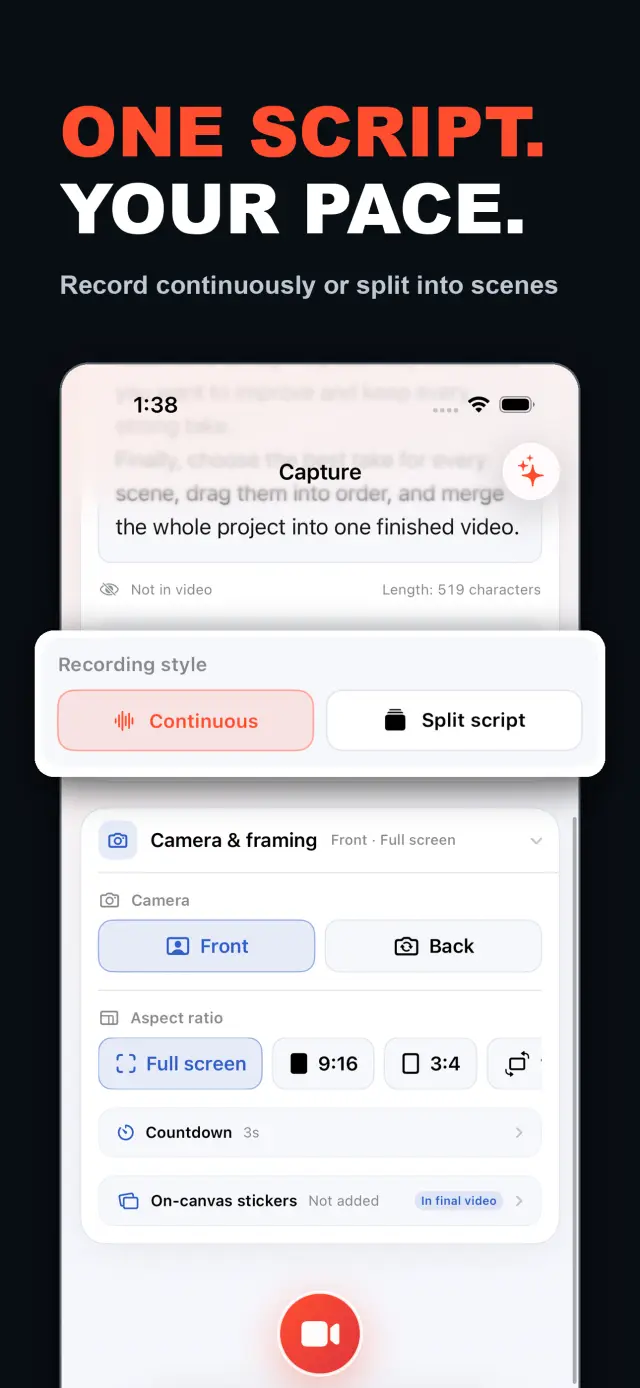
TalkCam is a teleprompter camera and video editor for recording one talking-head video in parts. Tap Record to create the current video automatically: capture one thought, stop, continue from there, or return hours or days later to add the next part. Choose Continuous or Split Script directly on the capture home. Continuous starts without a script — or keeps a full script together — and after every stop, Continue Recording appends the next part to the same video. Split Script pastes a full script and organizes it into short, recordable scenes before filming: the basic splitter runs on device and preserves the original words, and on supported devices Apple Intelligence can optionally organize the split on device; your script is not sent to a TalkCam server. Each scene can hold multiple takes — redo only the part that needs work without overwriting earlier versions, then choose the most natural take in the editor. After a scripted take, the pacing report compares your recording time with paragraph targets using teleprompter reading-position estimates. The multi-scene editor plays the assembled story above a scrubbable clip timeline: seek directly, skip ±5 seconds, switch between 1x/1.5x/2x playback, reorder scenes, select takes, and change the canvas. You do not need to finish every scene first — export what is ready and record the rest later. Inside a take, split, delete, and adjust volume, or add cut, fade, slide, and zoom transitions; text, images, logos, beauty, crop, letterbox treatment, and supplemental footage remain nondestructive. The full-screen camera supports scrolling, page, card, and manual prompt modes with adjustable text size, speed, position, colors, and background opacity — the prompt is an interface overlay only and never appears in the raw recording or exported video. Front or back camera with in-take pause/resume and pinch to zoom; if no camera is available but the microphone is, Audio-Only Studio saves a standard, timeline-compatible video take. Silence removal, noise reduction, audio fades, and gaze correction run on device where available. Choose 480p, 720p, 1080p, 2K, or 4K; 30/50/60 fps; SDR/HDR; and the matching bitrate before export — H.264 or HDR HEVC MP4 with no TalkCam watermark. Free includes continuous recording, split-script recording, the on-device splitter, multiple scenes and takes, timeline preview, the teleprompter, text and logo layers, core editing, and 480p/720p/1080p, 30 fps, SDR, compact or standard bitrate export, with takes up to 60 minutes. TalkCam Pro unlocks 2K/4K, 50/60 fps, HDR, high-bitrate export, unlimited take length, supplemental footage, image stickers, noise reduction, audio fades, and gaze correction. Local-first: no account, no ads, no tracking.

TalkCam
Sekilas
Fig. 01A talking-head video no longer needs one perfect take: record it part by part, keep every version, pick the best takes on the timeline — then export one finished video.
Di dalam aplikasi
Fig. 02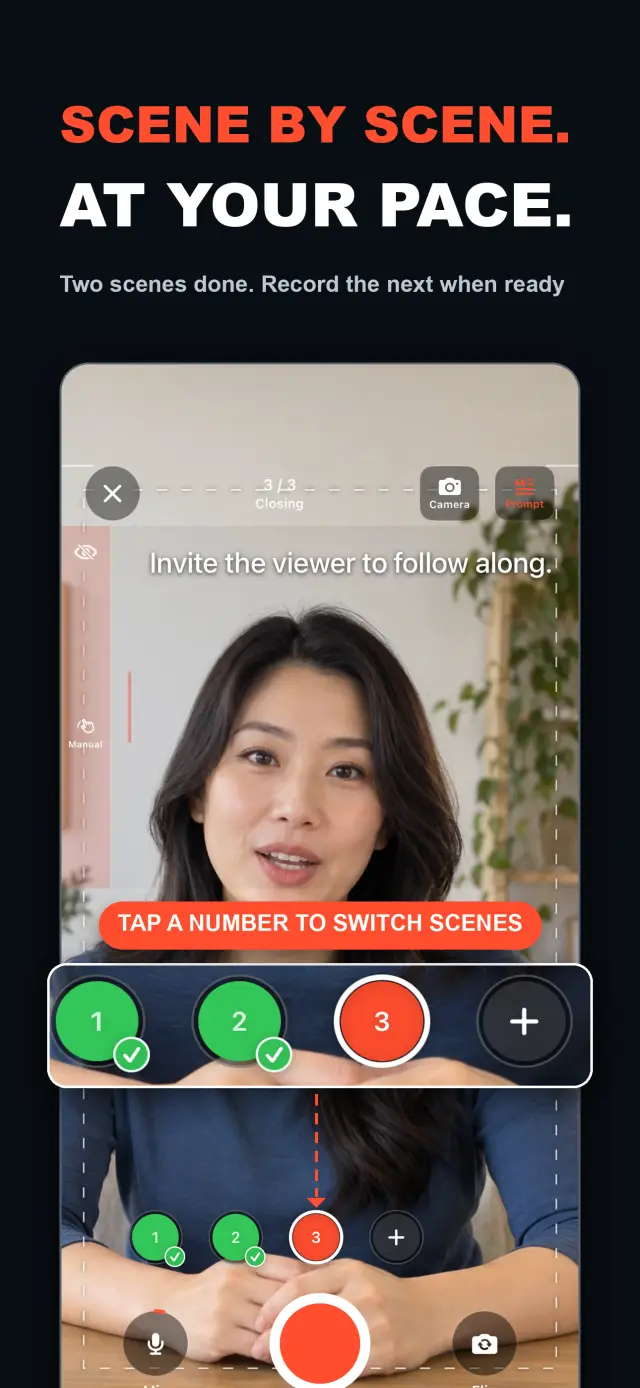
Fitur
No. 01stop and continue, or come back days later
choose your mode right on the capture home
Specifications
Tab. 01Alur kerja
No. 02Choose Continuous or Split Script on the capture home; stop after every thought and continue later, or film a script scene by scene — each scene holds multiple takes.
Redo only the scene that needs work; earlier takes stay untouched until you pick the best one on the timeline.
Scrub the timeline, reorder scenes, switch takes, then export one finished MP4 — with the resolution, frame rate, and SDR/HDR you choose.
Kepercayaan dan Privasi
No. 03Local-first: no account, no ads, no tracking — data never leaves the device.
No sign-up, no login. Install it and it just works.
Everything core runs offline; no network required.
Free includes continuous recording, split-script recording with the on-device splitter, multiple scenes and takes, timeline preview, the teleprompter, text and logo layers, core editing, and 480p/720p/1080p 30 fps SDR export, with takes up to 60 minutes; TalkCam Pro unlocks 2K/4K, 50/60 fps, HDR, high-bitrate export, unlimited take length, supplemental footage, image stickers, noise reduction, audio fades, and gaze correction. Local-first: no account, no ads, no tracking, everything processed on device.
product direction
No. 04Where this app is headed, in the maker’s own hand.
Record one talking-head video in parts: stop whenever you like, continue from there, or come back days later — the parts stay in the same video.
Start freeform and keep recording after every stop, or paste a script and organize it into short scenes on device before filming.
Every scene keeps multiple takes; retake one part without overwriting, review its pacing, then assemble the chosen takes on the scrubbable timeline.
Scrolling, page, card, and manual modes over the full-screen camera — an overlay that never enters the recording.
Preview and export recorded scenes before the script is finished — 480p to 4K, up to 60 fps, SDR or HDR, no watermark.
about TalkCam
No. 5The longer story — what it is, who it is for, and the choices behind it.
Terakhir diperbarui: 2026-09-24
TalkCam adalah kamera iPhone yang merekam satu video talking-head dalam beberapa bagian, take demi take. Ketuk Rekam dan video saat ini dimulai sendiri: tangkap satu pikiran, berhenti, lalu lanjutkan dari sana — atau kembali berjam-jam atau berhari-hari kemudian dan tambahkan bagian berikutnya. Bekerja dari naskah? Tempel sekali dan TalkCam menyusunnya menjadi adegan-adegan pendek yang dapat direkam di perangkat Anda. Setiap adegan menyimpan beberapa take, sehingga take ulang tidak pernah menimpa versi yang berhasil, dan cerita utuhnya terangkai pada timeline yang bisa di-scrub. Paket gratis mencakup take hingga 60 menit dan ekspor bersih hingga 1080p; TalkCam Pro membuka 2K/4K, 50/60 fps, HDR, ekspor bitorate tinggi, durasi take tanpa batas, dan rangkaian polesan profesional lengkap.
Pilih Berkesinambungan (Continuous) atau Pecah skenario (Split Script) langsung di beranda perekaman — tanpa formulir proyek yang harus diisi lebih dulu. Pada mode Berkesinambungan, mulailah tanpa naskah atau pertahankan satu naskah utuh; setelah setiap berhenti, pilih Lanjutkan Perekaman (Continue Recording) dan bagian berikutnya tetap berada di video yang sama untuk pratinjau, penyuntingan, dan ekspor. Pada mode Pecah skenario, tempel naskah lengkap dan susun menjadi adegan-adegan pendek sebelum syuting: pemisah dasar berjalan di perangkat dan mempertahankan kata-kata asli Anda, dan pada perangkat yang didukung Apple Intelligence dapat menyusun pemisahan tersebut secara opsional di perangkat — naskah Anda tidak pernah dikirim ke server TalkCam.
Setiap adegan dapat menampung beberapa take. Ulangi hanya bagian yang perlu diperbaiki tanpa menimpa versi-versi sebelumnya, lalu pilih take paling natural di editor. Editor multi-adegan memutar cerita utuh di atas timeline klip yang bisa di-scrub: lompat langsung ke momen mana pun, lewati ±5 detik, ganti kecepatan pemutaran 1x/1.5x/2x, susun ulang adegan, pilih take, dan ubah kanvas sebelum mengekspor satu video. Anda tidak harus menyelesaikan semua adegan lebih dulu — begitu ada take yang layak pakai, pratinjau dan ekspor yang sudah siap, lalu kembali ke proyek nanti untuk merekam sisanya.
Di dalam satu take, belah, hapus, dan atur volume, atau tambahkan transisi potong, fade, geser, dan zoom. Teks, gambar, logo, kecantikan, pemangkasan, perlakuan letterbox, dan cuplikan tambahan tetap nondestruktif; rekaman kamera aslinya tidak tersentuh. Saat Anda berbicara dari naskah, kamera layar penuh menawarkan mode prompt bergulir, halaman, kartu, dan manual dengan ukuran teks, kecepatan, posisi, warna, dan opasitas latar yang bisa diatur — overlay antarmuka yang tidak pernah muncul di rekaman mentah maupun video yang diekspor.
Kameranya ikut menyesuaikan: kamera depan atau belakang, jeda/lanjut di tengah take, dan cubit untuk zoom. Jika tidak ada kamera yang tersedia tetapi mikrofon ada, Studio Hanya-Audio (Audio-Only Studio) menyimpan take video standar yang kompatibel dengan timeline. Penghapusan keheningan, peredam bising, fade audio, dan koreksi tatapan berjalan di perangkat jika tersedia. Sebelum ekspor, pilih 480p, 720p, 1080p, 2K, atau 4K; 30, 50, atau 60 fps; SDR atau HDR; serta bitorate yang sesuai — MP4 H.264 atau HEVC HDR tanpa tanda air TalkCam.
Sebagian besar aplikasi talking-head mengharapkan satu take sempurna dan berhenti pada perekaman. TalkCam membangun video take demi take: berhenti setelah setiap pikiran, ambil ulang hanya adegan yang perlu diperbaiki tanpa kehilangan versi yang berhasil, dan biarkan timeline merangkai ceritanya. Teleprompter — bergulir, halaman, kartu, atau manual — membantu Anda tampil tetapi tidak pernah masuk ke piksel rekaman, dan efek hanya dipanggang saat ekspor melalui proses render offline. Setiap rekaman tetap MP4 kamera + mikrofon yang bersih, jadi Anda bisa mengubah gaya stiker, menyetel ulang kecantikan, dan mengganti rasio aspek sebanyak yang Anda mau tanpa kehilangan take asli. Pencerminan kamera depan hanyalah kenyamanan saat pengambilan/pratinjau; ekspor menggunakan bingkai tersimpan apa adanya tanpa mencerminkan ulang.
TalkCam mengutamakan lokal: tanpa akun, tanpa iklan, tanpa SDK analitik atau pelacakan, dan tanpa pengumpulan data pribadi. Proyek, naskah, rekaman, media yang diimpor, dan ekspor diproses di perangkat — termasuk pemisahan naskah Apple Intelligence opsional, yang berjalan di perangkat pada perangkat keras yang didukung. Kamera dan mikrofon hanya digunakan untuk perekaman; akses Photos hanya diminta saat Anda memilih menyimpan ekspor, dan video yang diekspor masuk ke pustaka Photos Anda sendiri. TalkCam mendukung bahasa Inggris dan Tionghoa Sederhana serta tampilan terang/gelap.
Paket gratis mencakup perekaman berkesinambungan, perekaman pecah skenario dengan pemisah di perangkat, beberapa adegan dan take, pratinjau timeline, teleprompter, lapisan teks dan logo, serta penyuntingan inti — pangkas, belah, hapus, transisi, dan volume — dengan take hingga 60 menit dan ekspor 480p/720p/1080p, 30 fps, SDR, bitorate ringkas atau standar. TalkCam Pro membuka:
Tersedia sebagai langganan opsional bulanan atau tahunan yang diperpanjang otomatis, atau pembelian seumur hidup sekali bayar. Langganan diperpanjang otomatis kecuali dibatalkan setidaknya 24 jam sebelum periode berjalan berakhir; kelola atau batalkan melalui pengaturan akun App Store Anda, dan pulihkan pembelian dari Pengaturan → TalkCam Pro Workflow di dalam aplikasi.
docs support
No. 6Plain-language documents. No fine print you would be surprised by.
faq title
Yes — that is the point. Tap Record and TalkCam creates the current video automatically; stop whenever you like and continue from there, or come back hours or days later. Paste a script to split it into scenes, record one scene at a time, and keep multiple takes of each. When you finish, the takes you chose merge into one video.
Continuous keeps one video growing: after every stop, choose Continue Recording and the next part is appended to the same video for preview, editing, and export. Split Script is for working from a script: paste the full text, organize it into short scenes on device, then film scene by scene with multiple takes each. Both modes share the same camera, takes, editor, and export path.
Nothing is overwritten. Every take of a scene is kept; you choose the one that goes into the final video, and you can switch or delete takes at any time before export.
Never. The full-screen camera supports scrolling, page, card, and manual prompt modes — an interface overlay only. The recording stays a clean camera-plus-microphone MP4, and text or effects are baked in at export, not captured by accident.
Every take shows its total time. With a script and visible teleprompter, paragraph times are estimated from when the reading position crosses each paragraph, then compared with the target. This is a pacing guide, not speech transcription.
Yes. As soon as a usable take exists, preview it on the timeline and export the scenes you have already recorded, then return to the project later to film the rest. In the export panel, choose the resolution, frame rate, SDR/HDR, and bitrate — some options require TalkCam Pro.
Nowhere. The basic splitter runs on device and preserves your original wording, and the optional Apple Intelligence split also runs on device on supported hardware. Your script is not sent to a TalkCam server; projects, recordings, and exports are all processed locally.
Free: continuous recording, split-script recording with the on-device splitter, multiple scenes and takes, timeline preview, the teleprompter, text and logo layers, core editing, and 480p/720p/1080p 30 fps SDR export, with takes up to 60 minutes. TalkCam Pro unlocks 2K/4K, 50/60 fps, HDR, high-bitrate export, unlimited take length, supplemental footage, image stickers, noise reduction, audio fades, and gaze correction.
TalkCam
TalkCam is on the App Store — record in parts, keep every take, finish as one video.