01
One video, many takes
stop and continue, or come back days later
 ZelonAI
Apple Platform App · iPhone
TalkCam
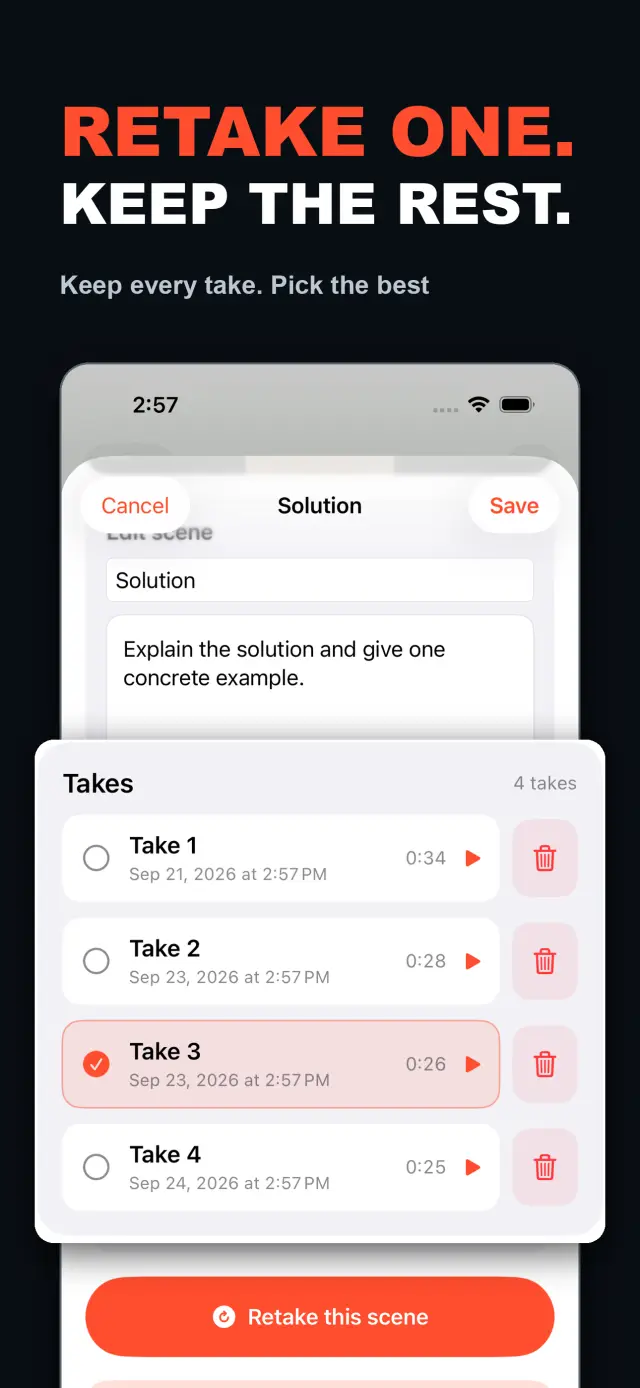
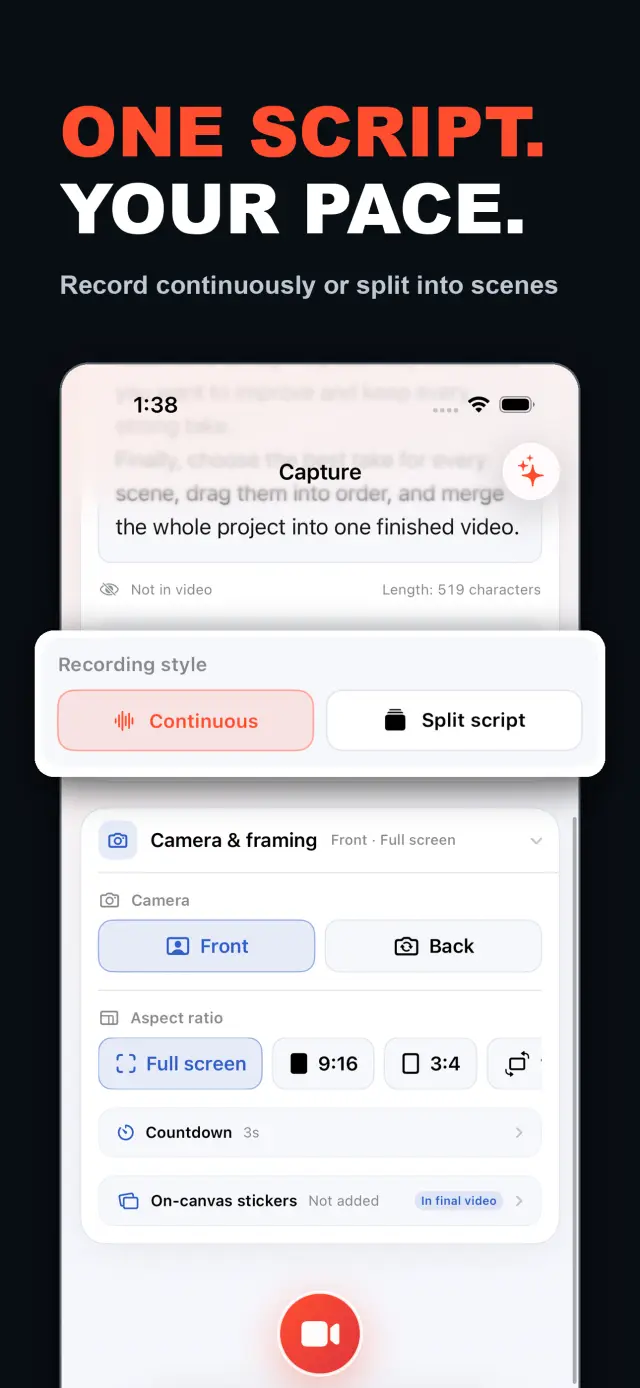
TalkCam is a teleprompter camera and video editor for recording one talking-head video in parts. Tap Record to create the current video automatically: capture one thought, stop, continue from there, or return hours or days later to add the next part. Choose Continuous or Split Script directly on the capture home. Continuous starts without a script — or keeps a full script together — and after every stop, Continue Recording appends the next part to the same video. Split Script pastes a full script and organizes it into short, recordable scenes before filming: the basic splitter runs on device and preserves the original words, and on supported devices Apple Intelligence can optionally organize the split on device; your script is not sent to a TalkCam server. Each scene can hold multiple takes — redo only the part that needs work without overwriting earlier versions, then choose the most natural take in the editor. After a scripted take, the pacing report compares your recording time with paragraph targets using teleprompter reading-position estimates. The multi-scene editor plays the assembled story above a scrubbable clip timeline: seek directly, skip ±5 seconds, switch between 1x/1.5x/2x playback, reorder scenes, select takes, and change the canvas. You do not need to finish every scene first — export what is ready and record the rest later. Inside a take, split, delete, and adjust volume, or add cut, fade, slide, and zoom transitions; text, images, logos, beauty, crop, letterbox treatment, and supplemental footage remain nondestructive. The full-screen camera supports scrolling, page, card, and manual prompt modes with adjustable text size, speed, position, colors, and background opacity — the prompt is an interface overlay only and never appears in the raw recording or exported video. Front or back camera with in-take pause/resume and pinch to zoom; if no camera is available but the microphone is, Audio-Only Studio saves a standard, timeline-compatible video take. Silence removal, noise reduction, audio fades, and gaze correction run on device where available. Choose 480p, 720p, 1080p, 2K, or 4K; 30/50/60 fps; SDR/HDR; and the matching bitrate before export — H.264 or HDR HEVC MP4 with no TalkCam watermark. Free includes continuous recording, split-script recording, the on-device splitter, multiple scenes and takes, timeline preview, the teleprompter, text and logo layers, core editing, and 480p/720p/1080p, 30 fps, SDR, compact or standard bitrate export, with takes up to 60 minutes. TalkCam Pro unlocks 2K/4K, 50/60 fps, HDR, high-bitrate export, unlimited take length, supplemental footage, image stickers, noise reduction, audio fades, and gaze correction. Local-first: no account, no ads, no tracking.
TalkCam
نظرة سريعة
Fig. 01A talking-head video no longer needs one perfect take: record it part by part, keep every version, pick the best takes on the timeline — then export one finished video.
داخل التطبيق
Fig. 02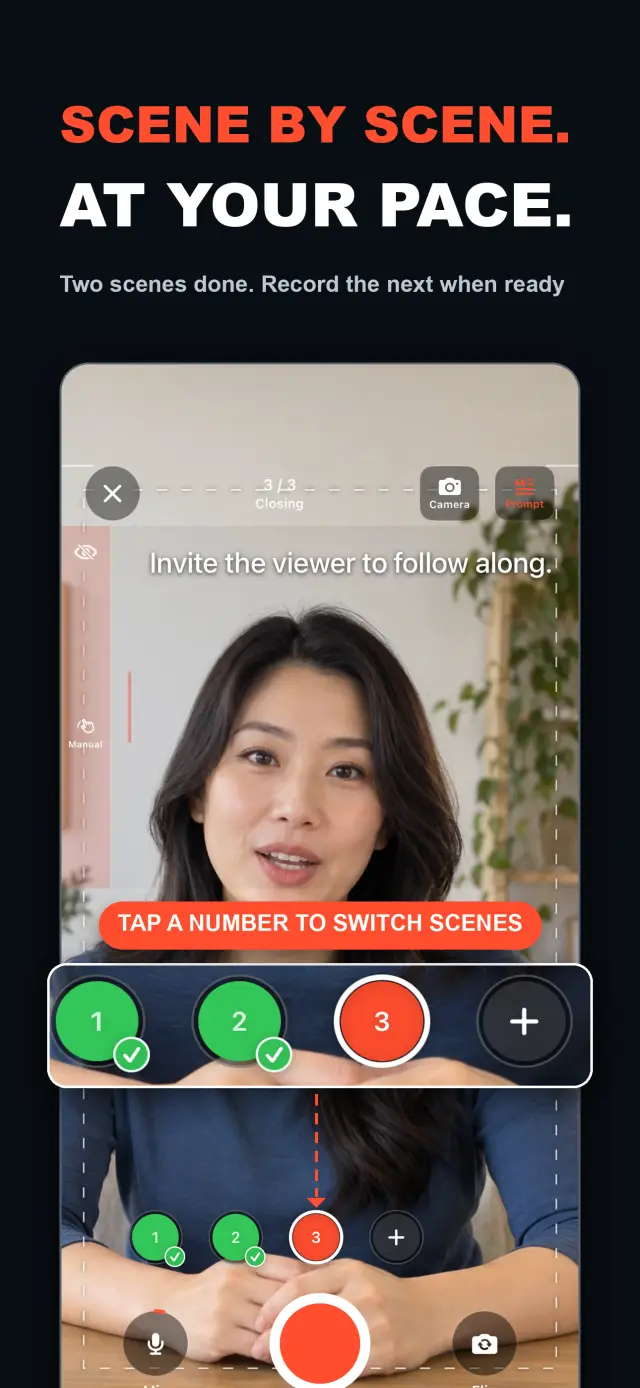
الميزات
No. 01stop and continue, or come back days later
choose your mode right on the capture home
Specifications
Tab. 01سير العمل
No. 02Choose Continuous or Split Script on the capture home; stop after every thought and continue later, or film a script scene by scene — each scene holds multiple takes.
Redo only the scene that needs work; earlier takes stay untouched until you pick the best one on the timeline.
Scrub the timeline, reorder scenes, switch takes, then export one finished MP4 — with the resolution, frame rate, and SDR/HDR you choose.
الثقة والخصوصية
No. 03Local-first: no account, no ads, no tracking — data never leaves the device.
No sign-up, no login. Install it and it just works.
Everything core runs offline; no network required.
Free includes continuous recording, split-script recording with the on-device splitter, multiple scenes and takes, timeline preview, the teleprompter, text and logo layers, core editing, and 480p/720p/1080p 30 fps SDR export, with takes up to 60 minutes; TalkCam Pro unlocks 2K/4K, 50/60 fps, HDR, high-bitrate export, unlimited take length, supplemental footage, image stickers, noise reduction, audio fades, and gaze correction. Local-first: no account, no ads, no tracking, everything processed on device.
product direction
No. 04Where this app is headed, in the maker’s own hand.
Record one talking-head video in parts: stop whenever you like, continue from there, or come back days later — the parts stay in the same video.
Start freeform and keep recording after every stop, or paste a script and organize it into short scenes on device before filming.
Every scene keeps multiple takes; retake one part without overwriting, review its pacing, then assemble the chosen takes on the scrubbable timeline.
Scrolling, page, card, and manual modes over the full-screen camera — an overlay that never enters the recording.
Preview and export recorded scenes before the script is finished — 480p to 4K, up to 60 fps, SDR or HDR, no watermark.
حول TalkCam
No. 5The longer story — what it is, who it is for, and the choices behind it.
آخر تحديث: 2026-09-24
TalkCam هي كاميرا iPhone التي تسجّل فيديو المتحدث الواحد على أجزاء، لقطة بعد لقطة. اضغط زر التسجيل فيبدأ الفيديو الحالي تلقائيًا: التقط فكرة واحدة، وتوقف، ثم واصل من هناك — أو عُد بعد ساعات أو أيام وأضف الجزء التالي. هل تعمل بسيناريو؟ الصقه مرة واحدة وينظّمه TalkCam على جهازك إلى مشاهد قصيرة قابلة للتسجيل. يحتفظ كل مشهد بعدة لقطات، فإعادة اللقطة لا تحذف أبدًا النسخة التي نجحت، ويتجمّع العمل كاملًا على خط زمني قابل للتمرير. تغطي النسخة المجانية لقطات مدتها 60 دقيقة وتصديرًا نظيفًا حتى دقة 1080p؛ بينما يفتح TalkCam Pro دقة 2K/4K، ومعدل 50/60 fps، وتقنية HDR، والتصدير بمعدل بت مرتفع، ومدة لقطة غير محدودة، ومجموعة كاملة من أدوات الصقل الاحترافية.
اختر التسجيل المتصل (Continuous) أو تقسيم النص (Split Script) مباشرة من شاشة التسجيل الرئيسية — دون أي نموذج مشروع تتعبيه أولًا. في وضع التسجيل المتصل، ابدأ بلا سيناريو أو مع سيناريو كامل يبقى موحدًا؛ وبعد كل توقف اختر متابعة التسجيل (Continue Recording) فيبقى الجزء التالي داخل الفيديو نفسه للمعاينة والتحرير والتصدير. في وضع تقسيم النص، الصق السيناريو كاملًا ونظّمه إلى مشاهد قصيرة قبل التصوير: أداة التقسيم الأساسية تعمل على الجهاز وتحافظ على كلماتك الأصلية، وعلى الأجهزة المدعومة يمكن لـ Apple Intelligence تنظيم التقسيم اختياريًا على الجهاز نفسه — سيناريوك لا يُرسل أبدًا إلى خادم TalkCam.
يمكن لكل مشهد أن يحمل لقطات متعددة. أعد تصوير الجزء الذي يحتاج إلى تحسين فقط دون الكتابة فوق النسخ السابقة، ثم اختر اللقطة الأكثر طبيعية في المحرر. يشغّل محرر المشاهد المتعددة العمل المجمّع فوق خط زمني قابل للتمرير: انتقل مباشرة إلى أي لحظة، وتخطَّ ±5 ثوانٍ، وبدّل بين سرعات تشغيل 1x/1.5x/2x، وأعد ترتيب المشاهد، واختر اللقطات، وغيّر الكانفاس قبل تصدير فيديو واحد. لست مضطرًا لإنهاء كل مشهد أولًا — فبمجرد توفر لقطة صالحة، عاين وصدّر ما جاهز، ثم عُد إلى المشروع لاحقًا لتسجيل الباقي.
داخل اللقطة الواحدة، قسّم واحذف واضبط مستوى الصوت، أو أضف انتقالات قطع وتلاشي وانزلاق وتكبير. تبقى النصوص والصور والشعارات والمسات التجميلية والاقتصاص وأشرطة الليتربوكس والمواد التكميلية غير إتلافية؛ وتظل تسجيلات الكاميرا الأصلية كما هي دون أي تغيير. وعندما تتحدث من سيناريو، توفر الكاميرا ملء الشاشة أوضاع تليبرومبت بالتمرير أو الصفحات أو البطاقات أو الإعداد اليدوي، مع ضبط حجم النص وسرعته وموضعه وألوانه وشفافية الخلفية — طبقة واجهة فقط لا تظهر أبدًا في التسجيل الخام ولا في الفيديو المصدَّر.
تواكب الكاميرا وتيرتك: كاميرا أمامية أو خلفية، وإيقاف مؤقت واستئناف داخل اللقطة، وتكبير بإصبعين. وإذا لم تتوفر كاميرا لكن الميكروفون متاح، يحفظ استوديو الصوت فقط (Audio-Only Studio) لقطة فيديو قياسية متوافقة مع الخط الزمني. أما إزالة الصمت وتقليل الضوضاء وتلاشي الصوت وتصحيح النظرة فتعمل على الجهاز حيثما توفرت. وقبل التصدير، اختر 480p أو 720p أو 1080p أو 2K أو 4K؛ و30 أو 50 أو 60 fps؛ وSDR أو HDR؛ ومعدل البت المناسب — ملف MP4 بترميز H.264 أو HEVC بدعم HDR دون علامة مائية من TalkCam.
معظم تطبيقات فيديو المتحدث تفترض لقطة واحدة مثالية وتتوقف عند التسجيل. أما TalkCam فيبني الفيديو لقطة بعد لقطة: توقف بعد كل فكرة، وأعد تصوير المشهد الذي يحتاج تحسينًا فقط دون فقدان النسخ التي نجحت، ودع الخط الزمني يجمع القصة. التليبرومبت — تمرير أو صفحات أو بطاقات أو إعداد يدوي — يساعدك على الأداء لكنه لا يدخل أبدًا إلى البكسلات المسجلة، ولا تُطبَّق التأثيرات إلا عند التصدير عبر معالجة عرض دون اتصال. يبقى كل تسجيل ملف MP4 نظيفًا من الكاميرا والميكروفون، فيمكنك إعادة تصميم الملصقات وضبط المسات التجميلية وتبديل نسب العرض مرات لا نهائية دون فقدان لقطاتك الأصلية. وانعكاس الكاميرا الأمامية مجرد وسيلة راحة أثناء التصوير والمعاينة؛ أما التصدير فيستخدم الإطارات المخزنة كما هي دون انعكاس جديد.
TalkCam محلي أولًا: بلا حساب، وبلا إعلانات، وبلا حزم SDK للتحليلات أو التتبع، وبلا جمع للبيانات الشخصية. تُعالج المشاريع والسيناريوهات والتسجيلات والوسائط المستوردة والتصديرات على الجهاز — بما في ذلك تقسيم السيناريو الاختياري عبر Apple Intelligence الذي يعمل على الجهاز على الأجهزة المدعومة. تُستخدم الكاميرا والميكروفون للتسجيل فقط؛ ولا يُطلب الوصول إلى الصور إلا عندما تختار حفظ تصدير، وتذهب مقاطع الفيديو المصدرة إلى مكتبة الصور الخاصة بك. يدعم TalkCam الإنجليزية والصينية المبسطة والمظهر الفاتح/الداكن.
تشمل النسخة المجانية التسجيل المتصل، والتسجيل بتقسيم النص عبر أداة التقسيم على الجهاز، ومشاهد ولقطات متعددة، ومعاينة الخط الزمني، والتليبرومبت، وطبقات النصوص والشعارات، والتحرير الأساسي — قص وتقسيم وحذف وانتقالات وصوت — بلقطات حتى 60 دقيقة وتصدير 480p/720p/1080p بمعدل 30 fps وSDR ومعدل بت مضغوط أو قياسي. أما TalkCam Pro فيفتح:
متاح كاشتراك اختياري متجدد شهريًا أو سنويًا، أو كشراء لمرة واحدة مدى الحياة. تتجدد الاشتراكات تلقائيًا ما لم تُلغَ قبل 24 ساعة على الأقل من نهاية الفترة الحالية؛ وأدرها أو ألغها من إعدادات حسابك في App Store، واستعد المشتريات من الإعدادات → TalkCam Pro Workflow داخل التطبيق.
docs support
No. 6Plain-language documents. No fine print you would be surprised by.
faq title
Yes — that is the point. Tap Record and TalkCam creates the current video automatically; stop whenever you like and continue from there, or come back hours or days later. Paste a script to split it into scenes, record one scene at a time, and keep multiple takes of each. When you finish, the takes you chose merge into one video.
Continuous keeps one video growing: after every stop, choose Continue Recording and the next part is appended to the same video for preview, editing, and export. Split Script is for working from a script: paste the full text, organize it into short scenes on device, then film scene by scene with multiple takes each. Both modes share the same camera, takes, editor, and export path.
Nothing is overwritten. Every take of a scene is kept; you choose the one that goes into the final video, and you can switch or delete takes at any time before export.
Never. The full-screen camera supports scrolling, page, card, and manual prompt modes — an interface overlay only. The recording stays a clean camera-plus-microphone MP4, and text or effects are baked in at export, not captured by accident.
Every take shows its total time. With a script and visible teleprompter, paragraph times are estimated from when the reading position crosses each paragraph, then compared with the target. This is a pacing guide, not speech transcription.
Yes. As soon as a usable take exists, preview it on the timeline and export the scenes you have already recorded, then return to the project later to film the rest. In the export panel, choose the resolution, frame rate, SDR/HDR, and bitrate — some options require TalkCam Pro.
Nowhere. The basic splitter runs on device and preserves your original wording, and the optional Apple Intelligence split also runs on device on supported hardware. Your script is not sent to a TalkCam server; projects, recordings, and exports are all processed locally.
Free: continuous recording, split-script recording with the on-device splitter, multiple scenes and takes, timeline preview, the teleprompter, text and logo layers, core editing, and 480p/720p/1080p 30 fps SDR export, with takes up to 60 minutes. TalkCam Pro unlocks 2K/4K, 50/60 fps, HDR, high-bitrate export, unlimited take length, supplemental footage, image stickers, noise reduction, audio fades, and gaze correction.
TalkCam
TalkCam is on the App Store — record in parts, keep every take, finish as one video.