01
One video, many takes
stop and continue, or come back days later
 ZelonAI
Apple Platform App · iPhone
TalkCam
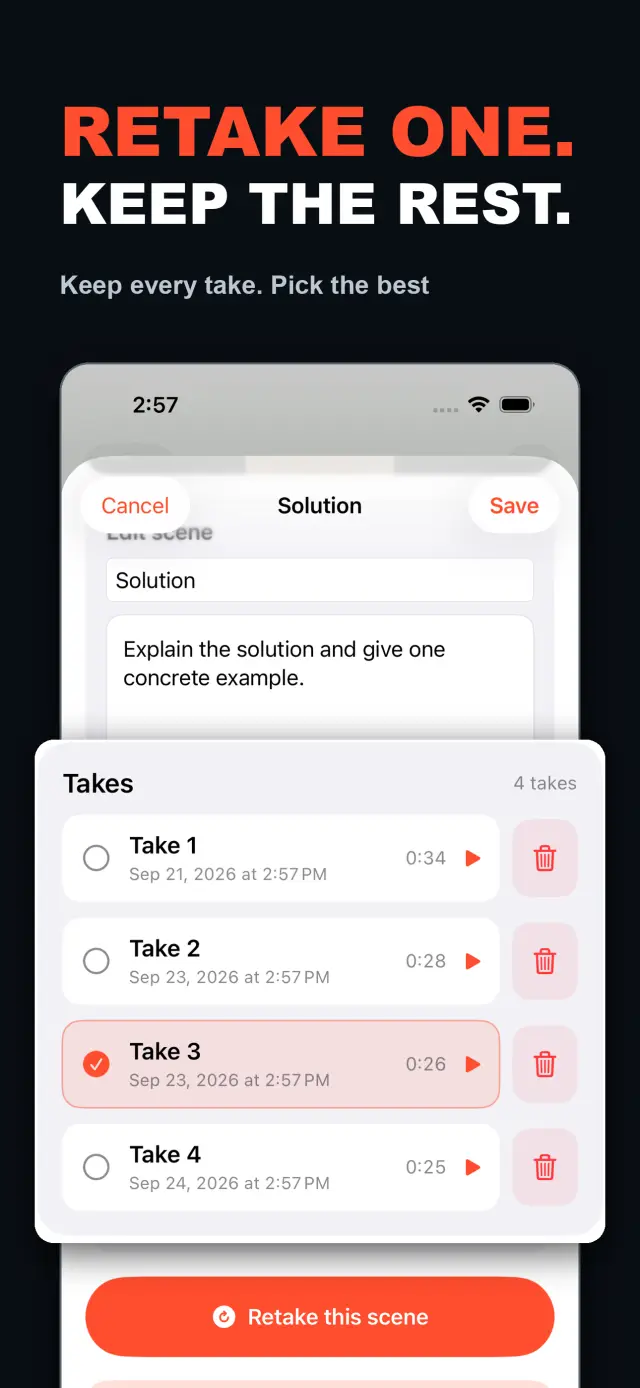
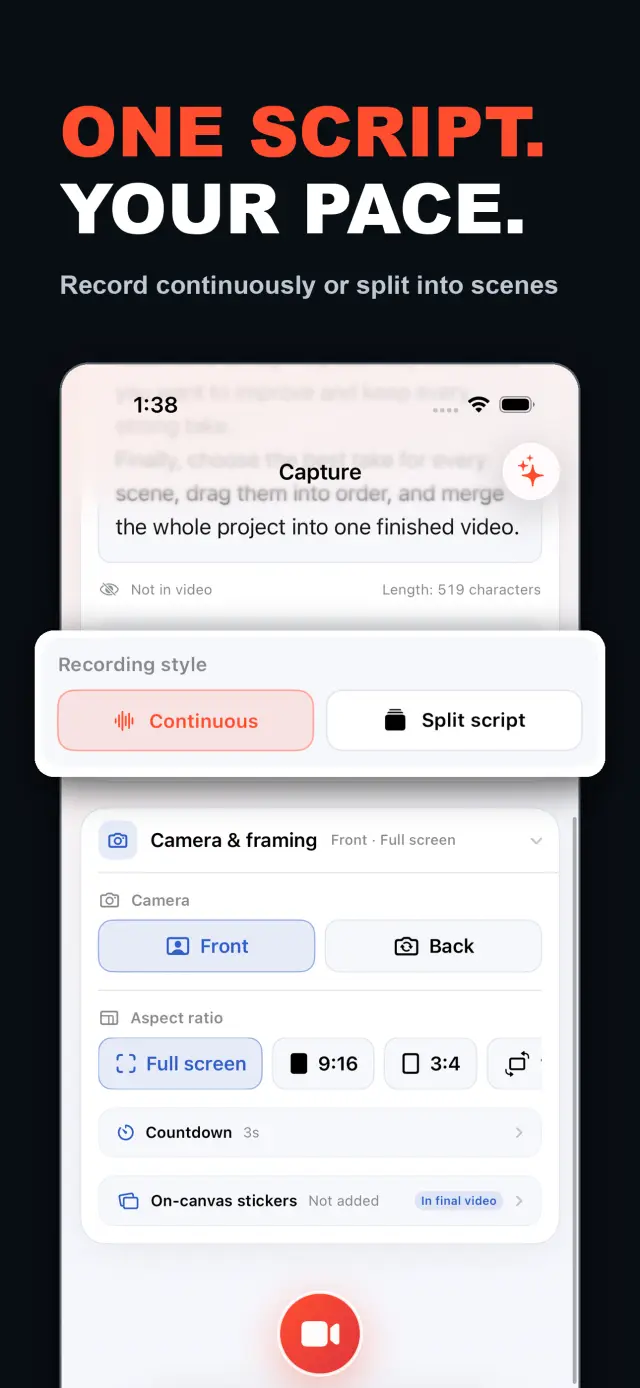
TalkCam is a teleprompter camera and video editor for recording one talking-head video in parts. Tap Record to create the current video automatically: capture one thought, stop, continue from there, or return hours or days later to add the next part. Choose Continuous or Split Script directly on the capture home. Continuous starts without a script — or keeps a full script together — and after every stop, Continue Recording appends the next part to the same video. Split Script pastes a full script and organizes it into short, recordable scenes before filming: the basic splitter runs on device and preserves the original words, and on supported devices Apple Intelligence can optionally organize the split on device; your script is not sent to a TalkCam server. Each scene can hold multiple takes — redo only the part that needs work without overwriting earlier versions, then choose the most natural take in the editor. After a scripted take, the pacing report compares your recording time with paragraph targets using teleprompter reading-position estimates. The multi-scene editor plays the assembled story above a scrubbable clip timeline: seek directly, skip ±5 seconds, switch between 1x/1.5x/2x playback, reorder scenes, select takes, and change the canvas. You do not need to finish every scene first — export what is ready and record the rest later. Inside a take, split, delete, and adjust volume, or add cut, fade, slide, and zoom transitions; text, images, logos, beauty, crop, letterbox treatment, and supplemental footage remain nondestructive. The full-screen camera supports scrolling, page, card, and manual prompt modes with adjustable text size, speed, position, colors, and background opacity — the prompt is an interface overlay only and never appears in the raw recording or exported video. Front or back camera with in-take pause/resume and pinch to zoom; if no camera is available but the microphone is, Audio-Only Studio saves a standard, timeline-compatible video take. Silence removal, noise reduction, audio fades, and gaze correction run on device where available. Choose 480p, 720p, 1080p, 2K, or 4K; 30/50/60 fps; SDR/HDR; and the matching bitrate before export — H.264 or HDR HEVC MP4 with no TalkCam watermark. Free includes continuous recording, split-script recording, the on-device splitter, multiple scenes and takes, timeline preview, the teleprompter, text and logo layers, core editing, and 480p/720p/1080p, 30 fps, SDR, compact or standard bitrate export, with takes up to 60 minutes. TalkCam Pro unlocks 2K/4K, 50/60 fps, HDR, high-bitrate export, unlimited take length, supplemental footage, image stickers, noise reduction, audio fades, and gaze correction. Local-first: no account, no ads, no tracking.
TalkCam
W skrócie
Fig. 01A talking-head video no longer needs one perfect take: record it part by part, keep every version, pick the best takes on the timeline — then export one finished video.
W aplikacji
Fig. 02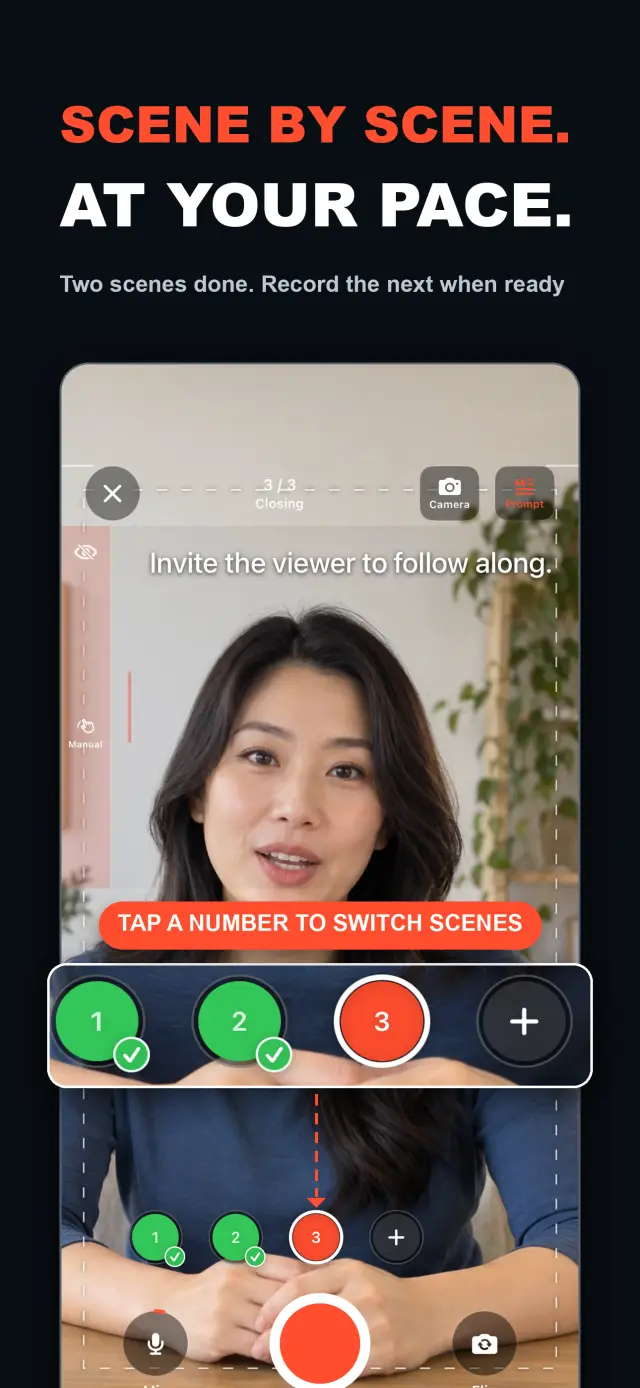
Funkcje
No. 01stop and continue, or come back days later
choose your mode right on the capture home
Specifications
Tab. 01Przepływ pracy
No. 02Choose Continuous or Split Script on the capture home; stop after every thought and continue later, or film a script scene by scene — each scene holds multiple takes.
Redo only the scene that needs work; earlier takes stay untouched until you pick the best one on the timeline.
Scrub the timeline, reorder scenes, switch takes, then export one finished MP4 — with the resolution, frame rate, and SDR/HDR you choose.
Zaufanie i prywatność
No. 03Local-first: no account, no ads, no tracking — data never leaves the device.
No sign-up, no login. Install it and it just works.
Everything core runs offline; no network required.
Free includes continuous recording, split-script recording with the on-device splitter, multiple scenes and takes, timeline preview, the teleprompter, text and logo layers, core editing, and 480p/720p/1080p 30 fps SDR export, with takes up to 60 minutes; TalkCam Pro unlocks 2K/4K, 50/60 fps, HDR, high-bitrate export, unlimited take length, supplemental footage, image stickers, noise reduction, audio fades, and gaze correction. Local-first: no account, no ads, no tracking, everything processed on device.
product direction
No. 04Where this app is headed, in the maker’s own hand.
Record one talking-head video in parts: stop whenever you like, continue from there, or come back days later — the parts stay in the same video.
Start freeform and keep recording after every stop, or paste a script and organize it into short scenes on device before filming.
Every scene keeps multiple takes; retake one part without overwriting, review its pacing, then assemble the chosen takes on the scrubbable timeline.
Scrolling, page, card, and manual modes over the full-screen camera — an overlay that never enters the recording.
Preview and export recorded scenes before the script is finished — 480p to 4K, up to 60 fps, SDR or HDR, no watermark.
O nas TalkCam
No. 5The longer story — what it is, who it is for, and the choices behind it.
Ostatnia aktualizacja: 2026-09-24
TalkCam to kamera na iPhone'a, która nagrywa jedno wideo talking head w częściach, ujęcie po ujęciu. Dotknij przycisku nagrywania, a bieżące wideo startuje samo: nagraj jedną myśl, zatrzymaj się i kontynuuj od tego miejsca — albo wróć po godzinach czy dniach i dodaj kolejną część. Pracujesz ze scenariuszem? Wklej go raz, a TalkCam podzieli go na krótkie, nagrywalne sceny na urządzeniu. Każda scena zachowuje wiele ujęć, więc poprawka nigdy nie nadpisuje wersji, która się udała, a gotowa historia składają się na przewijanej osi czasu. Darmowy plan obejmuje 60-minutowe ujęcia i czysty eksport do 1080p; TalkCam Pro odblokowuje 2K/4K, 50/60 fps, HDR, eksport z wysokim bitrate, nieograniczony czas ujęcia i pełny profesjonalny zestaw do wykończenia materiału.
Wybierz tryb Ciągłe nagrywanie (Continuous) lub Podziel skrypt (Split Script) bezpośrednio na ekranie głównym nagrywania — bez wypełniania formularza projektu. W trybie ciągłym nagrywaj bez scenariusza albo trzymaj cały scenariusz w całości; po każdym zatrzymaniu wybierz „Kontynuuj nagrywanie" (Continue Recording) i następna część zostanie w tym samym wideo — do podglądu, edycji i eksportu. W trybie dzielenia scenariusza wklej pełny tekst i podziel go na krótkie sceny jeszcze przed nagrywaniem: podstawowy podział odbywa się na urządzeniu i zachowuje Twoje oryginalne słowa, a na obsługiwanych urządzeniach Apple Intelligence może opcjonalnie uporządkować podział na urządzeniu — scenariusz nigdy nie trafia na serwer TalkCam.
Każda scena może pomieścić wiele ujęć. Nagraj ponownie tylko część wymagającą poprawki, bez nadpisywania wcześniejszych wersji, a potem wybierz najbardziej naturalne ujęcie w edytorze. Edytor wielu scen odtwarza złożoną historię nad przewijaną osią czasu klipów: przeskakuj bezpośrednio do dowolnego momentu, pomijaj ±5 sekund, przełączaj odtwarzanie 1x/1.5x/2x, zmieniaj kolejność scen, wybieraj ujęcia i zmieniaj kanwę przed wyeksportowaniem jednego wideo. Nie musisz najpierw kończyć wszystkich scen — gdy tylko masz użyteczne ujęcie, wyświetlaj i eksportuj to, co gotowe, a do reszty wróć w projekcie później.
Wewnątrz pojedynczego ujęcia: dzielenie, usuwanie i regulacja głośności oraz przejścia — cięcie, przenikanie, przesuw i zoom. Tekst, obrazy, logo, upiększanie, kadrowanie, letterbox i materiały dodatkowe pozostają nieniszczące; oryginalne nagrania z kamery zostają nietknięte. Gdy mówisz ze scenariusza, pełnoekranowa kamera oferuje tryby promptera — przewijany, stronnicowy, kartowy i ręczny — z regulowanym rozmiarem tekstu, prędkością, pozycją, kolorami i przezroczystością tła; to nakładka interfejsu, która nigdy nie pojawia się ani w surowym nagraniu, ani w eksportowanym wideo.
Kamera nadąża za Tobą: przednia lub tylna kamera, pauza i wznawianie w trakcie ujęcia, zoom gestem uszczypnięcia. Gdy kamery nie ma, a mikrofon jest dostępny, Studio tylko audio (Audio-Only Studio) zapisze standardowe ujęcie wideo zgodne z osią czasu. Usuwanie ciszy, redukcja szumów, przenikanie dźwięku i korekta kontaktu wzrokowego działają na urządzeniu, tam gdzie są dostępne. Przed eksportem wybierz 480p, 720p, 1080p, 2K lub 4K; 30, 50 lub 60 fps; SDR lub HDR — oraz pasujący bitrate: plik H.264 lub HDR HEVC MP4 bez znaku wodnego TalkCam.
Większość aplikacji talking head oczekuje jednego idealnego ujęcia i kończy się na nagrywaniu. TalkCam buduje wideo ujęcie po ujęciu: zatrzymuj się po każdej myśli, nagrywaj ponownie tylko scenę wymagającą poprawki bez utraty wersji, które się udały, i pozwól, by oś czasu złożyła całą historię. Teleprompter — przewijany, stronnicowy, kartowy lub ręczny — pomaga Ci występować, ale nigdy nie wchodzi w zarejestrowane piksele, a efekty wypalają się dopiero przy eksporcie, w przebiegu renderowania offline. Każde nagranie pozostaje czystym MP4 z kamery i mikrofonu, więc możesz dowolnie często zmieniać styl naklejek, dostrajać upiększanie i przełączać proporcje obrazu bez utraty oryginalnych ujęć. Lustrzane odbicie przedniej kamery to wyłącznie udogodnienie przy nagrywaniu i podglądzie; eksport używa zapisanych klatek takimi, jakie są, bez ponownego odbicia lustrzanego.
TalkCam stawia lokalność na pierwszym miejscu: bez konta, bez reklam, bez SDK analitycznych i śledzących oraz bez zbierania danych osobowych. Projekty, scenariusze, nagrania, zaimportowane multimedia i eksporty są przetwarzane na urządzeniu — w tym opcjonalny podział scenariusza przez Apple Intelligence, który na obsługiwanym sprzęcie wykonuje się na urządzeniu. Kamera i mikrofon służą wyłącznie do nagrywania; dostęp do Zdjęć jest proszony tylko wtedy, gdy zdecydujesz się zapisać eksport, a wyeksportowane wideo trafia do Twojej własnej biblioteki Zdję. TalkCam obsługuje angielski i chiński uproszczony oraz jasny/ciemny wygląd.
Darmowy plan obejmuje ciągłe nagrywanie, nagrywanie ze scenariusza z podziałem na urządzeniu, wiele scen i ujęć, podgląd na osi czasu, teleprompter, warstwy tekstu i logo oraz podstawową edycję — przycinanie, dzielenie, usuwanie, przejścia i głośność — z ujęciami do 60 minut i eksportem 480p/720p/1080p, 30 fps, SDR, kompaktowym lub standardowym bitrate. TalkCam Pro odblokowuje:
Dostępne jako opcjonalna subskrypcja miesięczna lub roczna z automatycznym odnawianiem albo jednorazowy zakup dożywotni. Subskrypcje odnawiają się automatycznie, chyba że zostaną anulowane co najmniej 24 godziny przed końcem bieżącego okresu; zarządzaj nimi lub anuluj je w ustawieniach konta App Store, a zakupy przywracaj z Ustawienia → TalkCam Pro Workflow w aplikacji.
docs support
No. 6Plain-language documents. No fine print you would be surprised by.
faq title
Yes — that is the point. Tap Record and TalkCam creates the current video automatically; stop whenever you like and continue from there, or come back hours or days later. Paste a script to split it into scenes, record one scene at a time, and keep multiple takes of each. When you finish, the takes you chose merge into one video.
Continuous keeps one video growing: after every stop, choose Continue Recording and the next part is appended to the same video for preview, editing, and export. Split Script is for working from a script: paste the full text, organize it into short scenes on device, then film scene by scene with multiple takes each. Both modes share the same camera, takes, editor, and export path.
Nothing is overwritten. Every take of a scene is kept; you choose the one that goes into the final video, and you can switch or delete takes at any time before export.
Never. The full-screen camera supports scrolling, page, card, and manual prompt modes — an interface overlay only. The recording stays a clean camera-plus-microphone MP4, and text or effects are baked in at export, not captured by accident.
Every take shows its total time. With a script and visible teleprompter, paragraph times are estimated from when the reading position crosses each paragraph, then compared with the target. This is a pacing guide, not speech transcription.
Yes. As soon as a usable take exists, preview it on the timeline and export the scenes you have already recorded, then return to the project later to film the rest. In the export panel, choose the resolution, frame rate, SDR/HDR, and bitrate — some options require TalkCam Pro.
Nowhere. The basic splitter runs on device and preserves your original wording, and the optional Apple Intelligence split also runs on device on supported hardware. Your script is not sent to a TalkCam server; projects, recordings, and exports are all processed locally.
Free: continuous recording, split-script recording with the on-device splitter, multiple scenes and takes, timeline preview, the teleprompter, text and logo layers, core editing, and 480p/720p/1080p 30 fps SDR export, with takes up to 60 minutes. TalkCam Pro unlocks 2K/4K, 50/60 fps, HDR, high-bitrate export, unlimited take length, supplemental footage, image stickers, noise reduction, audio fades, and gaze correction.
TalkCam
TalkCam is on the App Store — record in parts, keep every take, finish as one video.