
01
Aplicație iOS · iPhone · iPad · macOS
Lighter photos, private by default.
ImageTiny
ImageTiny is an on-device image workflow app for iPhone, iPad, and Mac, focused on compression, format conversion, metadata cleanup, and local-first privacy.
Confidențialitate pe primul loc
Nu este necesar cont
Funcționează offline

ImageTiny
- status
- status live
- App Store
- iPhone / iPad / macOS
- tech stack
- Image Workflow · On-device Privacy
Pe scurt
Fig. 01A photograph carries more than pixels — places, times, the quiet metadata of a life. ImageTiny keeps only what you meant to share.
În aplicație
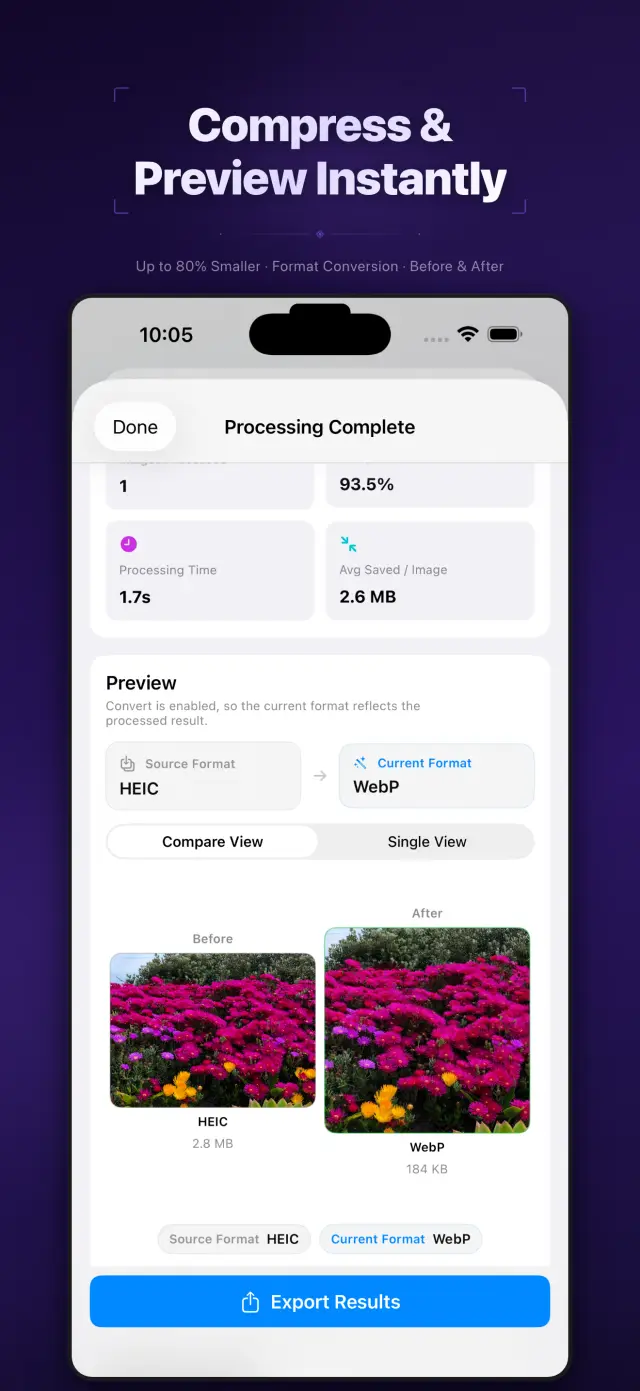
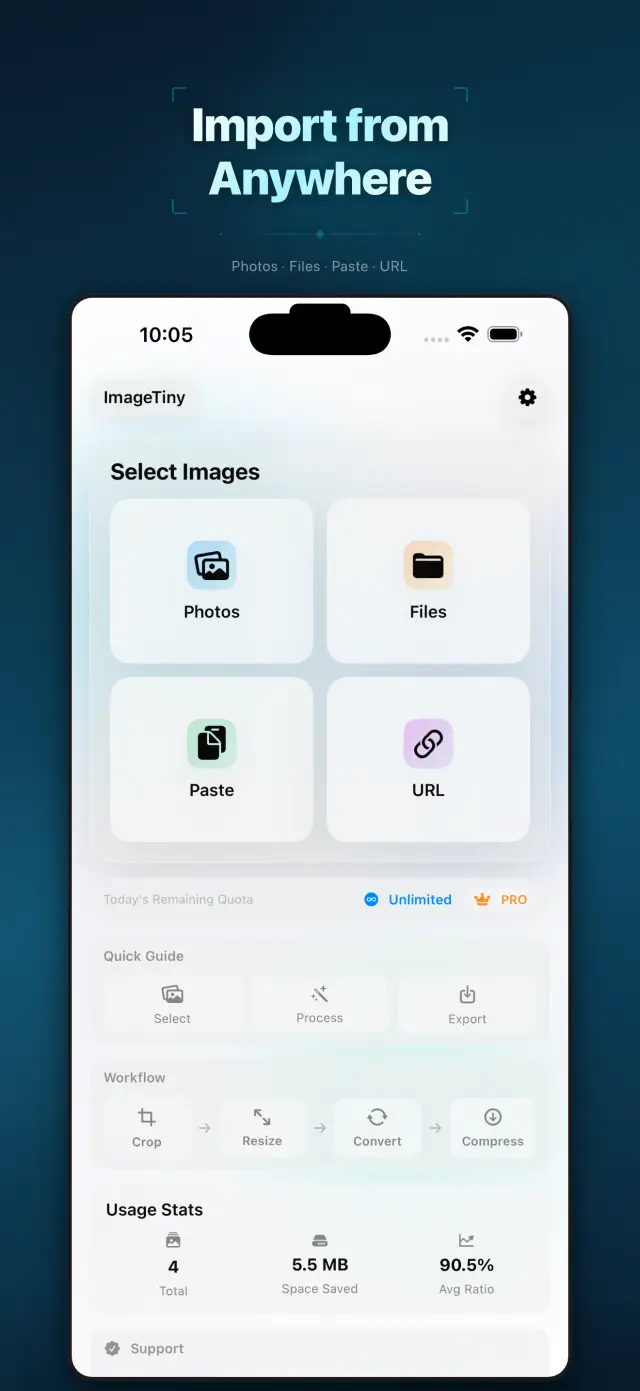
Fig. 02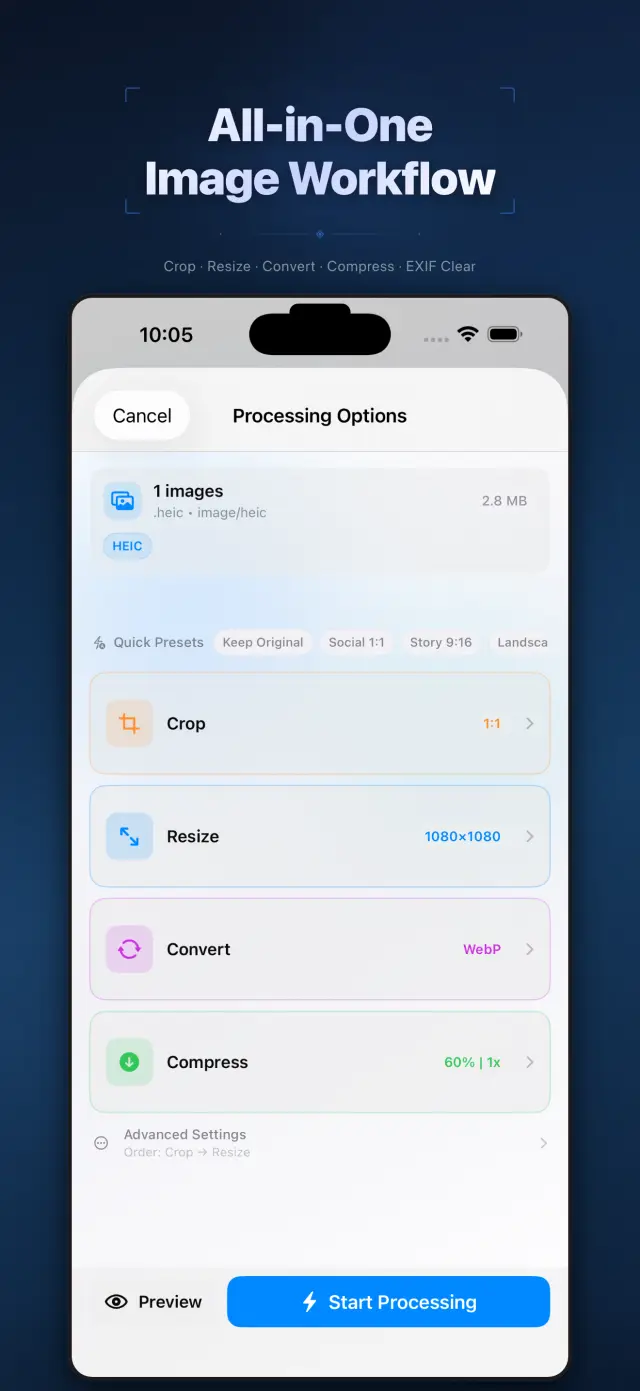
Funcții
No. 01Set your photos right before they go out.
02
Format conversion and metadata cleanup
03
Privacy-first export workflow
Specifications
Tab. 01At a glance
- Platforms
- iPhone · iPad · Mac
- Processing
- Batch compress & convert, 100% on device
- Metadata
- EXIF & GPS stripped before sharing
- Privacy
- Photos never uploaded, no tracking
Flux de lucru
No. 02Pick, process, export — in one pass.
-
01
Select photos
Choose the batch you plan to share from your library, or drop them into the Mac app. You define the scope.
-
02
Process on device
Compression, format conversion and metadata cleanup all happen on device — photos never leave it mid-process.
-
03
Export with peace of mind
Get lighter, cleaner images to share or save. Every export is private by default.
Încredere și confidențialitate
No. 03Photos are among the most personal files you have.
Confidențialitate pe primul loc
Local-first: no account, no ads, no tracking — data never leaves the device.
Nu este necesar cont
No sign-up, no login. Install it and it just works.
Funcționează offline
Everything core runs offline; no network required.
What hides in metadata? EXIF often carries capture time, device model, even precise GPS coordinates. ImageTiny makes “clean before export” the default path — share the picture, not your whereabouts.
Despre ImageTiny
No. 4The longer story — what it is, who it is for, and the choices behind it.
Ultima actualizare: April 23, 2026
ImageTiny este o aplicație de flux de lucru pentru imagini care rulează pe dispozitiv, destinată pentru iPhone, iPad și Mac.
Vă ajută să reduceți dimensiunea fișierelor imagine, să convertiți formate, să eliminați metadatele sensibile și să pregătiți materialele pentru partajare fără a vă încărca fotografiile pe serverele noastre.
Funcții principale
- Import de imagini din Fotografii, Fișiere, clipboard sau de la o adresă URL HTTPS a unei imagini furnizată de utilizator
- Comprimare, redimensionare, decupare și conversie a imaginilor într-un singur flux de lucru local
- Eliminarea metadatelor EXIF și GPS înainte de export
- Exportul rezultatelor în Fotografii, Fișiere sau prin foaia de partajare a sistemului
- Procesarea și rezumatele utilizării locale rămân pe dispozitiv
Confidențialitatea pe primul loc, prin design
ImageTiny este construită în jurul procesării locale. Imaginile selectate de dvs. rămân pe dispozitivul dvs., cu excepția cazului în care alegeți în mod explicit să le exportați sau să le partajați.
Facturare
ImageTiny oferă un nivel gratuit cu limite mai mici și upgrade-uri Pro opționale prin Apple StoreKit. Gestionarea abonamentelor și a achizițiilor se realizează prin contul dvs. Apple.
Dezvoltat de ZelonAI
Pentru informații juridice, de confidențialitate și de asistență, folosiți paginile legate mai jos de acest document.
docs support
No. 5Plain-language documents. No fine print you would be surprised by.
faq title
Never. ImageTiny performs compression, conversion, and metadata cleanup entirely on your device. There is no upload step because there is no server — airplane mode is a fine working environment.
Photos carry EXIF metadata: GPS coordinates, device model, timestamps. Before sharing a photo, ImageTiny strips what you did not mean to send — the image keeps its pixels, you keep your privacy.
ImageTiny runs natively on iPhone, iPad, and Mac. The workflow is the same everywhere, so a batch prepared on your phone finishes on your Mac.
Yes — conversion between common formats is built into the same workflow. Shoot in HEIC, deliver in JPG or WebP, and trim the file size in the same pass.
A compression website sees every photo you feed it. On-device processing removes that trust question entirely — for family albums, ID scans, and work screenshots, that is not a feature, it is the point.
Every photo you send out, lighter and cleaner.
ImageTiny
iPhone, iPad and Mac. Download on the App Store.