
01
Εφαρμογή iOS · iPhone · iPad · macOS
Lighter photos, private by default.
ImageTiny
ImageTiny is an on-device image workflow app for iPhone, iPad, and Mac, focused on compression, format conversion, metadata cleanup, and local-first privacy.
Ιδιωτικότητα πρώτα
Δεν χρειάζεται λογαριασμός
Λειτουργεί εκτός σύνδεσης

ImageTiny
- status
- status live
- App Store
- iPhone / iPad / macOS
- tech stack
- Image Workflow · On-device Privacy
Με μια ματιά
Fig. 01A photograph carries more than pixels — places, times, the quiet metadata of a life. ImageTiny keeps only what you meant to share.
Στην εφαρμογή
Fig. 02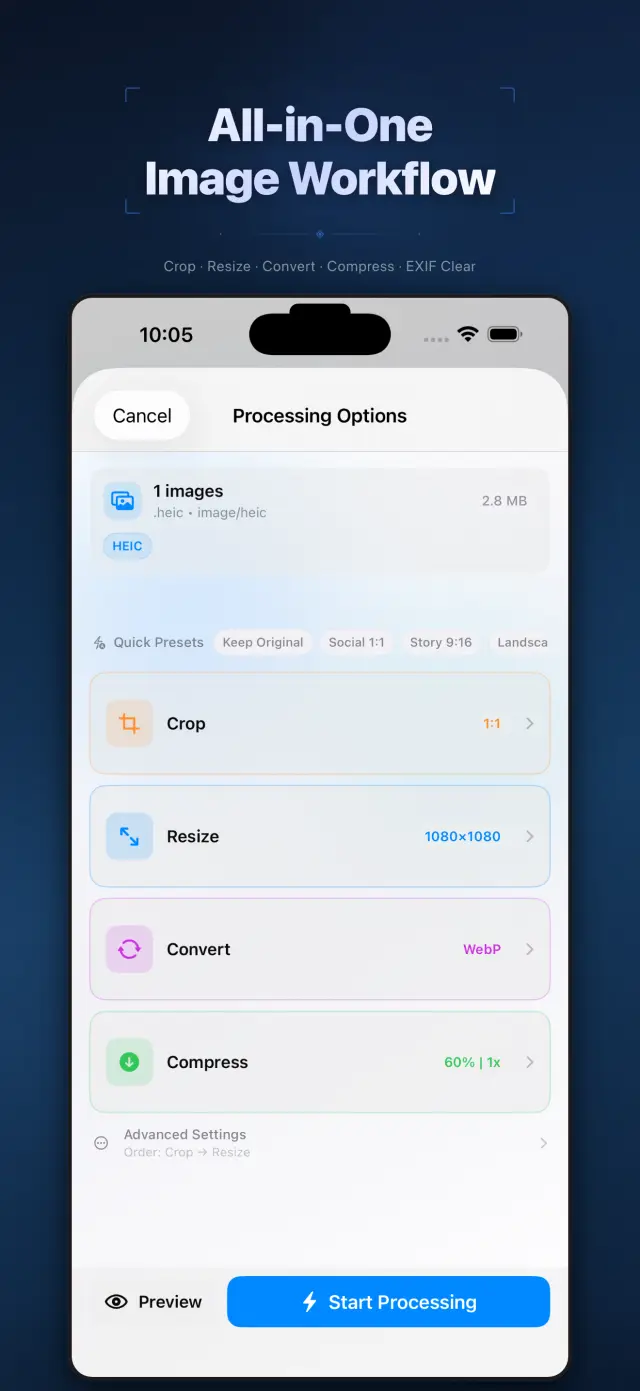
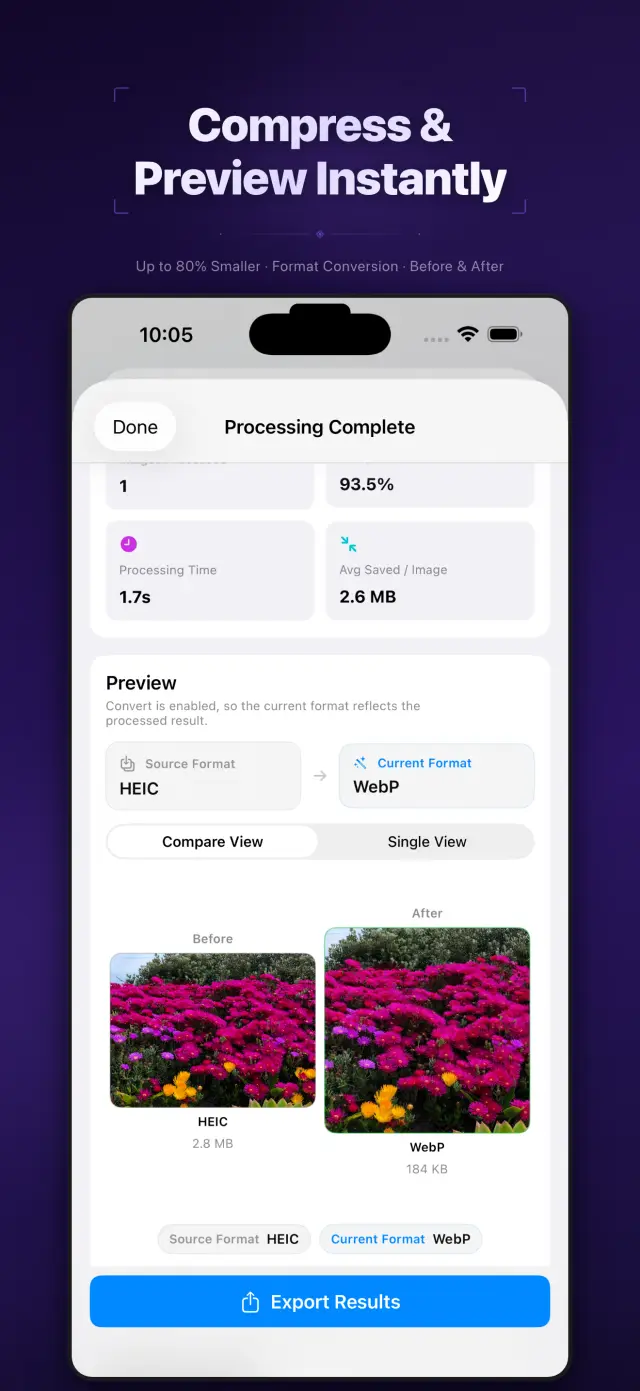
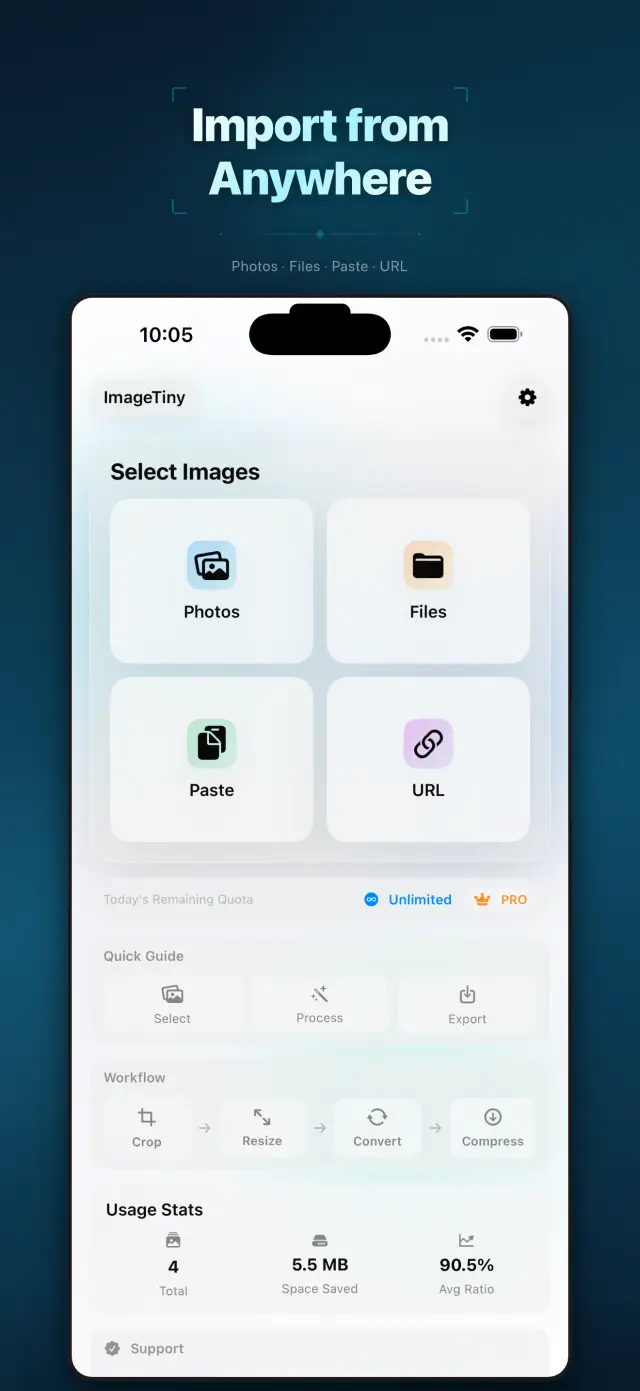
Λειτουργίες
No. 01Set your photos right before they go out.
02
Format conversion and metadata cleanup
03
Privacy-first export workflow
Specifications
Tab. 01At a glance
- Platforms
- iPhone · iPad · Mac
- Processing
- Batch compress & convert, 100% on device
- Metadata
- EXIF & GPS stripped before sharing
- Privacy
- Photos never uploaded, no tracking
Ροή εργασίας
No. 02Pick, process, export — in one pass.
-
01
Select photos
Choose the batch you plan to share from your library, or drop them into the Mac app. You define the scope.
-
02
Process on device
Compression, format conversion and metadata cleanup all happen on device — photos never leave it mid-process.
-
03
Export with peace of mind
Get lighter, cleaner images to share or save. Every export is private by default.
Εμπιστοσύνη και ιδιωτικότητα
No. 03Photos are among the most personal files you have.
Ιδιωτικότητα πρώτα
Local-first: no account, no ads, no tracking — data never leaves the device.
Δεν χρειάζεται λογαριασμός
No sign-up, no login. Install it and it just works.
Λειτουργεί εκτός σύνδεσης
Everything core runs offline; no network required.
What hides in metadata? EXIF often carries capture time, device model, even precise GPS coordinates. ImageTiny makes “clean before export” the default path — share the picture, not your whereabouts.
Σχετικά ImageTiny
No. 4The longer story — what it is, who it is for, and the choices behind it.
Τελευταία ενημέρωση: 23 Απριλίου 2026
Το ImageTiny είναι μια εφαρμογή επεξεργασίας εικόνων για iPhone, iPad και Mac, που λειτουργεί απευθείας στη συσκευή.
Σας βοηθά να μειώσετε το μέγεθος των αρχείων εικόνων, να μετατρέψετε μορφές, να αφαιρέσετε ευαίσθητα μεταδεδομένα και να προετοιμάσετε υλικό για κοινή χρήση, χωρίς να ανεβάζετε τις φωτογραφίες σας στους διακομιστές μας.
Βασικές λειτουργίες
- Εισαγωγή εικόνων από τις Φωτογραφίες, τα Αρχεία, το πρόχειρο ή από διεύθυνση URL εικόνας HTTPS που ορίζετε εσείς
- Συμπίεση, αλλαγή μεγέθους, περικοπή και μετατροπή εικόνων σε μία ενιαία τοπική ροή εργασίας
- Αφαίρεση μεταδεδομένων EXIF και GPS πριν από την εξαγωγή
- Εξαγωγή αποτελεσμάτων στις Φωτογραφίες, τα Αρχεία ή στο φύλλο κοινοποίησης του συστήματος
- Η επεξεργασία και οι τοπικές περιλήψεις χρήσης παραμένουν στη συσκευή
Ιδιωτικότητα σε πρώτη προτεραιότητα από τον σχεδιασμό
Το ImageTiny είναι χτισμένο γύρω από την τοπική επεξεργασία. Οι εικόνες που επιλέγετε παραμένουν στη συσκευή σας, εκτός αν επιλέξετε εσείς ρητά να τις εξαγάγετε ή να τις μοιραστείτε.
Χρέωση
Το ImageTiny προσφέρει δωρεάν έκδοση με χαμηλότερα όρια και προαιρετικές αναβαθμίσεις Pro μέσω Apple StoreKit. Η διαχείριση συνδρομών και αγορών γίνεται μέσω του λογαριασμού Apple σας.
Ανάπτυξη από τη ZelonAI
Για νομικές πληροφορίες, πληροφορίες απορρήτου και υποστήριξη, χρησιμοποιήστε τις σελίδες που συνδέονται παρακάτω από αυτό το έγγραφο.
docs support
No. 5Plain-language documents. No fine print you would be surprised by.
faq title
Never. ImageTiny performs compression, conversion, and metadata cleanup entirely on your device. There is no upload step because there is no server — airplane mode is a fine working environment.
Photos carry EXIF metadata: GPS coordinates, device model, timestamps. Before sharing a photo, ImageTiny strips what you did not mean to send — the image keeps its pixels, you keep your privacy.
ImageTiny runs natively on iPhone, iPad, and Mac. The workflow is the same everywhere, so a batch prepared on your phone finishes on your Mac.
Yes — conversion between common formats is built into the same workflow. Shoot in HEIC, deliver in JPG or WebP, and trim the file size in the same pass.
A compression website sees every photo you feed it. On-device processing removes that trust question entirely — for family albums, ID scans, and work screenshots, that is not a feature, it is the point.
Every photo you send out, lighter and cleaner.
ImageTiny
iPhone, iPad and Mac. Download on the App Store.