
01
iOS-app · iPhone · iPad · macOS
Lighter photos, private by default.
ImageTiny
ImageTiny is an on-device image workflow app for iPhone, iPad, and Mac, focused on compression, format conversion, metadata cleanup, and local-first privacy.
Privatliv først
Ingen konto nødvendig
Virker offline

ImageTiny
- status
- status live
- App Store
- iPhone / iPad / macOS
- tech stack
- Image Workflow · On-device Privacy
Med et blik
Fig. 01A photograph carries more than pixels — places, times, the quiet metadata of a life. ImageTiny keeps only what you meant to share.
I appen
Fig. 02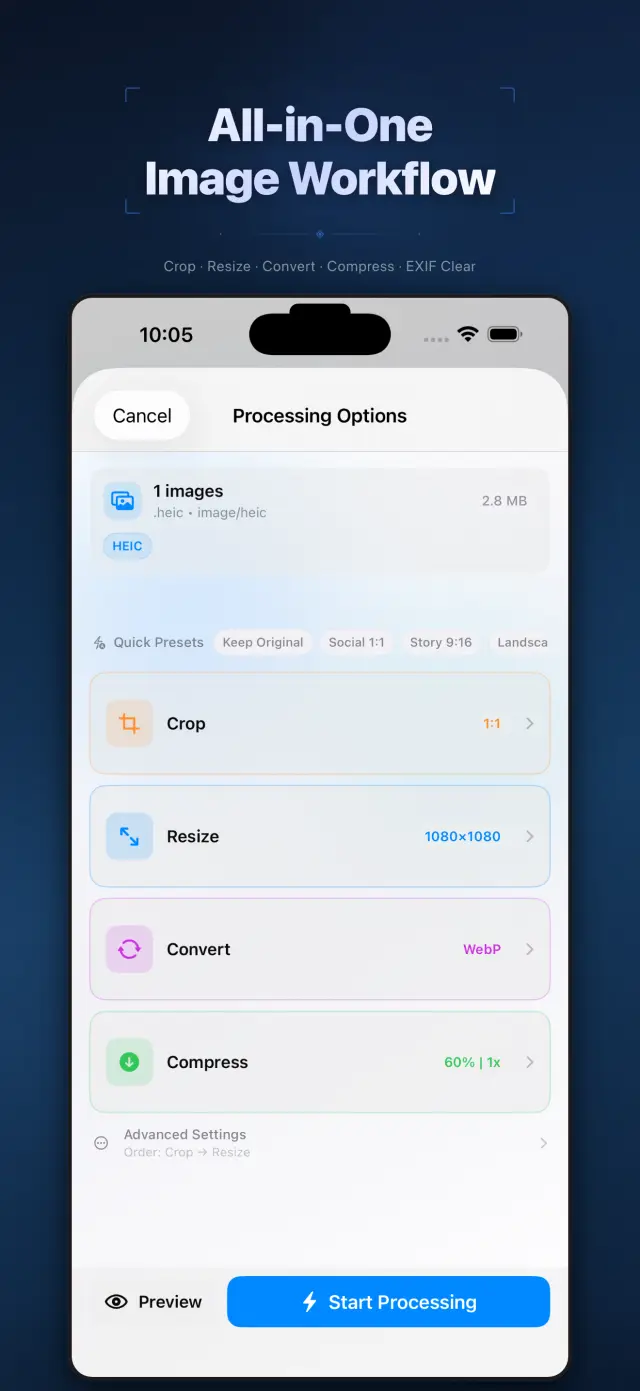
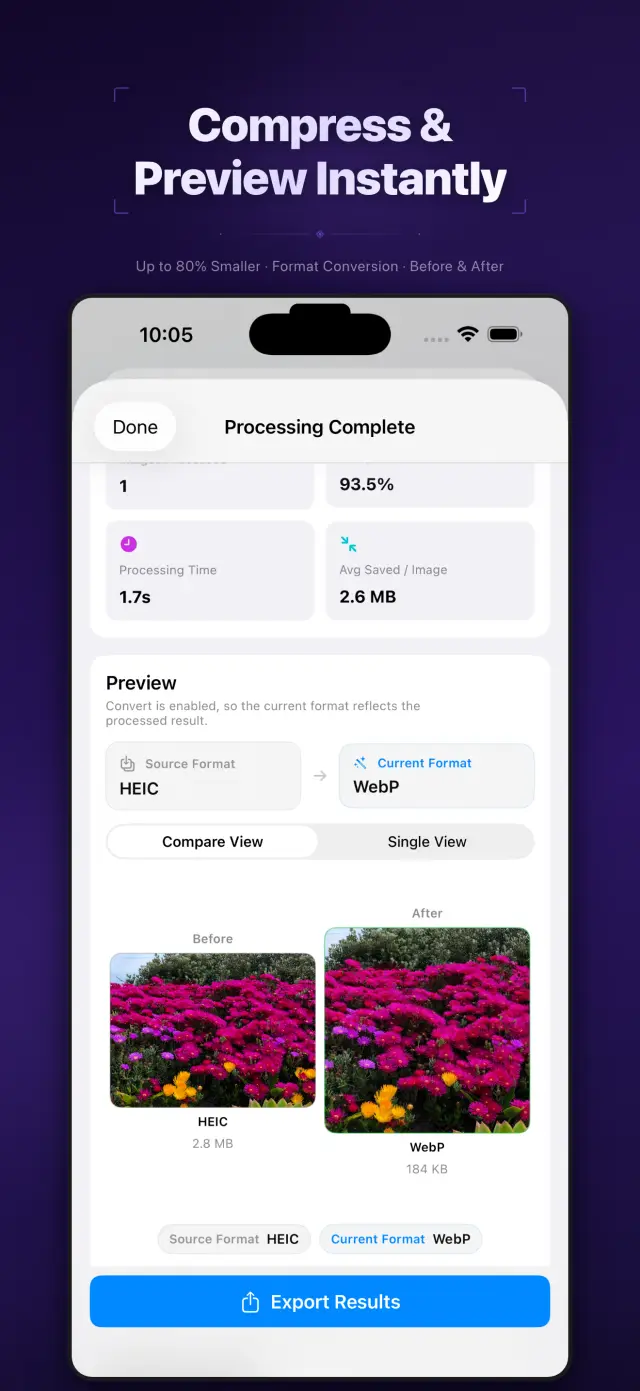
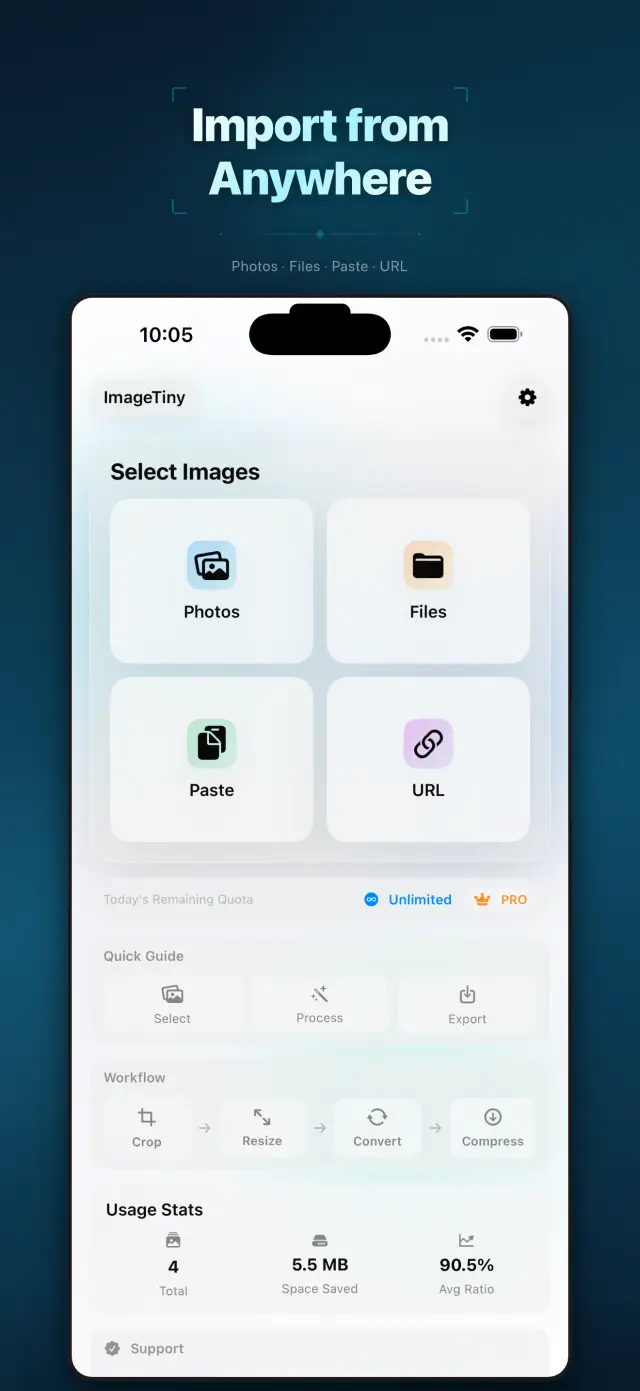
Funktioner
No. 01Set your photos right before they go out.
02
Format conversion and metadata cleanup
03
Privacy-first export workflow
Specifications
Tab. 01At a glance
- Platforms
- iPhone · iPad · Mac
- Processing
- Batch compress & convert, 100% on device
- Metadata
- EXIF & GPS stripped before sharing
- Privacy
- Photos never uploaded, no tracking
Arbejdsproces
No. 02Pick, process, export — in one pass.
-
01
Select photos
Choose the batch you plan to share from your library, or drop them into the Mac app. You define the scope.
-
02
Process on device
Compression, format conversion and metadata cleanup all happen on device — photos never leave it mid-process.
-
03
Export with peace of mind
Get lighter, cleaner images to share or save. Every export is private by default.
Tillid og privatliv
No. 03Photos are among the most personal files you have.
Privatliv først
Local-first: no account, no ads, no tracking — data never leaves the device.
Ingen konto nødvendig
No sign-up, no login. Install it and it just works.
Virker offline
Everything core runs offline; no network required.
What hides in metadata? EXIF often carries capture time, device model, even precise GPS coordinates. ImageTiny makes “clean before export” the default path — share the picture, not your whereabouts.
Om ImageTiny
No. 4The longer story — what it is, who it is for, and the choices behind it.
Sidst opdateret: 23. april 2026
ImageTiny er en billedbehandlingsapp til iPhone, iPad og Mac, der arbejder direkte på enheden.
Den hjælper dig med at gøre billedfiler mindre, konvertere formater, fjerne følsomme metadata og forberede materialer til deling – uden at uploade dine fotos til vores servere.
Vigtigste funktioner
- Importér billeder fra Fotos, Filer, udklipsholderen eller en HTTPS-billed-URL, du selv angiver
- Komprimér, ændr størrelse på, beskær og konvertér billeder i én lokal arbejdsproces
- Fjern EXIF- og GPS-metadata før eksport
- Eksportér resultater til Fotos, Filer eller systemets delingsark
- Behandling og lokale forbrugsoversigter forbliver på enheden
Privatliv i fokus fra starten
ImageTiny er bygget op omkring lokal behandling. Dine valgte billeder forbliver på din enhed, medmindre du selv vælger at eksportere eller dele dem.
Fakturering
ImageTiny tilbyder en gratis version med lavere grænser og valgfrie Pro-opgraderinger via Apple StoreKit. Administration af abonnementer og køb håndteres via din Apple-konto.
Udviklet af ZelonAI
Brug de sider, der linkes til nedenfor dette dokument, til juridiske oplysninger, oplysninger om privatliv og support.
docs support
No. 5Plain-language documents. No fine print you would be surprised by.
faq title
Never. ImageTiny performs compression, conversion, and metadata cleanup entirely on your device. There is no upload step because there is no server — airplane mode is a fine working environment.
Photos carry EXIF metadata: GPS coordinates, device model, timestamps. Before sharing a photo, ImageTiny strips what you did not mean to send — the image keeps its pixels, you keep your privacy.
ImageTiny runs natively on iPhone, iPad, and Mac. The workflow is the same everywhere, so a batch prepared on your phone finishes on your Mac.
Yes — conversion between common formats is built into the same workflow. Shoot in HEIC, deliver in JPG or WebP, and trim the file size in the same pass.
A compression website sees every photo you feed it. On-device processing removes that trust question entirely — for family albums, ID scans, and work screenshots, that is not a feature, it is the point.
Every photo you send out, lighter and cleaner.
ImageTiny
iPhone, iPad and Mac. Download on the App Store.