Apple Platform App · iPhone · iPad

PDFs and images, explained on camera.

PresentCam

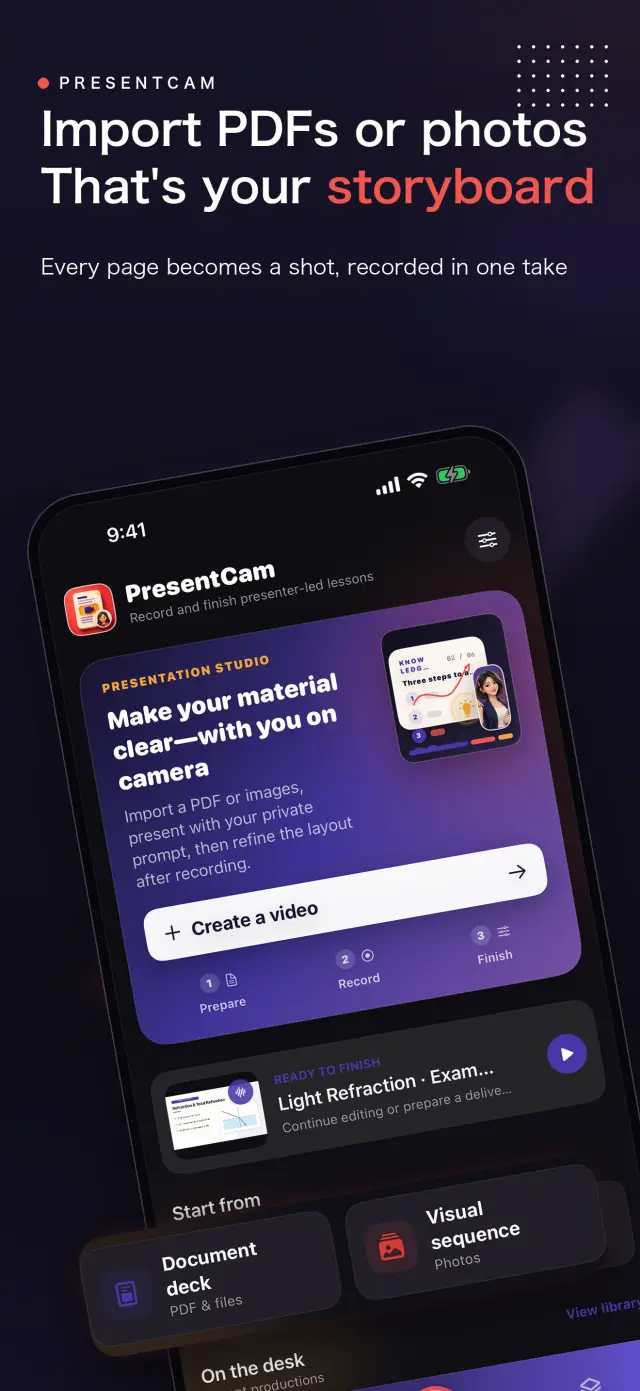
PresentCam is a document-first explainer video maker for iPhone and iPad. Import a PDF or ordered images, annotate the material live with a pen, highlighter, or laser pointer, explain on camera with microphone audio and a built-in teleprompter, then export the pages, annotations, presenter video, and audio as one MP4. Free includes watermark-free export up to 1080p/30 fps; Pro adds 2K/4K, 50/60 fps, HDR, and higher-bitrate options. Local-first: no account, no ads, no analytics, and no tracking.

Hinweis zu privacy first Hinweis zu no account needed Hinweis zu works offline
PresentCam mark

PresentCam

status
status coming soon
App Store
iPhone / iPad
tech stack
Live Annotation · Presenter Video · On-device Privacy

Hinweis zu at glance

Fig. 01

Import the material, mark the point, explain it face to face, and leave with a finished video.

Hinweis zu features

No. 01

Hinweis zu material stays visible while you explain it

01

Import PDFs or ordered images

02

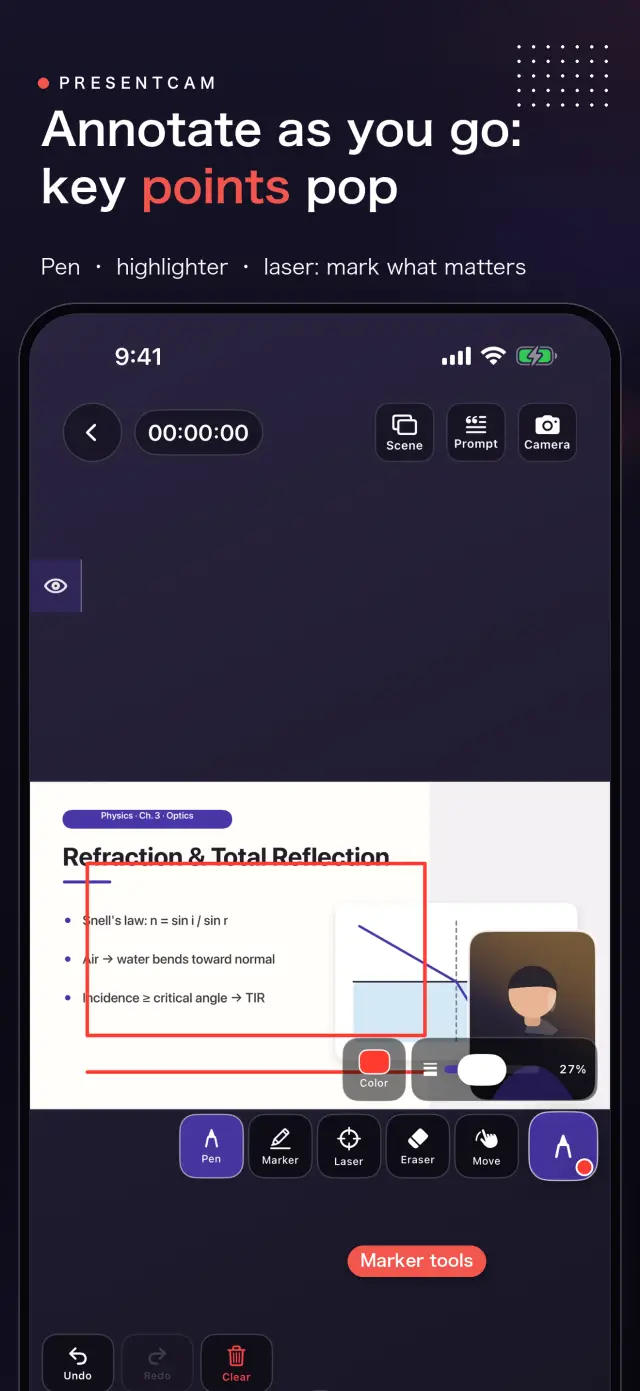
Annotate live with pen, highlighter, and laser

03

Explain on camera with microphone audio

Hinweis zu workflow

No. 02

Hinweis zu import annotate explain export

  1. 01

    Hinweis zu import material

    Hinweis zu choose pdf ordered set images apple s system

  2. 02

    Hinweis zu mark point

    Hinweis zu draw highlight point laser directly material while recording

  3. 03

    Hinweis zu explain face

    Hinweis zu record movable presenter window microphone audio while teleprompter

  4. 04

    Hinweis zu export result

    Hinweis zu preview composition export material annotations presenter audio as

Hinweis zu trust privacy

No. 03

Hinweis zu source material recordings stay device

Hinweis zu privacy first

Hinweis zu local first no account ads tracking data never

Hinweis zu no account needed

Hinweis zu no sign up login install it just works

Hinweis zu works offline

Hinweis zu everything core runs offline no network required

Hinweis zu presentcam has no account advertising analytics tracking cloud

Produktrichtung

No. 04

Hinweis zu where this app headed maker s own hand

01

Hinweis zu import pdf images

Hinweis zu choose pdf files ordered images system photo picker

02

Hinweis zu annotate live

Hinweis zu use pen highlighter laser pointer identify exact point

03

Hinweis zu explain camera

Hinweis zu keep material visible while movable presenter window microphone

04

Hinweis zu export one video

Hinweis zu preview layout then combine material annotations presenter video

Über PresentCam

No. 5

Hinweis zu longer story what it who choices behind

Zuletzt aktualisiert: 12. September 2026

PresentCam ist eine iPhone/iPad-App zum Erstellen von Erklärvideos auf Dokumentebasis. Importieren Sie ein PDF oder geordnete Bilder, annotieren Sie das Material live, erklären Sie es vor der Kamera mit Mikrofon-Ton und exportieren Sie Material, Anmerkungen, Präsentator-Video und Ton als ein fertiges MP4.

Was die App macht

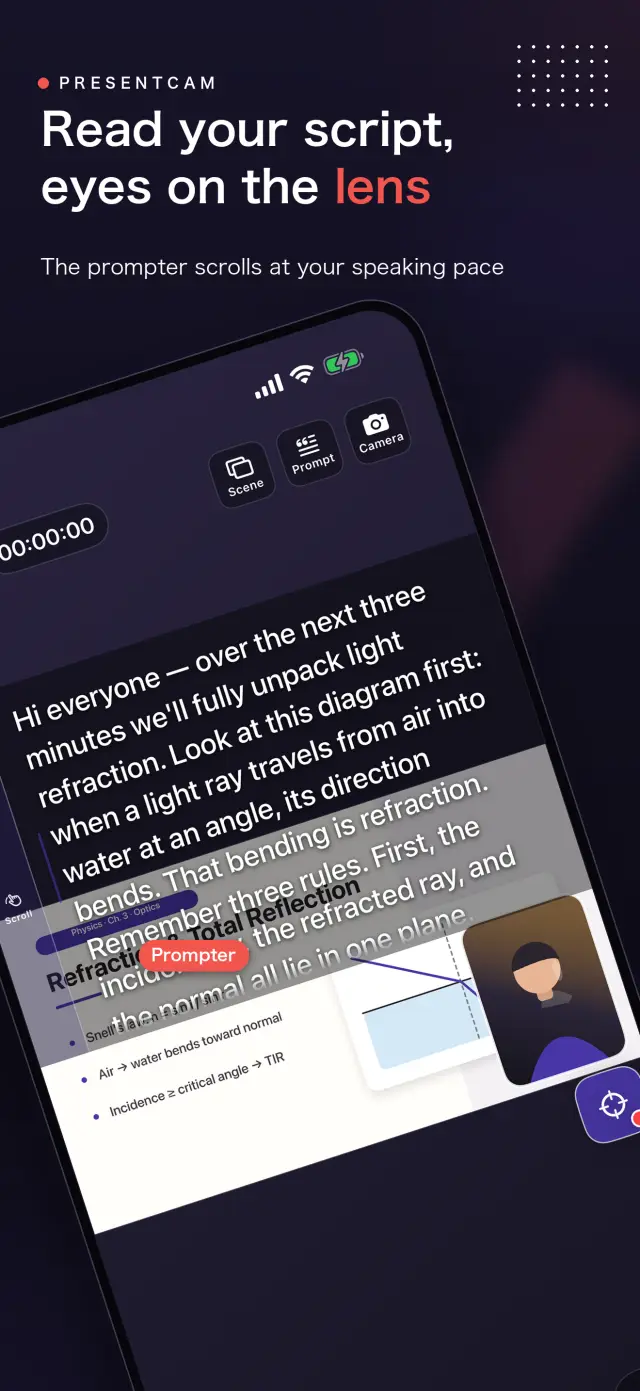
Wählen Sie ein PDF aus der Dateien-App oder geordnete Bilder über Apples System-Fotopicker aus. Während das Material sichtbar bleibt, markieren Sie mit Stift, Textmarker oder Laserpointer genau die Stelle, die Sie gerade erklären. Ein verschiebbares Präsentator-Fenster mit Front- oder Rückkamera und das Mikrofon nehmen Ihre Erklärung auf, und der integrierte Teleprompter hält Ihr Skript in Reichweite. Sehen Sie sich das Layout in der Vorschau an und exportieren Sie dann ein fertiges Video.

Zentraler Workflow

  • Importieren — wählen Sie ein PDF aus der Dateien-App oder eine geordnete Bildserie aus dem System-Fotopicker.
  • Live annotieren — zeichnen, markieren oder zeigen Sie während der Aufnahme direkt auf dem Material mit dem Laser.
  • Vor der Kamera erklären — die Quelle bleibt sichtbar, während das Präsentator-Fenster und das Mikrofon Ihre Erklärung aufnehmen.
  • Exportieren — prüfen Sie die Komposition in der Vorschau und führen Sie dann Quelle, Anmerkungen, Präsentator und Ton zu einem MP4 zusammen.

Ergänzende Steuerungen umfassen einen integrierten Teleprompter, das Umschalten zwischen Front- und Rückkamera, verschiebbare und in der Größe veränderbare Präsentator-Layouts sowie Präsentator-Rahmen als abgerundetes Rechteck, Kreis oder Rechteck — jeweils als quadratisches oder hochformatiges Fenster wählbar —, die auch in der Vorschau noch anpassbar bleiben. Ein integrierter Editor ermöglicht es, vor dem finalen Export Clips zu trimmen oder zu teilen sowie Titel, Bilder oder ergänzende Videos hinzuzufügen.

Warum die App anders ist

Die meisten Aufnahme-Apps backen das Kamera-Layout direkt in die Aufnahme — wer es sich anders überlegt, muss neu drehen. PresentCam nimmt eine reine Kamera-Spur auf und wendet Porträtform und Layout erst zur Ansichtszeit an (sofortiges Umschalten); die finalen Pixel werden einmalig beim Export gebrannt. Sie formen das Video nach der Aufnahme, nicht davor.

Auf Privatsphäre ausgelegt

PresentCam folgt dem Local-first-Prinzip: kein Konto, keine Werbung, keine Analyse- oder Tracking-SDKs und keine Erhebung persönlicher Informationen. Von Nutzern ausgewählte PDFs und Bilder, Projekte, Aufnahmen, Anmerkungen, Einstellungen und Skripte bleiben auf Ihrem Gerät. PresentCam lädt keine Medien zu einem Cloud-Dienst hoch; Exporte gehen nur an Ziele, die Sie selbst wählen, etwa Ihre Fotomediathek.

PresentCam Pro

Die kostenlose Version ermöglicht Aufnehmen, Formen und Exportieren mit bis zu 1080p / 30 fps — ohne Wasserzeichen und ohne Begrenzung der Aufnahmelänge. PresentCam Pro schaltet frei:

  • 2K-/4K-Export — Ausgabe in höherer Auflösung für scharfes Kursmaterial.
  • 50/60 fps, HDR und hohe Bitrate — flüssigere Bewegung und Optionen für getreuere Wiedergabe.

Wählen Sie ein Monats- oder Jahresabonnement oder einen einmaligen lebenslangen Kauf.

Vollständige Einführung ansehen ->

Dokumente & Unterstützung

No. 6

Hinweis zu plain language documents no fine print you would

Häufig gestellte Fragen

Yes. PresentCam records a camera-only track and applies the presenter shape and layout at view time, so you can switch the camera bubble's shape, window ratio, and position instantly in the preview without re-recording. The final pixels are baked once, at export.

Pro adds 2K/4K export, 50/60 fps, HDR, and higher-bitrate delivery options. Recording length is unlimited and exports carry no watermark at every tier. Choose a Monthly or Yearly auto-renewable subscription, or a one-time Lifetime purchase.

No. PresentCam does not require an account and does not include advertising SDKs, third-party analytics trackers, or cross-app tracking. All recording, compositing, and export happens on-device.

PresentCam supports iPhone and iPad running iOS 17 or later.

Hinweis zu next lesson could ship tonight

PresentCam

Hinweis zu development follow progress product page