iOS অ্যাপ · iOS
A quiet tide gauge for your moods.
MoodTide
MoodTide is a gentle mood journal for iPhone. Log how you feel in five levels, keep short notes, revisit your year on the calendar, and let widgets put a quiet tide gauge on your Home Screen. Entries stay local-first, with optional iCloud sync.
MoodTide
- status
- status live
- App Store
- iOS
- tech stack
- SwiftUI · WidgetKit · CloudKit
এক নজরে
Fig. 01Feelings do not need grading — only room. A small daily mark, a sentence, and time turns them into a shoreline you can read.
অ্যাপে
Fig. 02
বৈশিষ্ট্য
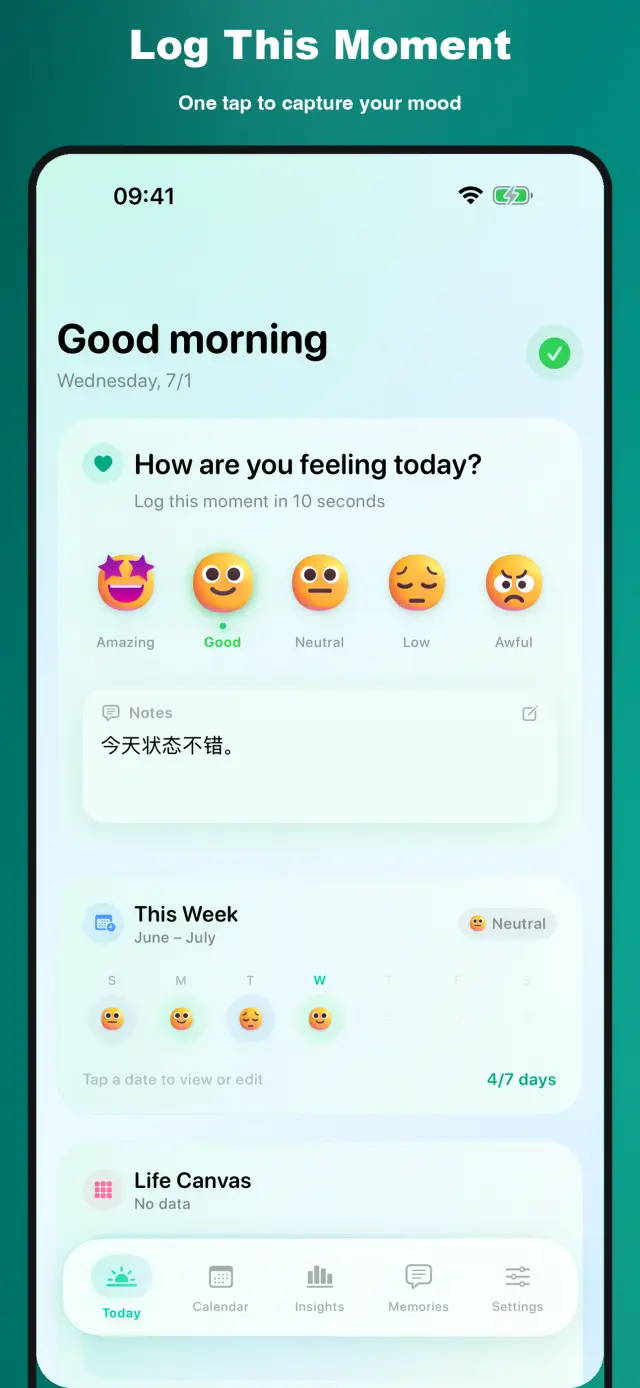
No. 01Ten seconds is enough to log a mood.
Short notes and timeline review
Widgets, calendar views, and local-first iCloud sync
Specifications
Tab. 01At a glance
- Platforms
- iPhone
- Check-ins
- Five-level daily mood + short notes
- Extras
- Home-screen widgets & calendar review
- Sync
- Local-first, optional iCloud sync
- Privacy
- No account, no ads
The Shape of a Day
No. 02Ten seconds at night, a look back in the morning.
-
01
Tap today
Pick one of five moods and add a short note if you like — or nothing at all.
-
02
Watch the tide
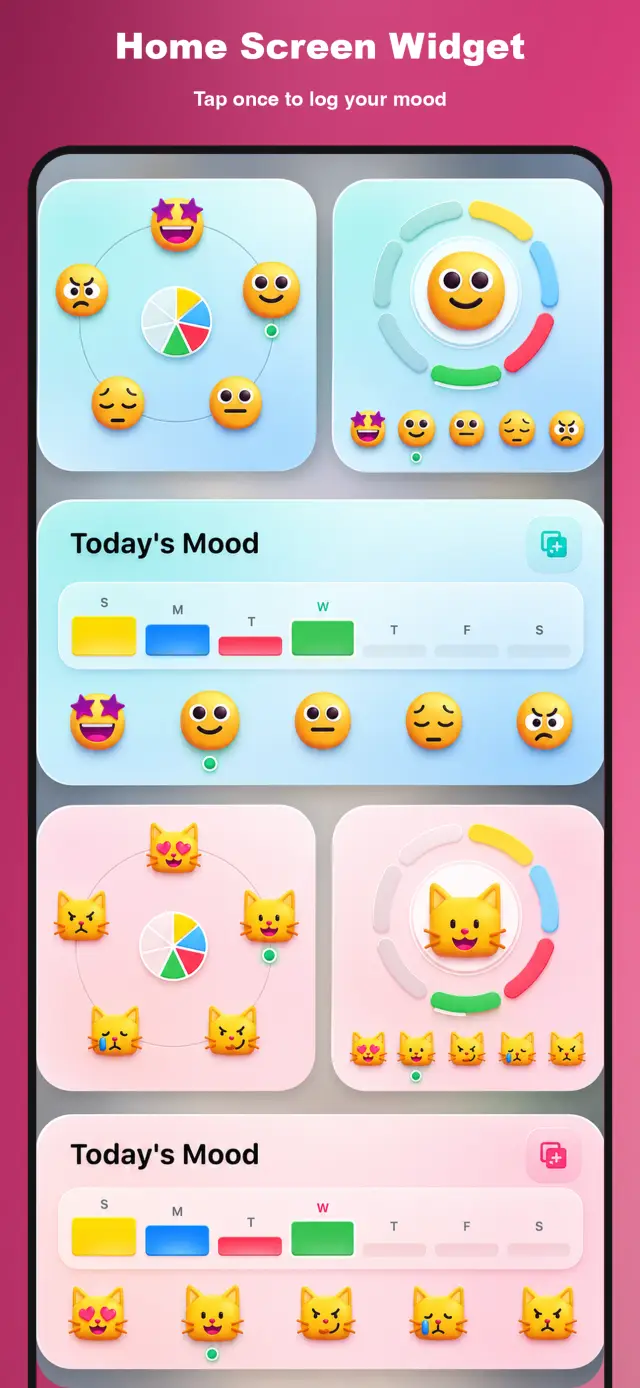
The widget keeps you company on the home screen; the calendar waits at year’s end. The ups and downs connect into your rhythm.
-
03
Hold your data
Stored locally first; decide whether to turn on iCloud sync when you change devices.
আস্থা ও গোপনীয়তা
No. 03What’s on your mind stays on your device.
গোপনীয়তা প্রথম
Local-first: no account, no ads, no tracking — data never leaves the device.
অ্যাকাউন্টের প্রয়োজন নেই
No sign-up, no login. Install it and it just works.
অফলাইনে কাজ করে
Everything core runs offline; no network required.
On the App Store. A mood doesn’t need to be reported to anyone — just a quiet tide gauge.
product direction
No. 04Where this app is headed, in the maker’s own hand.
Five Mood Levels
Quick daily check-ins with a simple mood scale.
Memories & Timeline
Keep short thoughts and calendar reviews together.
Widgets & Sync
Home-screen widgets and local-first optional iCloud sync.
about MoodTide
No. 5The longer story — what it is, who it is for, and the choices behind it.
সর্বশেষ আপডেট: ২৮ জুন ২০২৬
ওয়েবসাইট: https://zelonai.com/app/moodtide/
MoodTide
MoodTide হলো iPhone-এর জন্য একটি হালকা মুড জার্নাল যা একটি সহজ দৈনিক প্রবাহের চারপাশে তৈরি: আজকের মুড লগ করুন, একটি ছোট চিন্তা লিখুন এবং মনে রাখার মতো মুহূর্তগুলো সংরক্ষণ করুন।
এটি এমন মানুষদের জন্য ডিজাইন করা যারা ভারী জার্নালিং ওয়ার্কফ্লো ছাড়াই একটি শান্ত, টেকসই প্রতিফলন অভ্যাস চান।
MoodTide আপনাকে যা করতে সাহায্য করে
- সেকেন্ডে মুড লগ করুন: দ্রুত দৈনিক চেক-ইনের জন্য একটি সহজ পাঁচ-স্তরের মুড স্কেল ব্যবহার করুন
- চিন্তা এবং স্মৃতি সংরক্ষণ করুন: প্রসঙ্গ সংরক্ষণের জন্য ছোট নোট যোগ করুন
- একাধিক দৃশ্য থেকে পর্যালোচনা করুন: টাইমলাইন, মেমরি ফিড এবং ক্যালেন্ডার-শৈলী ব্রাউজিংয়ের মাধ্যমে এন্ট্রি পুনরায় দেখুন
- দ্রুত চেক-ইনের জন্য উইজেট ব্যবহার করুন: হোম স্ক্রিন থেকে মুড আপডেট করুন এবং অ্যাপটি আপনার দৈনিক রুটিনে রাখুন
- চাপ ছাড়াই ধারাবাহিক থাকুন: MoodTide জটিল জার্নালিং সিস্টেমের পরিবর্তে হালকা পুনরাবৃত্তিতে ফোকাস করে
মূল অভিজ্ঞতা
- দৈনিক মুড ট্র্যাকিং একটি পরিষ্কার, কম-ঘর্ষণ চেক-ইন প্রবাহ সহ
- স্বল্প-ফর্ম জার্নালিং ধারণা, আবেগ এবং প্রতিফলনের জন্য
- ক্যালেন্ডার এবং রিকল ভিউ সময়ের সাথে প্যাটার্ন দেখতে সাহায্য করতে
- গোপনীয়তা-প্রথম পণ্য ডিজাইন স্থানীয়-প্রথম ডেটা সংরক্ষণ সহ
ডেটা এবং গোপনীয়তা
- স্থানীয়-প্রথম সংরক্ষণ: আপনার রেকর্ডগুলো ডিফল্টরূপে আপনার ডিভাইসে থাকে
- ঐচ্ছিক iCloud সিঙ্ক: আপনার Apple ID-তে iCloud সক্রিয় থাকলে, CloudKit এর মাধ্যমে আপনার Apple ডিভাইসগুলোতে ডেটা সিঙ্ক হতে পারে
- কোনো বিজ্ঞাপন SDK নেই: MoodTide তৃতীয় পক্ষের বিজ্ঞাপন ট্র্যাকার অন্তর্ভুক্ত করে না
- কোনো পৃথক MoodTide অ্যাকাউন্ট প্রয়োজন নেই: মূল ব্যবহার একটি নতুন অ্যাকাউন্ট তৈরি ছাড়াই কাজ করে
যোগাযোগ
- সহায়তা ইমেইল: [email protected]
- ওয়েবসাইট: https://zelonai.com/app/moodtide/
- সহায়তা পৃষ্ঠা: https://zelonai.com/app/moodtide/support
© ২০২৬ MoodTide। সর্বস্বত্ব সংরক্ষিত।
docs support
No. 6Plain-language documents. No fine print you would be surprised by.
faq title
One tap. Pick from five levels — no sliders, no essay. Add a short note when something deserves one; skip it when it does not. The point is a daily mark you will actually keep making.
A quiet tide gauge on your Home Screen: your latest check-in and the recent rhythm of your days. It is a glance, not a dashboard — gentle enough to live on screen permanently.
Yes — the calendar view turns your year into a readable shoreline: good stretches, rough weeks, and the notes you wrote along the way.
Entries stay local-first on your device, with optional iCloud sync if you want them on a second device. No servers of ours read your feelings, and no account is required.
Feelings do not need grading — only room. Ten steps invite overthinking an entry; five levels are distinct enough to be honest and coarse enough to finish in a second.